---
title: Concepts
url: /docs/esc/concepts/
---
Pulumi ESC (Environments, Secrets, and Configuration) is a secrets and configuration management system built around four core concepts: environments, sources, targets, and management. Understanding these concepts will help you build a mental model of how ESC works.
Pulumi ESC is available as a fully managed service in [Pulumi Cloud](/docs/pulumi-cloud/) and can be self-hosted for isolated environments. The [pulumi/esc project](https://github.com/pulumi/esc) is open source and contains the evaluation engine and CLI.
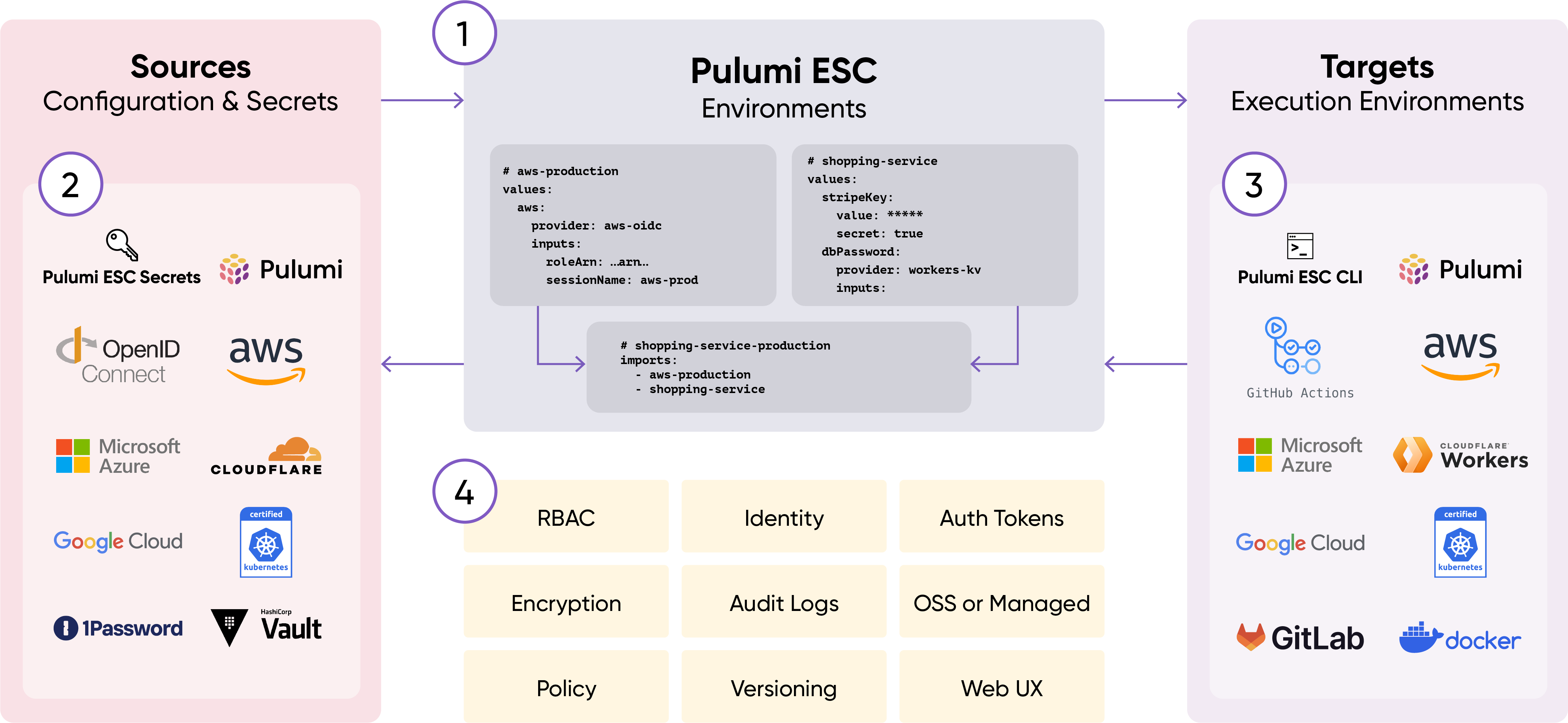
Figure: The Pulumi ESC ecosystem.
## Core concepts
### Environments
An environment is a named collection of configuration values and secrets defined in YAML. Environments are the fundamental unit of organization in ESC. Each environment:
- Has a unique name within a project (e.g., `my-org/my-project/production`)
- Contains a YAML document that defines values, imports other environments, and configures providers
- Is versioned—every change creates a new version
- Can be tagged for easier reference (e.g., `stable`, `v1.2.3`)
- Is evaluated when opened, resolving all dynamic values and imports
Environments are composable: one environment can import others, inheriting and overriding their values. This enables organizing configuration hierarchically to match team boundaries and security requirements.
### Sources
ESC pulls configuration and secrets from multiple sources through an extensible provider system:
- **Static values** - Key-value pairs defined directly in the environment YAML
- **Dynamic providers** - Plugins that generate or retrieve values at evaluation time:
- OIDC providers generate short-lived cloud credentials (AWS, Azure, GCP, Vault)
- Secret providers retrieve values from external systems (AWS Secrets Manager, Azure Key Vault, 1Password)
- Login providers authenticate with cloud services
Dynamic providers execute when an environment is opened, not when it's defined. This ensures credentials and secrets are fresh and never stored.
### Targets
ESC outputs configuration and secrets to multiple targets:
- **Environment variables** - Inject secrets into processes via the `esc run` command
- **Configuration APIs** - Access values programmatically through SDKs (TypeScript, Python, Go)
- **Pulumi IaC** - Reference environments in `Pulumi..yaml` files
- **CLI output** - View values with `esc env open` or `esc env get`
- **Kubernetes** - Sync secrets to Kubernetes clusters via the ESC operator
- **Other tools** - Integrate with Terraform, Docker, and developer tools
The same environment can output to multiple targets simultaneously, centralizing secrets management across different tools.
### Management
Environments are centrally managed in Pulumi Cloud with:
- **Role-Based Access Control (RBAC)** - Control who can read, write, or delete environments
- **Audit logs** - Track all access and modifications to environments
- **Versioning** - Every change creates a new immutable version
- **Tagging** - Label versions for rollback or staged deployments
- **Encryption** - All secrets are encrypted at rest and in transit
- **Customer-managed keys** - Optionally encrypt with your own keys
## Environment composition
Environments support composition through imports, allowing you to build complex configurations from reusable pieces. Consider this example:
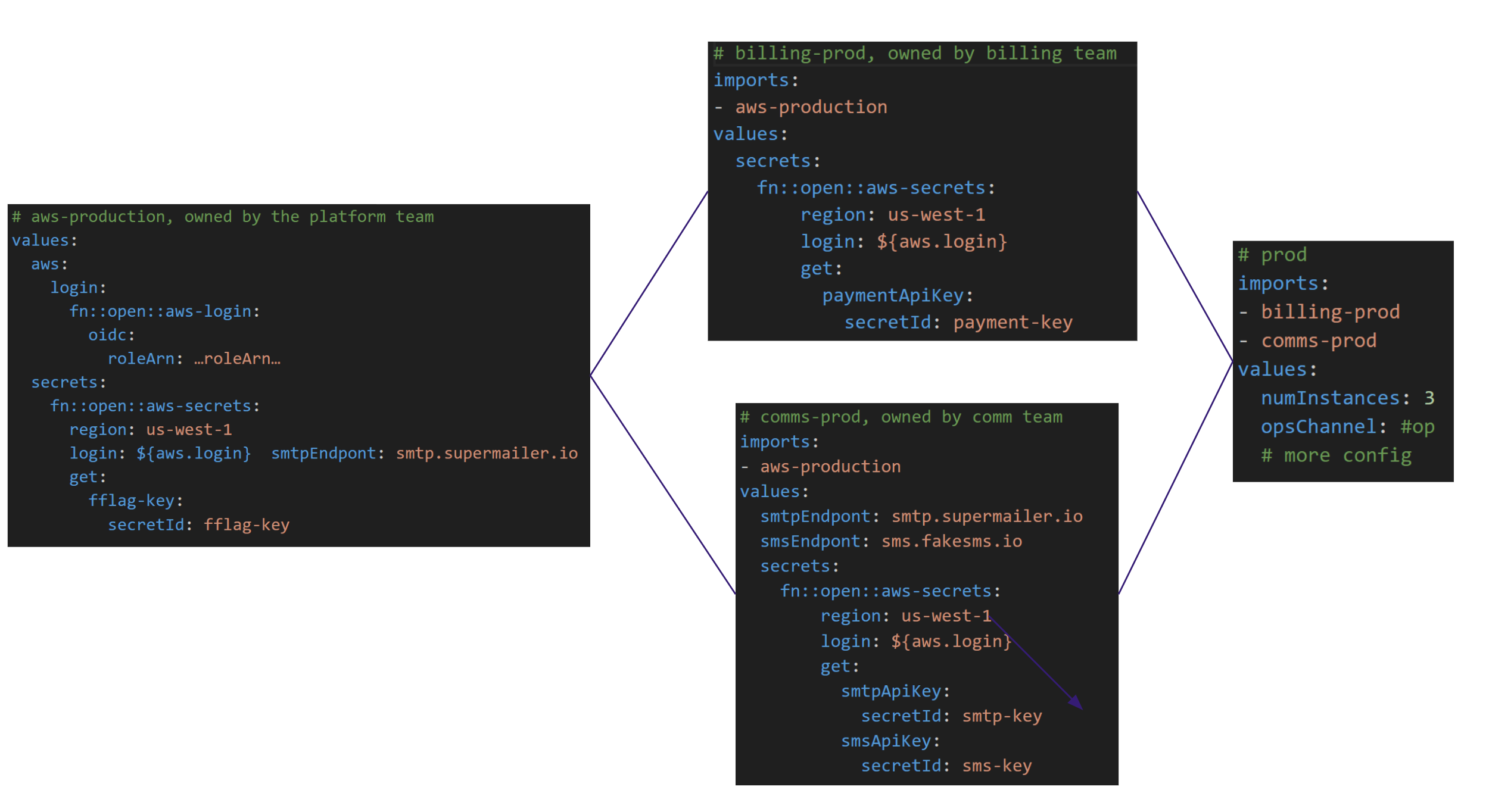
Figure: Composable ESC environments facilitate team-based organization.
An organization might structure environments by team and security boundaries:
- **Central platform team** - Owns common configuration like OIDC settings and feature flags
- **Billing service team** - Manages payment processor secrets
- **Communications team** - Manages secrets for mailing and texting services
Each team's environment can be independently permissioned and versioned. Application environments import these base environments and add application-specific configuration. When environments import others, values are merged using JSON Merge Patch semantics—later values override earlier ones.
This structure:
- Reduces duplication by sharing common configuration
- Enforces security boundaries through separate permissions per environment
- Allows teams to update their environments without affecting others
- Enables complex applications to compose from multiple security contexts
## Static vs. dynamic values
ESC supports both static and dynamic values in the same environment:
**Static values** are defined directly in the YAML and evaluated once:
```yaml
values:
region: us-west-2
apiEndpoint: https://api.example.com
```
**Dynamic values** are generated or retrieved when the environment is opened:
```yaml
values:
aws:
login:
fn::open::aws-login:
oidc:
roleArn: arn:aws:iam::123456789012:role/my-role
environmentVariables:
AWS_ACCESS_KEY_ID: ${aws.login.accessKeyId}
```
Dynamic providers execute during evaluation, generating fresh credentials or retrieving current values. This ensures credentials are short-lived and secrets are never stale.
## Configuration as code
ESC environments are defined as YAML documents that can be:
- Edited directly in the Pulumi Cloud console
- Modified via the `esc` CLI
- Managed programmatically through SDKs (TypeScript, Python, Go)
- Automated in CI/CD pipelines via the API
Environments support:
- **Interpolation** - Reference other values with `${path.to.value}` syntax
- **Functions** - Transform values with built-in functions (`fn::secret`, `fn::toJSON`)
- **Type safety** - Values maintain their types (strings, numbers, objects, arrays)
## Learn more
- [How Pulumi ESC works](/docs/esc/concepts/how-esc-works) - Architecture and evaluation model
- [ESC providers](/docs/esc/integrations/) - Full list of integrations
- [Environments reference](/docs/esc/environments/) - Complete syntax documentation