Video Thumbnailer Using AWS Fargate


A video thumbnail extractor using serverless functions and containers.
Loosely derived from the example at https://serverless.com/blog/serverless-application-for-long-running-process-fargate-lambda/.
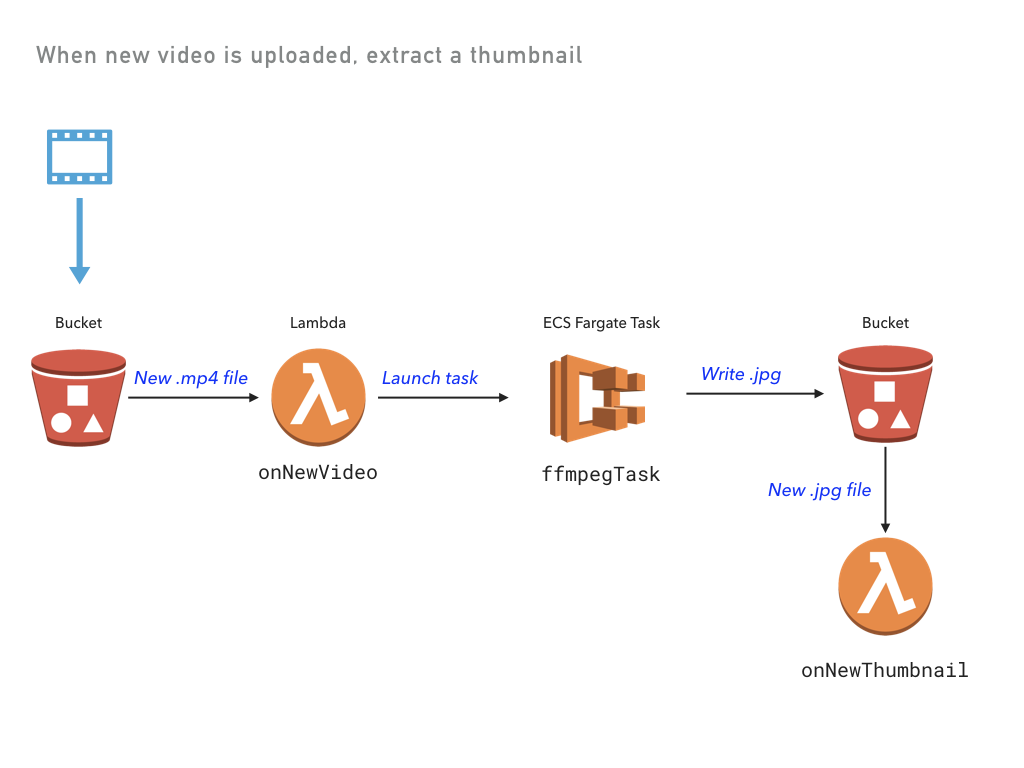
Prerequisites
To run this example, make sure Docker is installed and running.
Running the App
Note: some values in this example will be different from run to run. These values are indicated
with ***.
Create a new stack:
pulumi stack init thumbnailer-testingConfigure Pulumi to use an AWS region where Fargate is supported, which is currently only available in
us-east-1,us-east-2,us-west-2, andeu-west-1:pulumi config set aws:region us-west-2Restore NPM modules via
npm installoryarn install.Preview and deploy the app via
pulumi up. The preview will take some time, as it builds a Docker container. A total of 32 resources are created.$ pulumi up Previewing update of stack 'thumbnailer-testing' Previewing changes: Type Name Plan Info * global global no change 1 info message. info: Building container image 'pulum- + pulumi:pulumi:Stack video-thumbnailer-thumbnailer-testing create... 1 info message. info: Successfully tagged pulum- ... Do you want to perform this update? yes Updating stack 'thumbnailer-testing' Performing changes: Type Name Status Info * global global unchanged 1 info message. info: Building container image 'pulum- + pulumi:pulumi:Stack video-thumbnailer-thumbnailer-testing created 1 info message. info: 081c66fa4b0c: Pushed + ... ... info: 32 changes performed: + 32 resources created Update duration: *** Permalink: https://app.pulumi.com/***View the stack outputs:
$ pulumi stack output
Current stack outputs (1):
    OUTPUT                                           VALUE
    bucketName                                       ***
Upload a video, embedding the timestamp in the filename:
$ aws s3 cp ./sample/cat.mp4 s3://$(pulumi stack output bucketName)/cat_00-01.mp4
upload: sample/cat.mp4 to s3://***/cat_00-01.mp4
View the logs from both the Lambda function and the ECS task:
$ pulumi logs -f
Collecting logs for stack thumbnailer-testing since ***

2018-05-25T12:57:26.326-07:00[                    onNewVideo] *** New video: file cat_00-01.mp4 was uploaded at 2018-05-25T19:57:25.507Z.
2018-05-25T12:57:30.705-07:00[                    onNewVideo] Running thumbnailer task.
2018-05-25T12:58:34.960-07:00[               ffmpegThumbTask] Starting ffmpeg task...
2018-05-25T12:58:34.960-07:00[               ffmpegThumbTask] Copying video from S3 bucket-5ea6b28/cat_00-01.mp4 to cat_00-01.mp4...
2018-05-25T12:58:37.267-07:00[               ffmpegThumbTask] Completed 256.0 KiB/666.5 KiB (2.5 MiB/s) with 1 fildownload: s3://bucket-5ea6b28/cat_00-01.mp4 to ./cat_00-01.mp4
2018-05-25T12:58:40.306-07:00[               ffmpegThumbTask] Copying cat.jpg to S3 at bucket-5ea6b28/cat.jpg ...
2018-05-25T12:58:43.034-07:00[               ffmpegThumbTask] Completed 86.6 KiB/86.6 KiB (619.7 KiB/s) with 1 filupload: ./cat.jpg to s3://bucket-5ea6b28/cat.jpg
2018-05-25T12:58:43.758-07:00[                onNewThumbnail] *** New thumbnail: file cat.jpg was saved at 2018-05-25T19:58:43.028Z.
    ```
Download the key frame:
$ aws s3 cp s3://$(pulumi stack output bucketName)/cat.jpg .
download: s3://***/cat.jpg to ./cat.jpg
Clean up
To clean up the resources, you will first need to clear the contents of the bucket.
aws s3 rm s3://$(pulumi stack output bucketName) --recursive
Then, run pulumi destroy and answer the confirmation question at the prompt.
