Private Registry
Pulumi Private Registry is the source of truth for an organization’s infrastructure building blocks like components and templates – the same components and templates that power golden path workflows in Pulumi. Platform engineers can codify organizational standards in their building blocks using features like Pulumi ESC and Pulumi IaC Policies, ensuring that all infrastructure users provision is compliant from the beginning.
Developers leverage templates and components in their preferred workflows, whether it be incorporating components into Pulumi programs, scaffolding a low-code program with components and YAML, or using the Pulumi console for no-code deployments. The private registry is also a resource for developers to discover components and templates, browse their APIs, and use READMEs to understand how to use them.
Registry views
The Platform menu includes two package views:
Registry
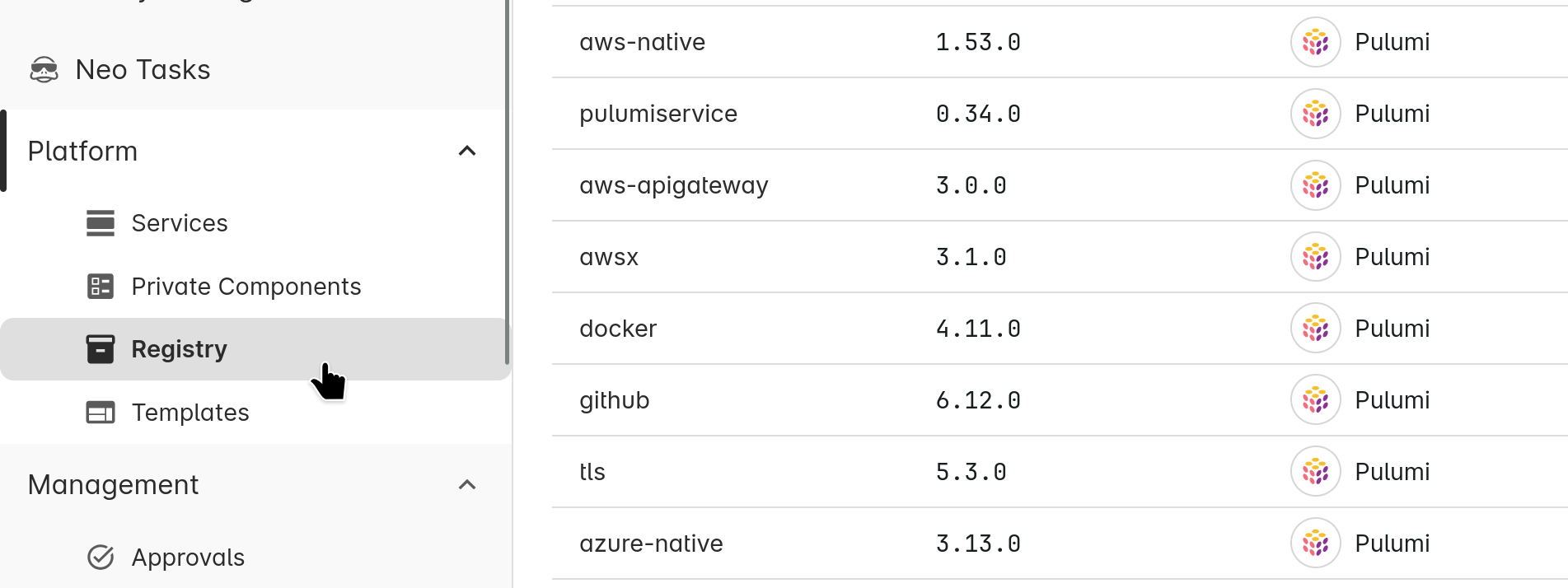
Browse all packages available to your organization, including public providers and components from pulumi.com/registry plus your organization’s private packages. Features include:
- View documentation for any version of a package
- See usage data showing how packages are adopted across your organization
- Filter by usage status to find packages that need attention
Private Components
This tab shows only the component packages published by your organization via pulumi package publish.
Usage tracking
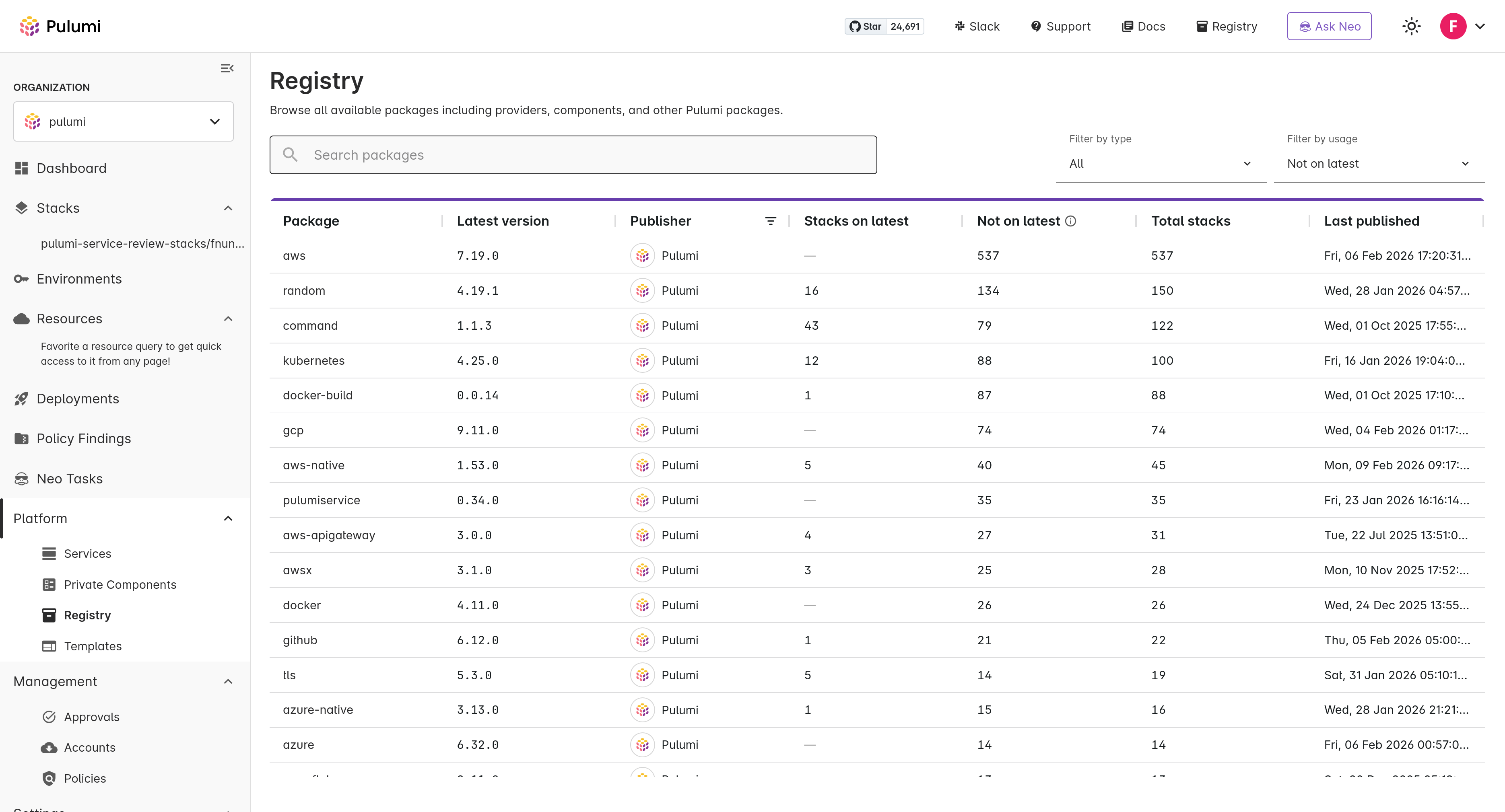
Both package list views display usage columns for each package: how many stacks are on the latest version, how many are on older versions, and the total number of stacks using the package. You can filter the list to show only used packages, unused packages, or packages where stacks are running older versions.
Each package page also includes a “Used by” tab showing which stacks use that package, including the stack name, project, version in use, and last update timestamp. This helps you assess the impact of changes before updating versions and identify stacks that may need upgrading.
Component Publishing
Pulumi Components are a way to encapsulate resources in a reusable manner. Components are also a powerful way for platform teams to integrate security, compliance, and operational requirements into golden paths so that developers don’t need to worry about it. Once a component is pushed to GitHub or GitLab, it is published to an organization’s private registry using the publish CLI command. Pulumi automatically introspects the component schema and generates API docs, which are displayed in the registry.
For detailed information about different component packaging approaches, see Packaging Components.
Publishing Components
If you’re new to Pulumi components, the Build a Component guide is a great resource for getting started. Once you’ve authored your component, push it to a GitHub or GitLab repository that Pulumi can access. Private repositories are supported, but the repository must be open to inbound requests.
The publish CLI command is used to publish components to the private registry.
pulumi package publish <provider|schema>
For example, if your github organization is ACME and you are publishing the k8s-cluster component, you’d run:
pulumi package publish github.com/acme/k8s-cluster
Component Versioning
Pulumi uses git tags for versioning components. By default, the latest version tag will be used. The tag must adhere to the semantic versioning standard plus a “v” prefix (e.g. v1.2.3).
To publish a specific version, append an @ followed by the semver version (excluding the “v”) after the git source.
To create a version, push it to your “origin” git remote and publish to Pulumi’s private registry, you’d run:
git tag v1.2.3
git push origin v1.2.3
pulumi package publish github.com/acme/k8s-cluster@1.2.3
Component README
A README is required when publishing a component. Pulumi renders markdown README files in the private registry. They’re a great way to provide context for a component. By default, the Pulumi CLI looks for a README in the component’s root directory. The --readme flag can be used to specify a custom source.
pulumi package publish github.com/acme/k8s-cluster --readme README_LOCATION
Component API Docs
In addition to the component README, when a new component or component version is published, API documentation is automatically generated listing the component’s inputs and outputs.
Additionally, input and output descriptions are generated based on annotations in the code as follows:
// Use JSDocs-like comments to annotate inputs and outputs.
export interface PetAbstractedArgs {
    /**
     * This input represents the size of the pet name to generate. Valid values are "small", "medium", "large", "xlarge", or a number representing the length of the pet name.
     **/
    size: string;
}

export class PetAbstracted extends pulumi.ComponentResource {
    /**
     * This output provides the generated pet name.
     **/
    public readonly petName: pulumi.Output<string>;
# Use Python docstrings to annotate inputs and outputs.
class PetAbstractedArgs(TypedDict):
    size: pulumi.Input[str]
    """This input represents the size of the pet name to generate. Valid values are "small", "medium", "large", "xlarge", or a number representing the length of the pet name."""

class AppImage(pulumi.ComponentResource):
    pet_name: pulumi.Output[str]
    """This output provides the generated pet name."""
// Use Annotate() to create annotations for go component inputs and outputs.
type PetAbstractedArgs struct {
	Size pulumi.StringInput 	`pulumi:"size"`
}

func (f *PetAbstractedArgs) Annotate(a infer.Annotator) {
	a.Describe(&f.Size, "This input represents the size of the pet name to generate. Valid values are "small", "medium", "large", "xlarge", or a number representing the length of the pet name.")
}

type PetAbstractedOutputs struct {
  PetName pulumi.StringOutput `pulumi:"petName"`
}
func (f *PetAbstractedOutputs) Annotate(a infer.Annotator) {
	a.Describe(&f.PetName, "This output provides the generated pet name.")
}
// Component API Docs annotations are not currently supported in .NET.
// Component API Docs annotations are not currently supported in Java.
Component Options
Specifying an Organization
If you’re part of multiple organizations and do not have a default organization set, you must specify the org by using the --publisher flag.
pulumi package publish github.com/acme/k8s-cluster --publisher ORG_NAME
Authenticating with Private Repositories
If your repository is private, a valid GITHUB_TOKEN or GITLAB_TOKEN is required for all commands, including publish, get schema, and when using the component in a program – pulumi install, pulumi up, etc.
By default, the Pulumi CLI will look for a token in the GITHUB_TOKEN and GITLAB_TOKEN environment variables.
GITHUB_TOKEN="$(gh auth token)"
pulumi package publish COMPONENT_LOCATION
Templates
Organization templates are an efficient way to scaffold new Pulumi programs. Templates are available to users in the private registry and New Project Wizard.
Templates can be published directly to the Private Registry using the pulumi template publish command, or sourced from configured GitHub or GitLab repositories. For detailed information on template publishing and management, see Organization Templates.
Thank you for your feedback!
If you have a question about how to use Pulumi, reach out in Community Slack.
Open an issue on GitHub to report a problem or suggest an improvement.