Container image pipeline with Pulumi Delivery on Google Cloud
This example lives in the pulumi/examples repository. Check out just this directory to use it:
git clone --filter=blob:none --sparse https://github.com/pulumi/examples pulumi-examplesgit -C pulumi-examples sparse-checkout set gcp-ts-delivery-image-buildcd pulumi-examples/gcp-ts-delivery-image-buildThis example uses Pulumi Delivery to build a container image on every push, push it to Google Artifact Registry, and deploy it to Cloud Run in a beta stage. The image is built once: the beta stage deploys the exact image the build stage pushed, by digest, then checks that the service answers.
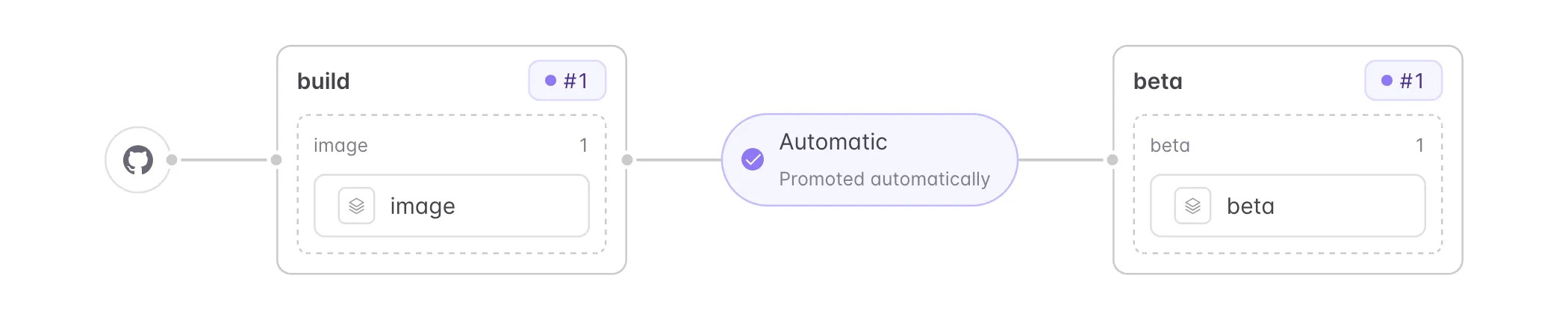
The example has three Pulumi projects, all in TypeScript:
pipeline/defines the pipeline: a GitHub source, abuildstage and abetastage. Delivery keeps the pipeline itself up to date from this directory. In thebetastage, a Job runspipeline/check-url.sh, which calls the service until it answers.image/creates an Artifact Registry repository, then buildsapp/and pushes it, tagged with the commit. It exports the image reference, pinned by digest.beta/deploys that image to a public Cloud Run service and exports its URL.
Every stack authenticates to Google Cloud through Pulumi ESC with OIDC, so no long-lived credentials are stored anywhere.
Prerequisites#
- Install Pulumi, version 3.277.0 or later
- Install Node.js, version 26 or later
- A Pulumi Cloud organization with Pulumi Delivery available
- A Google Cloud project with the Artifact Registry and Cloud Run APIs enabled
- A GitHub repository that holds this example, for example a fork of
pulumi/examples
Setting up the pipeline#
-
Give Pulumi Cloud access to your repository. Install the Pulumi GitHub App on your GitHub organization if it isn’t installed yet, then check that it can read the repository that holds this example: in Pulumi Cloud, go to Settings > Version control, open the GitHub installation, choose Configure repository access, and add the repository on GitHub.
-
Create an ESC environment that logs in to Google Cloud with OIDC. Follow Configuring OIDC for Google Cloud, then expose the credentials to the programs:
values:gcp:login:fn::open::gcp-login:project: <project-number>oidc:workloadPoolId: <pool-id>providerId: <provider-id>serviceAccount: <service-account-email>environmentVariables:GOOGLE_PROJECT: <project-id>GOOGLE_OAUTH_ACCESS_TOKEN: ${gcp.login.accessToken}GOOGLE_PROJECTmust be the project ID, not the project number: Artifact Registry rejects project numbers. The service account needs these roles in the project:roles/artifactregistry.adminto create the repository and push the image,roles/run.adminto deploy the Cloud Run service and make it public, androles/iam.serviceAccountUseron the service’s runtime account, which is the Compute Engine default service account because the beta stack doesn’t set one.The service account trusts each ESC environment by its exact name. If you reuse a workload identity pool and service account that already exist, grant this environment’s subject
roles/iam.workloadIdentityUseron the service account, following Configuring OIDC for Google Cloud. -
Create the image and beta stacks, and import the environment into each one. Delivery only updates stacks that already exist.
The project names in the three
Pulumi.yamlfiles, the stack references inpipeline/index.tsand the Artifact Registry repository ID inimage/index.tsare fixed. A second deployment in the same Pulumi organization, or in the same Google Cloud project and location, must change them first, or it fails with a 409 “already exists” error. Use your names in the commands below.Terminal window cd imagepulumi stack init <org>/gcp-ts-delivery-image-build-image/imagepulumi config env add <project>/<environment> --yescd ../betapulumi stack init <org>/gcp-ts-delivery-image-build-beta/betapulumi config env add <project>/<environment> --yescd .. -
Commit the two stack files. Delivery runs every program from your repository, so each stack’s
Pulumi.<stack>.yamlmust be in git. In a fork ofpulumi/examples, these files are ignored, so add them with-f:Terminal window git add -f image/Pulumi.image.yaml beta/Pulumi.beta.yamlgit commit -m "Add stack files for the Delivery example"git push -
Create the pipeline stack, point it at your repository, and tell Delivery where the pipeline program lives, then commit and push everything:
Terminal window cd pipelinepulumi installpulumi stack init <org>/gcp-ts-delivery-image-build-pipeline/pipelinepulumi config set repository <owner>/<name>pulumi config set branch <branch>pulumi config set path <path>pulumi config set location <location>pulumi config set --path 'delivery:source.url' https://github.com/<owner>/<name>pulumi config set --path 'delivery:source.branch' <branch>pulumi config set --path 'delivery:source.directory' <path>/pipelinegit add -f Pulumi.pipeline.yamlgit commit -m "Point the Delivery pipeline at this repository"git pushrepositoryis your repository, as<owner>/<name>, andbranchis the branch to watch.locationis the Artifact Registry and Cloud Run location, for exampleeurope-west2.pathis this example’s directory within the repository, for examplegcp-ts-delivery-image-build. The example must live in a subdirectory: the pipeline starts runs for pushes that match<path>/**. With the example at the repository root (pathof.), pushes update the pipeline but start no run.pulumi installinstalls the pipeline’s dependencies, including the Delivery SDK,@pulumi/delivery, from npm. -
Register the pipeline:
Terminal window pulumi delivery registerRegistration previews an update of the pipeline stack and asks you to confirm it. It ends with
warning: update has awaiting resources. That is expected: the first stage waits for a run. For the same reason, the pipeline stack’s update history shows the update as failed. Registration fails if the checkout has uncommitted changes or the commit is not on the branch indelivery:source. -
Let the pipeline open the ESC environment. Registration creates a service principal, named “Delivery gcp-ts-delivery-image-build-pipeline pipeline”, and gives it write access to the pipeline, image and beta stacks. The stacks run as that principal, so it also needs to open the environment they import. In Pulumi Cloud, open the environment, go to Settings, then Access, choose Add Principal, then Service Principal, pick the pipeline’s service principal and give it Environment Open.
Or from the command line:
Terminal window ORG=<org> # your Pulumi organizationENV_PROJECT=<project> # the environment you created aboveENV_NAME=<environment>PIPELINE="Delivery gcp-ts-delivery-image-build-pipeline pipeline"# Every call here is scoped to the organization.org_api() { local op=$1; shift; pulumi api "$op" -F orgName="$ORG" "$@"; }# The access calls name the kind of entity in a context object.type_wrap() { printf '{"__type":"%s"}' "$1"; }# The service principal Delivery generated for the pipeline, by name.# Delivery cuts names longer than 64 characters, so a cut-off name also matches.LOGIN=$(org_api ListOrganizationMembers -F type=service-principal \| jq -r --arg name "$PIPELINE" '.members[].user | select(.servicePrincipalKind == "delivery" and (.name == $name or ((.name | length) == 64 and (.name as $n | $name | startswith($n))))) | .githubLogin')[ -n "$LOGIN" ] || { echo "No service principal named: $PIPELINE" >&2; }# The built-in permission set that lets a principal open an environment.OPEN_ID=$(org_api ListRolesByOrgIDAndUXPurpose -F uxPurpose=set \| jq -r '.roles[] | select(.name == "Environment Open") | .id')# Let the pipeline open the environment.ENV_ID=$(org_api GetEnvironmentMetadata_esc_environments -F projectName=$ENV_PROJECT -F envName=$ENV_NAME \| jq -r .id)[ -n "$LOGIN" ] && org_api UpdateEntityAssignment -F id=$ENV_ID -F "context=$(type_wrap PermissionExpressionEnvironment)" \-F userId=$LOGIN -F permissionSetId=$OPEN_ID -
Start the first run: push a change to a file in this example, or choose Start a run on the pipeline in Pulumi Cloud, under Delivery in your organization. Registration does not start a run.
-
Watch the run in Pulumi Cloud. The
buildstage pushes the image, and thebetastage deploys it to Cloud Run and checks that it answers. The run records the app’s URL as thebeta-urlartifact of the release. From now on, every push that changes files in this example starts a new run.
Cleaning up#
Destroy the stacks in reverse order, then remove them:
cd pipeline && pulumi destroy && pulumi stack rmcd ../beta && pulumi destroy && pulumi stack rmcd ../image && pulumi destroy && pulumi stack rmDestroying the beta stack deletes the Cloud Run service. Destroying the image stack deletes the Artifact Registry repository and every image in it. Destroying the pipeline stack removes the pipeline’s service principal and its access to the environment.
If you created the ESC environment only for this example, remove it with pulumi env rm <project>/<environment>, along with any Google Cloud OIDC resources you created for it.