With ESC Approvals, you can propose, review, and apply environment changes with change requests. Until now, an environment could only have one open change request at a time. If a teammate’s change was waiting for review, others were blocked from opening change requests.
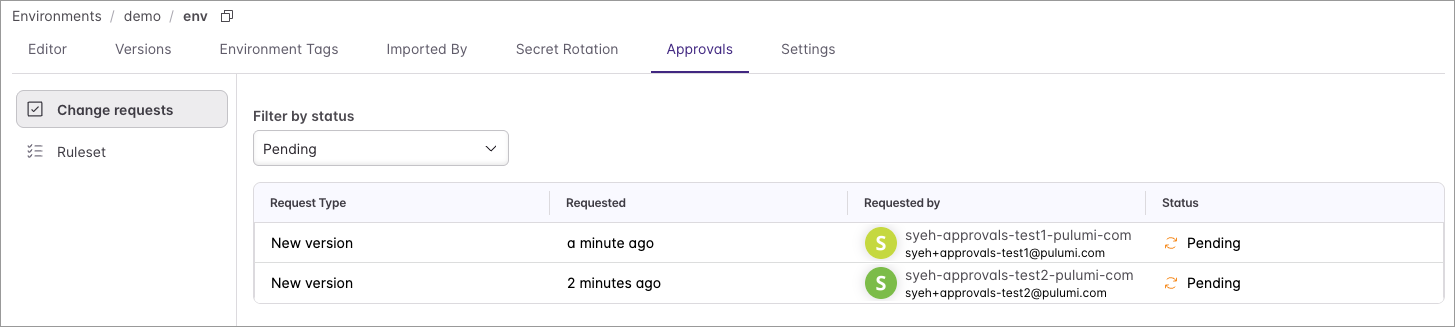
Today, multiple people can open change requests on the same environment at the same time. A platform engineer can rotate a database credential while an app team adds a new feature flag, and each change goes through its own review. You no longer need to wait on your teammates’ changes!
How it works
Creating and viewing change requests in the Pulumi Cloud console
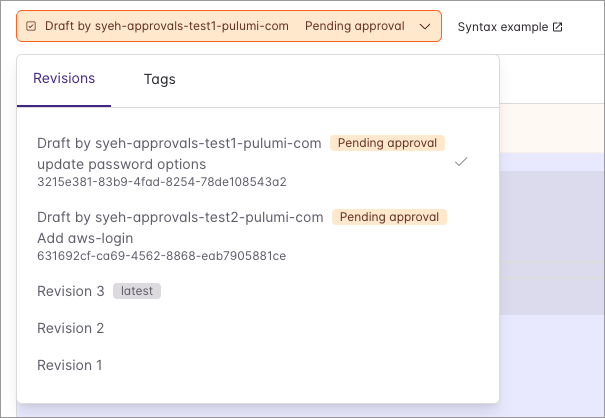
Creating environment change requests works the same as before - just edit an environment that has approvals enabled, and click “Create Draft” once ready, which opens a change request for your teammates to review. You can view all change requests for the environment from either the version dropdown or the Approvals tab.
Updating to the latest revision
If another change request gets applied first, yours is now based on an older revision. This is nothing to worry about - just click “Update to latest revision” and your changes are reapplied on top of the latest revision (using a 3-way merge).

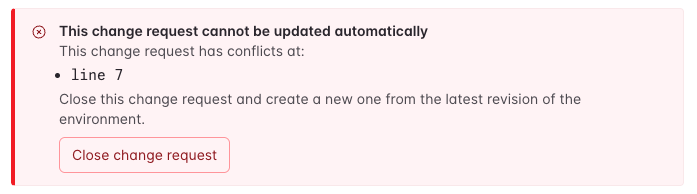
If there is a merge conflict, the console will show which lines conflict. You can resolve this by either editing the draft or recreating the change request.
Get started
Concurrent change requests are available today in Pulumi Cloud on the Pro and Enterprise editions, for any environment with approvals enabled. To get started, see the Approvals documentation.
Let us know what you think in the Pulumi Community Slack!