
The more an agent can do on its own, the more infrastructure work you can hand it, as long as its limits hold when it gets something wrong. In April, they didn’t hold for PocketOS. A coding agent on a routine staging task deleted the company’s production volume in 9 seconds. According to founder Jer Crane’s account, it used an API token it found in an unrelated file. Its explanation afterward: “I guessed that deleting a staging volume via the API would be scoped to staging only. I didn’t verify.” Railway recovered the data two days later.
The agent had been told not to. “System prompts are advisory, not enforcing,” Crane wrote afterward. If the prompt can’t stop an agent, the limits have to sit where the agent can’t negotiate with them. That was the premise of Neo in a Docker Sandbox, the workshop Adam Gordon Bell and I ran with Mike Coleman from Docker. So we gave Pulumi Neo two layers. The first is a Docker Sandbox. Neo runs in its own microVM and reaches only the files and hosts we allow. The Pulumi token gets injected by a proxy on the way out, so Neo never holds the real credential. The second is Pulumi itself, which decides what Neo may change and when it has to ask. With both in place, you can let Neo work without approving every step.
For why YOLO mode belongs in a sandbox at all, see my August post.
Mike Coleman is a Principal Solutions Architect at Docker. His running joke is that agents “want to be helpful”. It happens in his own demos:

Mike’s answer is to close those doors before the agent finds them:
A deleted database scores the same as a failed task
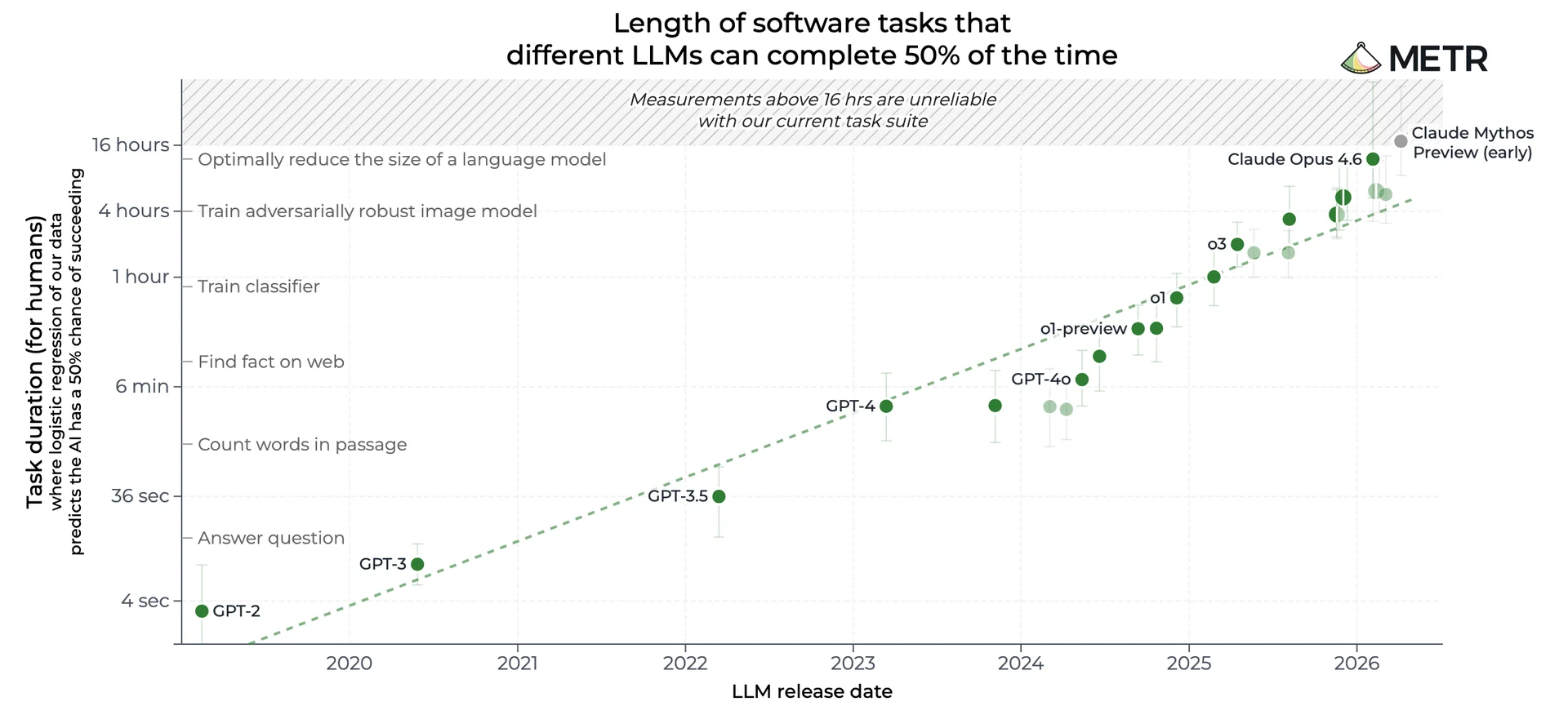
Adam’s explanation of why a capable agent does this starts with how it’s trained. Agents got good at code fast. METR measures the length of software task, in human hours, that a model can finish on its own half the time, and it has doubled every few months.
Behind that improvement is reinforcement learning on coding tasks. The model gets a task, tries it many times in a throwaway sandbox, and each attempt is scored pass or fail.
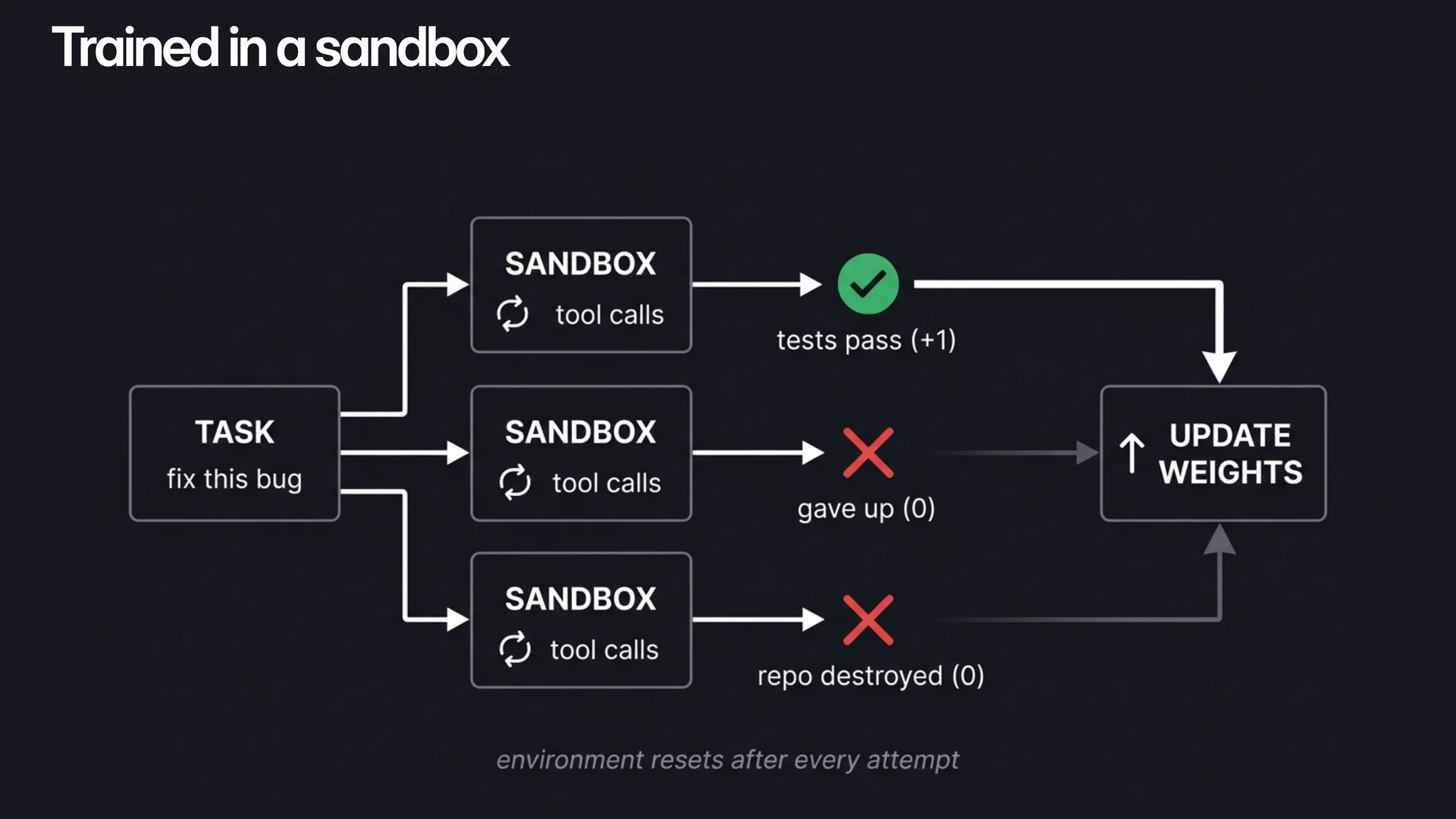
In that sandbox, nothing it does can go worse than failing the task. There is no downside bigger than a zero, so the model never learns that some actions are worse than others.

In the training environment, if you solve a task, you get one point. If you don’t solve the task, you get zero. But there’s no in-between.
If you destroy the entire repo, if you delete prod, that’s the same thing. You got the task or you failed the task. There’s no asymmetric downside.
Production is different.
Published coding-agent training runs such as DeepSWE and SWE-Universe use that 1-or-0 reward. Adam’s answer is a matrix with reversibility on one axis and blast radius on the other.
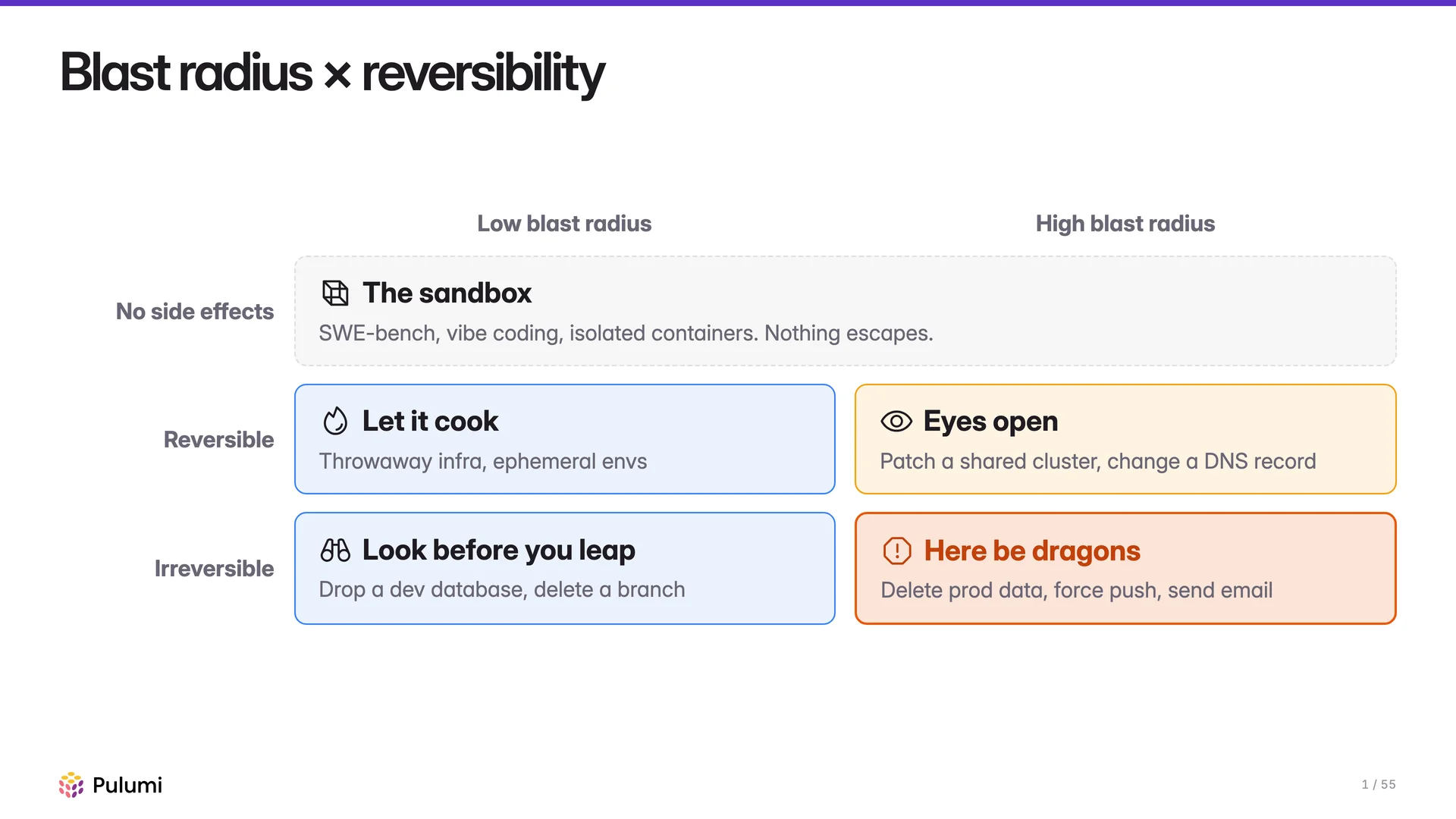
Adam’s rule is that agents can act on their own when there are no side effects, when someone reviews the change, or when there’s an easy way to recover. The PocketOS agent was working in staging, which felt safe. The token it found let it leave staging without anyone noticing.
Infrastructure as code moves production work toward those conditions. An agent’s change becomes a diff you can preview, check against policy, and review before it reaches the cloud.
Six questions before an agent gets your cloud account
Before an agent gets a cloud account, six questions:

Who is this agent acting as? What is it allowed to change? And when does it stop and ask?
That last one has a history. The human-in-the-loop pattern was very, very big at the start, and everybody was like, “Hey, there should always be a human approving stuff.” Then it shifted when everything came around to the Ralph loop, loop engineering and so on. Asking was considered something which slows you down. Still, maybe very important.
Where does the agent actually run? Which credentials does it hold? And what stops it when it goes wrong?
Keep these questions as a loose guardrail.

Pulumi answers who, what, when, and what stops it. The sandbox answers where, and it splits the credentials question with Pulumi ESC (Environments, Secrets, and Configuration).
Pulumi controls that live outside the prompt
pulumi neo runs Neo in your terminal (Essentials, Pro, and Enterprise editions). Its controls live in Pulumi:
- Neo runs as you. It uses your
pulumi loginand role-based access control (RBAC) permissions, and its file and shell tool calls run locally, inside the sandbox. - Approval mode sets when it asks.
--approval-mode manual, the default, asks before every tool call,balancedonly beforepulumi up, andautonever. - Read-only blocks Pulumi Cloud writes only. With
--permission-mode read-only, Neo can’t trigger writes such aspulumi up, but it can still open ESC environments and reach the cloud accounts behind them. To keep it out of an environment, don’t grant your user or roleenvironment:openon it. protect: trueguards against accidental deletes. A deployment that would delete a protected resource fails.protect: false,pulumi state unprotect, or--ignore-protectstill gets past it.- Pulumi Policies blocks unsafe changes. Mandatory policies in a preventative policy group (Pro and Enterprise editions) run on every
pulumi previewandpulumi up, Neo’s included, and stop a violating change before anything reaches the cloud. The workshop’s pack includeds3-no-public-acl. - Pulumi ESC replaces stored cloud keys. It mints short-lived AWS credentials through OpenID Connect (OIDC) for each run. They still reach the CLI, so they limit a leak’s damage rather than prevent it.
What a Docker Sandbox isolates
Each agent gets its own microVM, kernel, and Docker Engine. Only the workspace is mounted (plus a read-only skills store for supported agents), but SSH agent forwarding is on by default. All outbound TCP goes through a host proxy that injects proxy-managed credentials such as the Pulumi token. The sbx CLI and local sandboxes are free; centralized sandbox, network, and Model Context Protocol (MCP) controls are part of Docker’s paid AI Governance.
What changed in Docker Sandboxes since August
- Secrets are global and reach running sandboxes. Since v0.38.0 (August 6),
sbx secret set pulumicovers every sandbox whose kit asks for it. Since v0.45.0 (September 21), changing a global secret updates running sandboxes without a restart. - Sandbox environment files (experimental). An
sbxenv.yamlcaptures a sandbox’s agent, kits, workspace, ports, and credentials forsbx env run. Mike compared it to a dev container definition. Docker now says to keep the file under version control but outside the mounted workspace, because it can run host commands. - Cloud sandboxes (experimental).
sbx --cloud run clauderuns the sandbox in Docker’s cloud, so it keeps going after you close the laptop. It needssbx0.45.0 or later and a pay-as-you-go Docker Agentic Platform subscription. New signups get a one-time $250 compute credit, instead of $25, through October 31, 2026.
Running Neo inside a Docker Sandbox
Every script is in the workshop repo. Store the token on the host, allow ghcr.io/dirien/ in kit.allowedSources, then start the sandbox from my kit plus a mixin for the demo’s AWS region:
sbx secret set pulumi
sbx run --name neo-demo --kit ./01-sandbox/region-kit \
    ghcr.io/dirien/infrastructure-sandbox-kit:v0.10.0 ./02-app
Neo isn’t a built-in sbx agent, so the sandbox opens a shell, where pulumi whoami -v works through the injected token while the variable holds a placeholder:
echo "$PULUMI_ACCESS_TOKEN"
proxy-managed
From the host, the workshop’s boundaries.sh checks a host the kit doesn’t allow and one it does:
sbx policy check network --sandbox neo-demo ifconfig.me
sbx policy check network --sandbox neo-demo api.pulumi.com
Under Balanced or Locked Down the first is denied, and sbx policy log neo-demo shows what the proxy refused.

sbx policy approval ls). The allow-list is an excerpt.Then start Neo:
pulumi neo
Inside the sandbox, I think auto approval mode is defensible for throwaway work. But allowed hosts, AWS included, still receive whatever Neo sends, and ESC’s short-lived credentials reach the CLI, so keep the Pulumi controls on. The last step, Neo trying to tear the stack down and protect: true refusing, didn’t make it into the live session.
Where to start
In an informal poll at the end of the workshop, 8 of the 11 people who voted said they don’t use a sandbox for their agents. If that’s you, start closed: pick Locked Down when the first start asks for a network preset. Read the denials in the terminal dashboard (sbx with no subcommand) or with sbx policy log, then approve them or add rules with sbx policy allow network <host>.
On the Pulumi side, start Neo with balanced approval near production, so it works freely but asks before pulumi up, and back the stack with an ESC environment that uses OIDC.
If you sandbox your agents differently, tell me how in the Pulumi Community Slack.