Serverless app to copy and zip objects between Amazon S3 buckets
Copy and zip TPS reports, using AWS Lambda, from one S3 Bucket to another.
This example lives in the pulumi/examples repository. Check out just this directory to use it:
git clone --filter=blob:none --sparse https://github.com/pulumi/examples pulumi-examplesgit -C pulumi-examples sparse-checkout set aws-ts-s3-lambda-copyzipcd pulumi-examples/aws-ts-s3-lambda-copyzipThis example sets up two AWS S3 Buckets and a single Lambda that listens to one and, upon each new object arriving in it, zips it up and copies it to the second bucket. Its architecture looks like this:
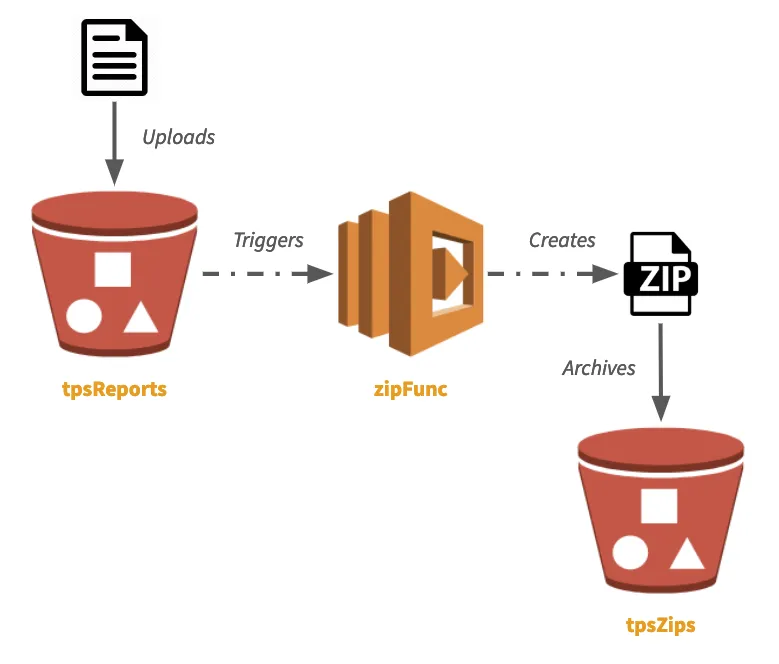
This example is also featured in the blog post Easy Serverless Apps and Infrastructure — Real Events, Real Code.
Prerequisites#
Deploying the example#
-
Create a new stack, which is an isolated deployment target for this example:
Terminal window pulumi stack init dev -
Set the AWS region to deploy into:
Terminal window pulumi config set aws:region us-east-1 -
Install dependencies:
Terminal window npm install -
Deploy the stack:
Terminal window pulumi up -
After about 20 seconds, your buckets and lambda will have been deployed. Their names are printed:
Outputs:tpsReportsBucket: "tpsreports-21b7b7a"tpsZipsBucket : "tpszips-c869600" -
Copy a file to the
tpsReportsBucketusing the AWS CLI:Terminal window aws s3 cp ./myTpsReport001.txt s3://$(pulumi stack output tpsReportsBucket) -
Tail the logs to see evidence the Lambda ran:
Terminal window pulumi logs -fCollecting logs for stack dev since 2019-03-10T10:09:56.000-07:00...2019-03-10T11:10:48.617-07:00[zipTpsReports] Zippingtpsreports-96458ef/tps001.txt into tpszips-edfde11/tps001.txt.zip -
Press
^Cto exitpulumi logs -f, and then download your new zipfile:Terminal window aws s3 cp s3://$(pulumi stack output tpsZipsBucket)/myTpsReport001.txt.zip .
Cleaning up#
Once you’re done, delete the bucket contents (by default, bucket content isn’t auto-deleted), then destroy your stack and remove it:
aws s3 rm s3://$(pulumi stack output tpsReportsBucket)/myTpsReport001.txtaws s3 rm s3://$(pulumi stack output tpsZipsBucket)/myTpsReport001.txt.zippulumi destroypulumi stack rm