Video thumbnailer using AWS Fargate
A video thumbnail extractor using serverless functions and containers
This example lives in the pulumi/examples repository. Check out just this directory to use it:
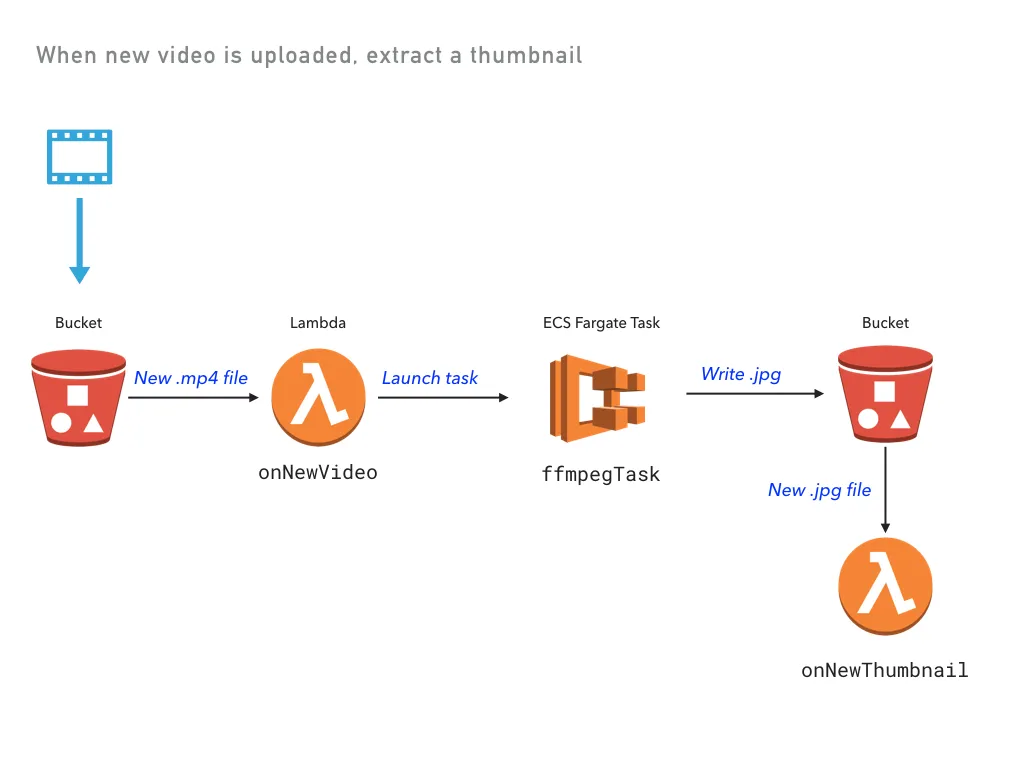
git clone --filter=blob:none --sparse https://github.com/pulumi/examples pulumi-examplesgit -C pulumi-examples sparse-checkout set aws-ts-thumbnailercd pulumi-examples/aws-ts-thumbnailerA video thumbnail extractor using serverless functions and containers. It combines the two into a single distributed application, using AWS Lambda functions as event triggers and a container running on AWS Fargate for the longer-running work: when a new video is uploaded to S3, a Lambda launches a Fargate task that extracts a thumbnail with FFmpeg and writes it back to S3.
Loosely derived from the example at https://serverless.com/blog/serverless-application-for-long-running-process-fargate-lambda/.
Prerequisites#
Deploying the example#
Note: some values in this example will be different from run to run. These values are indicated with ***.
-
Create a new stack:
Terminal window pulumi stack init thumbnailer-testing -
Configure Pulumi to use an AWS region where Fargate is supported, which is currently only available in
us-east-1,us-east-2,us-west-2, andeu-west-1:Terminal window pulumi config set aws:region us-west-2 -
Install dependencies:
Terminal window npm install -
Preview and deploy the app. The preview will take some time, as it builds a Docker container. A total of 32 resources are created.
Terminal window pulumi upPreviewing update of stack 'thumbnailer-testing'Previewing changes:Type Name Plan Info* global global no change 1 info message. info: Building container image 'pulum-+ pulumi:pulumi:Stack video-thumbnailer-thumbnailer-testing create... 1 info message. info: Successfully tagged pulum-...Do you want to perform this update? yesUpdating stack 'thumbnailer-testing'Performing changes:Type Name Status Info* global global unchanged 1 info message. info: Building container image 'pulum-+ pulumi:pulumi:Stack video-thumbnailer-thumbnailer-testing created 1 info message. info: 081c66fa4b0c: Pushed+ ......info: 32 changes performed:+ 32 resources createdUpdate duration: ***Permalink: https://app.pulumi.com/*** -
View the stack outputs:
Terminal window pulumi stack outputCurrent stack outputs (1):OUTPUT VALUEbucketName *** -
Upload a video, embedding the timestamp in the filename:
Terminal window aws s3 cp ./sample/cat.mp4 s3://$(pulumi stack output bucketName)/cat_00-01.mp4upload: sample/cat.mp4 to s3://***/cat_00-01.mp4 -
View the logs from both the Lambda function and the ECS task:
Terminal window pulumi logs -fCollecting logs for stack thumbnailer-testing since ***2018-05-25T12:57:26.326-07:00[ onNewVideo] *** New video: file cat_00-01.mp4 was uploaded at 2018-05-25T19:57:25.507Z.2018-05-25T12:57:30.705-07:00[ onNewVideo] Running thumbnailer task.2018-05-25T12:58:34.960-07:00[ ffmpegThumbTask] Starting ffmpeg task...2018-05-25T12:58:34.960-07:00[ ffmpegThumbTask] Copying video from S3 bucket-5ea6b28/cat_00-01.mp4 to cat_00-01.mp4...2018-05-25T12:58:37.267-07:00[ ffmpegThumbTask] Completed 256.0 KiB/666.5 KiB (2.5 MiB/s) with 1 fildownload: s3://bucket-5ea6b28/cat_00-01.mp4 to ./cat_00-01.mp42018-05-25T12:58:40.306-07:00[ ffmpegThumbTask] Copying cat.jpg to S3 at bucket-5ea6b28/cat.jpg ...2018-05-25T12:58:43.034-07:00[ ffmpegThumbTask] Completed 86.6 KiB/86.6 KiB (619.7 KiB/s) with 1 filupload: ./cat.jpg to s3://bucket-5ea6b28/cat.jpg2018-05-25T12:58:43.758-07:00[ onNewThumbnail] *** New thumbnail: file cat.jpg was saved at 2018-05-25T19:58:43.028Z. -
Download the key frame:
Terminal window aws s3 cp s3://$(pulumi stack output bucketName)/cat.jpg .download: s3://***/cat.jpg to ./cat.jpg
Cleaning up#
To clean up the resources, you will first need to clear the contents of the bucket:
aws s3 rm s3://$(pulumi stack output bucketName) --recursiveThen, destroy your stack and remove it:
pulumi destroypulumi stack rm