Nx monorepo
This example lives in the pulumi/examples repository. Check out just this directory to use it:
git clone --filter=blob:none --sparse https://github.com/pulumi/examples pulumi-examplesgit -C pulumi-examples sparse-checkout set nx-monorepocd pulumi-examples/nx-monorepoThis example shows how to use Nx to organize a monorepo and track dependencies between the packages in the monorepo.
The example consists of the following components:
- components/s3folder: A Component Resource that manages a S3 bucket and its access policies.
- components/website-deploy: A Component Resource that manages files in a S3 bucket
- website: A website built with Astro.
- infra: A Pulumi program that uses the
s3folderandwebsite-deployresources to deploy the generatedwebsite.
The components are written in TypeScript and have a build step to compile them.
To deploy the latest version of the website, we need to respect the following dependencies:
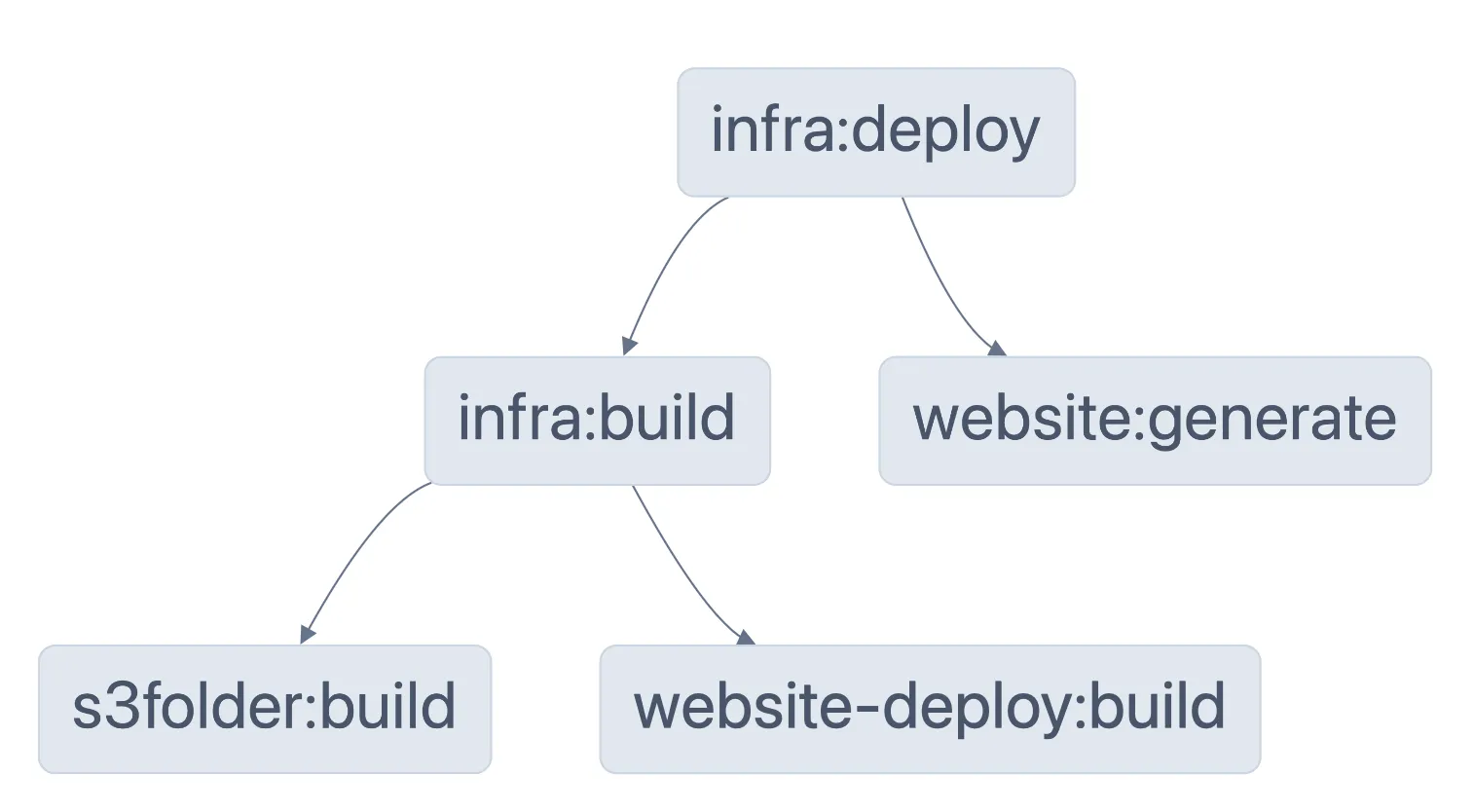
websiteneeds to generate the HTML output.s3folderandwebsite-deployneed to be compiled before we can buildinfra.infraneeds to be compiled before we can deploy.
These dependencies can be defined using Nx, for example in infra/package.json we declare that the deploy target for the infra package needs its dependencies to be built, and the HTML to generated:
... "nx": { "targets": { "deploy": { "dependsOn": [ "^build", "website:generate" ] } } }Nx can visualize the dependencies for us using npx nx deploy infra --graph
Prerequisites#
Deploying the example#
Since Nx manages the interdependencies, all we have to do is install our node dependencies:
npm installThen run nx:
npx nx deploy infra ✔ 3/3 dependent project tasks succeeded [0 read from cache]
Hint: you can run the command with --verbose to see the full dependent project outputs
—————————————————————————————————————————————————————————————————————————————————————————————————————————————————————————————————————————————————————————————————————————————————————————————————————————————————————
> nx run infra:build
> infra@1.0.0 build> tsc
> nx run infra:deploy
> infra@1.0.0 deploy> pulumi up --stack dev
Previewing update (dev)
View in Browser (Ctrl+O): https://app.pulumi.com/v-julien-pulumi-corp/nx-monorepo/dev/previews/19e33681-e8fa-49f0-b830-494cfd996c50
Type Name Plan + pulumi:pulumi:Stack nx-monorepo-dev create + ├─ pulumi:examples:WebsiteDeploy my-website create + │ ├─ aws:s3:BucketObject index.html create + │ └─ aws:s3:BucketObject favicon.svg create + └─ pulumi:examples:S3Folder my-folder create + ├─ aws:s3:Bucket my-folder create + ├─ aws:s3:BucketPublicAccessBlock public-access-block create + └─ aws:s3:BucketPolicy bucketPolicy create
Outputs: bucketId : output<string> websiteUrl: output<string>
Resources: + 8 to create
Do you want to perform this update? yesUpdating (dev)
View in Browser (Ctrl+O): https://app.pulumi.com/v-julien-pulumi-corp/nx-monorepo/dev/updates/25
Type Name Status + pulumi:pulumi:Stack nx-monorepo-dev created (6s) + ├─ pulumi:examples:WebsiteDeploy my-website created (1s) + │ ├─ aws:s3:BucketObject favicon.svg created (0.94s) + │ └─ aws:s3:BucketObject index.html created (1s) + └─ pulumi:examples:S3Folder my-folder created (5s) + ├─ aws:s3:Bucket my-folder created (2s) + ├─ aws:s3:BucketPublicAccessBlock public-access-block created (0.85s) + └─ aws:s3:BucketPolicy bucketPolicy created (1s)
Outputs: bucketId : "my-folder-c073a6e" websiteUrl: "http://my-folder-c073a6e.s3-website.eu-central-1.amazonaws.com"
Resources: + 8 created
Duration: 10s
———————————————————————————————————————————————————————————————————————————Cleaning up#
To destroy the stack, run:
npx nx destroy infra ✔ 2/2 dependent project tasks succeeded [2 read from cache]
Hint: you can run the command with --verbose to see the full dependent project outputs
—————————————————————————————————————————————————————————————————————————————————————————————————————————————————————————————————————————————————————————————————————————————————————————————————————————————————————
> nx run infra:build [existing outputs match the cache, left as is]
> infra@1.0.0 build> tsc
> nx run infra:destroy
> infra@1.0.0 destroy> pulumi destroy --stack dev
Previewing destroy (dev)
View in Browser (Ctrl+O): https://app.pulumi.com/v-julien-pulumi-corp/nx-monorepo/dev/previews/8cfe44be-b3e1-4858-8d48-8bf3223a344c
Type Name Plan - pulumi:pulumi:Stack nx-monorepo-dev delete - ├─ pulumi:examples:S3Folder my-folder delete - │ ├─ aws:s3:BucketPublicAccessBlock public-access-block delete - │ ├─ aws:s3:Bucket my-folder delete - │ └─ aws:s3:BucketPolicy bucketPolicy delete - └─ pulumi:examples:WebsiteDeploy my-website delete - ├─ aws:s3:BucketObject favicon.svg delete - └─ aws:s3:BucketObject index.html delete
Outputs: - bucketId : "my-folder-c073a6e" - websiteUrl: "http://my-folder-c073a6e.s3-website.eu-central-1.amazonaws.com"
Resources: - 8 to delete
Do you want to perform this destroy? yesDestroying (dev)
View in Browser (Ctrl+O): https://app.pulumi.com/v-julien-pulumi-corp/nx-monorepo/dev/updates/26
Type Name Status - pulumi:pulumi:Stack nx-monorepo-dev deleted (0.25s) - ├─ pulumi:examples:WebsiteDeploy my-website deleted (0.31s) - │ ├─ aws:s3:BucketObject favicon.svg deleted (1s) - │ └─ aws:s3:BucketObject index.html deleted (1s) - └─ pulumi:examples:S3Folder my-folder deleted (0.56s) - ├─ aws:s3:BucketPolicy bucketPolicy deleted (0.86s) - ├─ aws:s3:BucketPublicAccessBlock public-access-block deleted (0.88s) - └─ aws:s3:Bucket my-folder deleted (0.71s)
Outputs: - bucketId : "my-folder-c073a6e" - websiteUrl: "http://my-folder-c073a6e.s3-website.eu-central-1.amazonaws.com"
Resources: - 8 deleted
Duration: 8s
The resources in the stack have been deleted, but the history and configuration associated with the stack are still maintained.If you want to remove the stack completely, run `pulumi stack rm dev`.
—————————————————————————————————————————————————————————————————————————————————————————————————————————————————————————————————————————————————————————————————————————————————————————————————————————————————————
NX Successfully ran target destroy for project infra and 3 tasks it depends on (33s)
Nx read the output from the cache instead of running the command for 3 out of 4 tasks.