TL;DR: we are releasing a new major version of the Google Cloud provider. To migrate, ask Neo or your coding agent to run the Pulumi provider-upgrade skill (how to use it) or follow the v10 migration guide.
We are happy to announce the next major version of the Pulumi Google Cloud provider. This release is based on the new v8 major version of terraform-provider-google (see also the upstream v8 upgrade guide). It ships with a migration guide that covers every breaking change in depth.
Here are a few links to help you get started if you are new to Pulumi:
- Getting Started: a guided walkthrough for creating your first project
- Setup & Install: how to install the Google Cloud provider
- How-to guides: how to provision specific resources with the Google Cloud provider
- Pulumi Neo: ask Pulumi Neo to help you with your project
Upgrading
The migration guide accounts for every resource, type and function that changed in the new version. For the most popular resources, it gives a description of the change, a risk and impact section, a way to check whether you are affected, and step by step migration snippets.
Use an agent to assist with your upgrade
We have updated the provider-upgrade skill in Pulumi Agent Skills to cover the upgrade from v9. You can use it from Pulumi Neo or from any popular coding agent. Before it bumps the provider, it scans your stack and code for the changes that affect you, and it stops to ask before anything that would replace or delete live infrastructure. Then it upgrades the dependency, runs pulumi preview until the diff is explained, and leaves pulumi up to you.
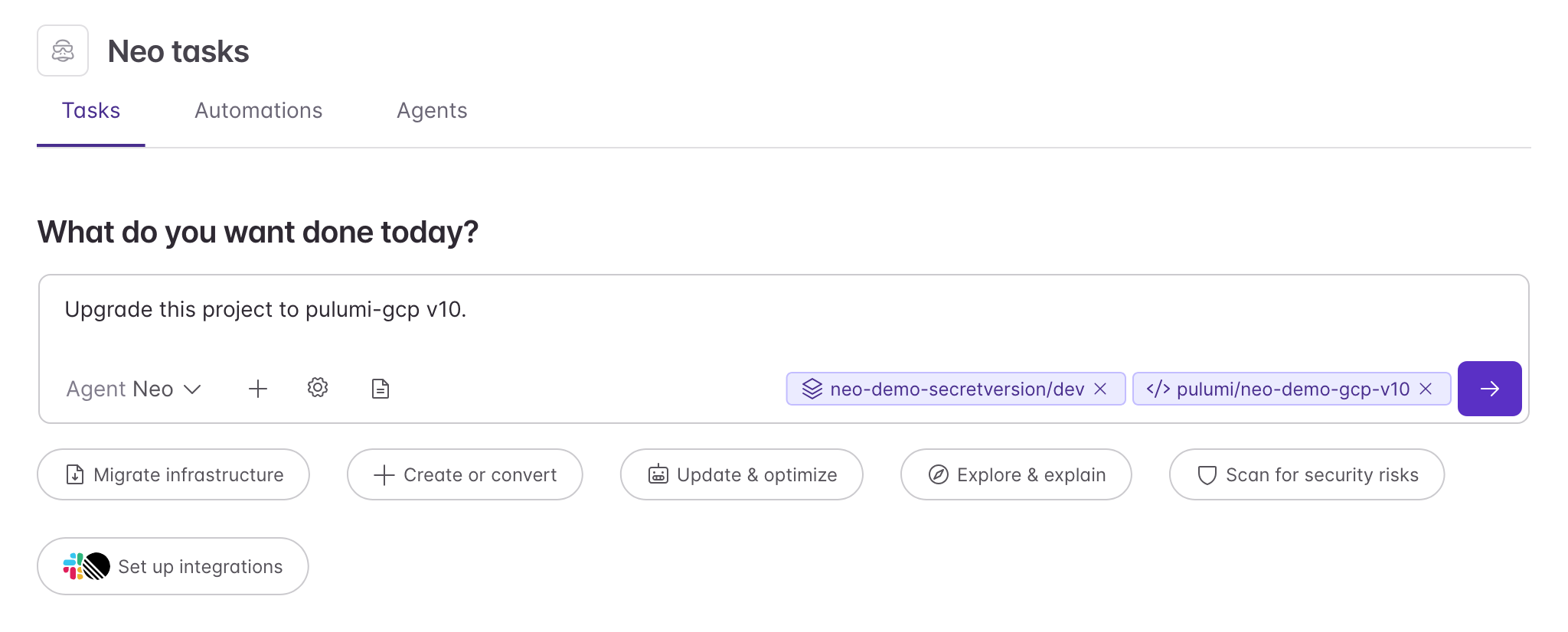
In Neo, ask: “Upgrade this project to pulumi-gcp v10.” Neo picks the provider-upgrade skill for you; there is nothing to install or name.
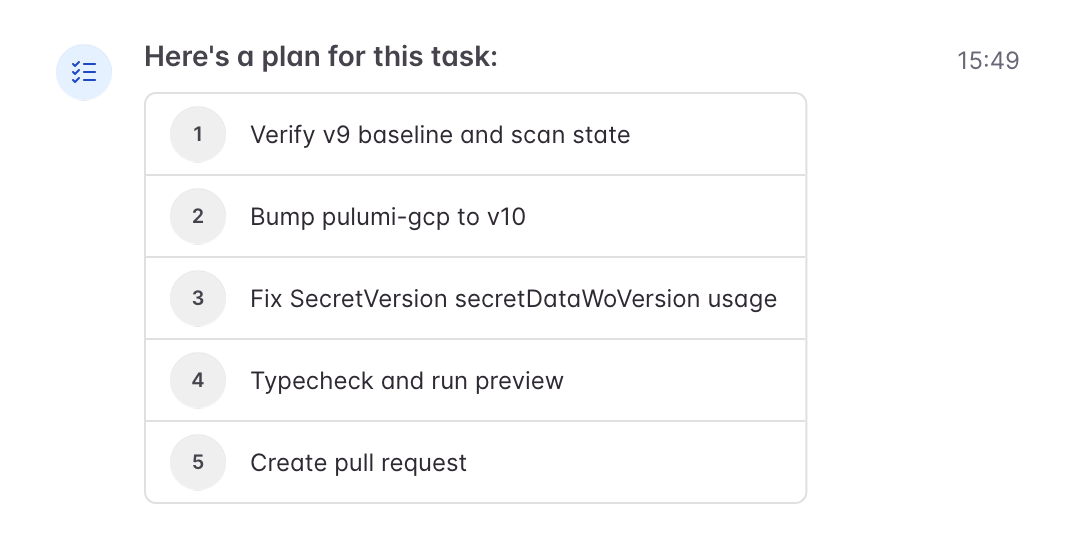
Neo plans the upgrade, starting with a scan of your stack while it is still on v9.
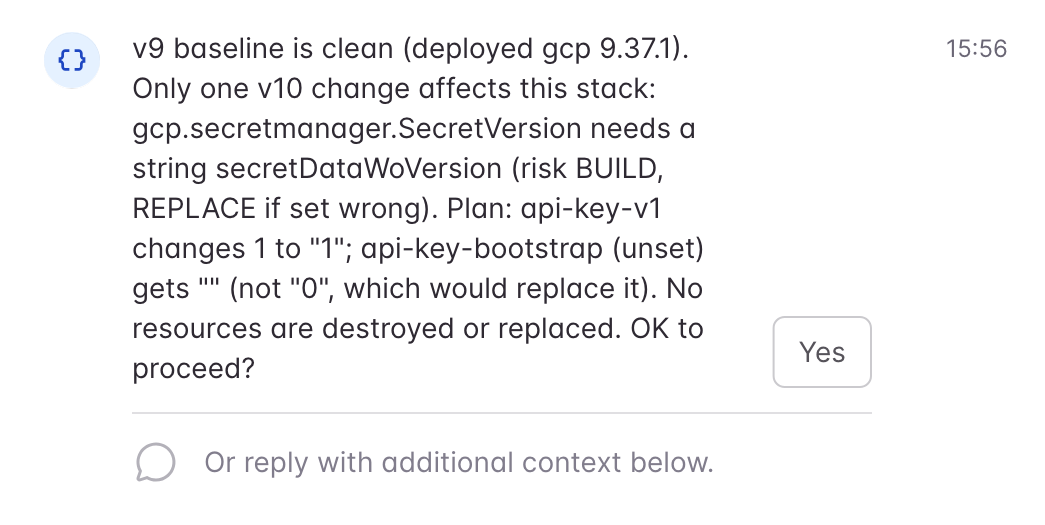
Before it edits any code, it tells you which resources are affected and what could be replaced, and waits for your answer.
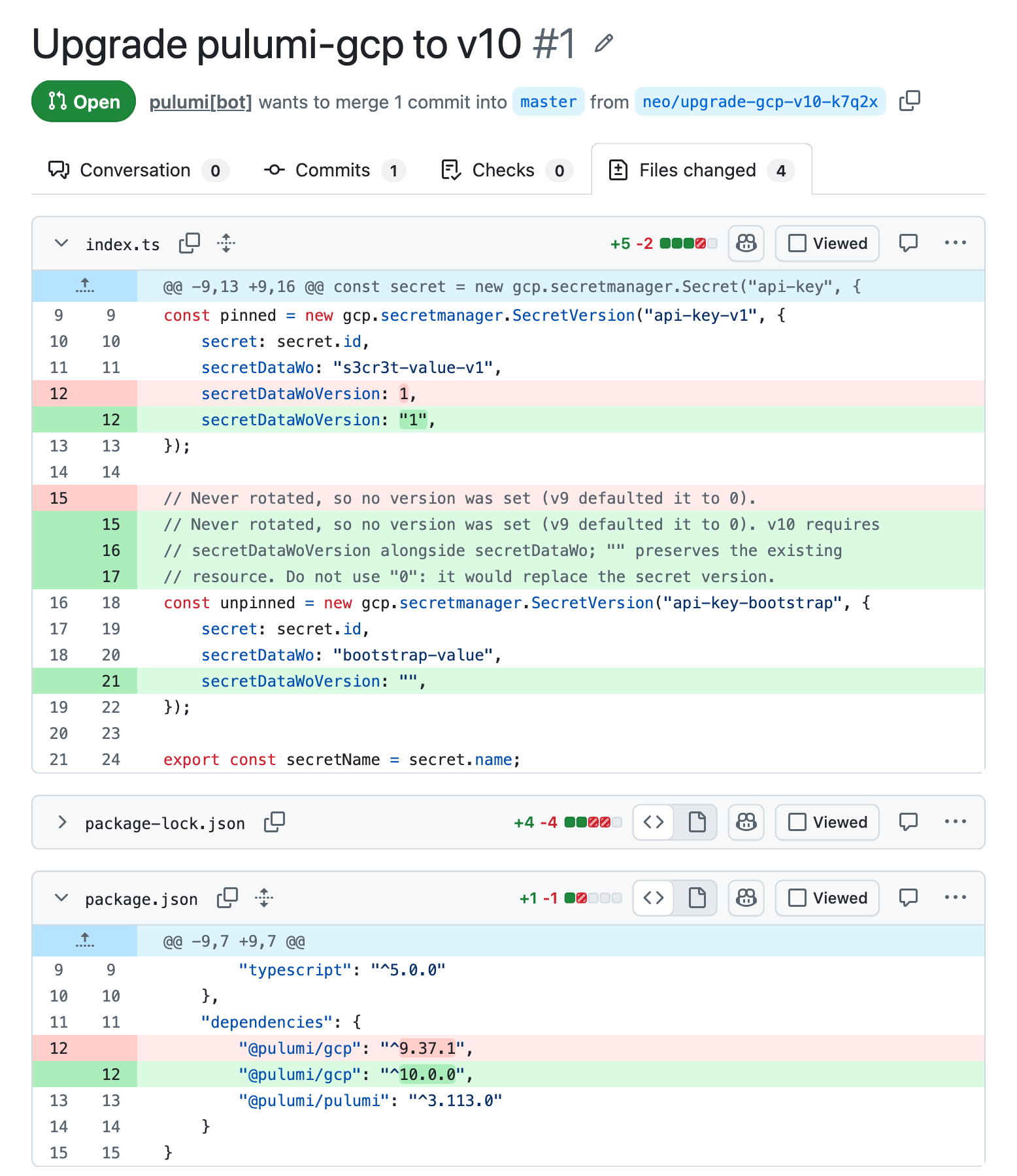
Finally, Neo opens a pull request with the changes and the preview results. You review it and run pulumi up when you are ready.
In Claude Code, add the Pulumi marketplace and install the pulumi plugin:
/plugin marketplace add pulumi/agent-skills
/plugin install pulumi
Then ask: “Upgrade this project to pulumi-gcp v10.” You can also run /provider-upgrade directly.
In OpenAI Codex, register the marketplace:
codex plugin marketplace add pulumi/agent-skills
Then run codex, open /plugins, and install pulumi. Ask Codex to upgrade the provider to v10, or invoke the skill with $provider-upgrade.
In Pi, and in any other agent that supports the Agent Skills standard, install the skill with the universal installer:
npx skills add pulumi/agent-skills/pulumi --skill provider-upgrade -a pi
Then ask Pi to upgrade the provider to v10, or trigger the skill with /skill:provider-upgrade.
Why upgrade
Moving to the latest version means you keep getting the latest updates from Google Cloud. GCP is covered by our provider support policy: with this release, v9 receives security updates for up to 12 months (or until v11 ships), while new features, bug fixes, and upstream updates land only in v10.
Staying on the latest version also means you keep getting new features. Google Cloud offers capabilities you will not find on other clouds, such as TPUs, accelerators Google designed for training and serving AI models. For example, here is how you could create a Cloud TPU v6e (Trillium) slice with the new major version, using gcp.tpu.V2Vm:
import * as gcp from "@pulumi/gcp";

// A Cloud TPU v6e (Trillium) slice with 8 chips, on Spot capacity.
const tpu = new gcp.tpu.V2Vm("trillium", {
    zone: "us-east1-d",
    runtimeVersion: "v2-alpha-tpuv6e",
    acceleratorConfig: {
        type: "V6E",
        topology: "2x4",
    },
    schedulingConfig: {
        spot: true,
    },
    labels: {
        workload: "training",
    },
});

export const tpuName = tpu.name;
export const tpuWorkers = tpu.networkEndpoints.apply(eps => eps.map(ep => ep.ipAddress));
import pulumi
import pulumi_gcp as gcp

# A Cloud TPU v6e (Trillium) slice with 8 chips, on Spot capacity.
tpu = gcp.tpu.V2Vm(
    "trillium",
    zone="us-east1-d",
    runtime_version="v2-alpha-tpuv6e",
    accelerator_config={
        "type": "V6E",
        "topology": "2x4",
    },
    scheduling_config={
        "spot": True,
    },
    labels={
        "workload": "training",
    },
)

pulumi.export("tpu_name", tpu.name)
pulumi.export(
    "tpu_workers",
    tpu.network_endpoints.apply(lambda eps: [ep.ip_address for ep in eps]),
)
package main

import (
	"github.com/pulumi/pulumi-gcp/sdk/v10/go/gcp/tpu"
	"github.com/pulumi/pulumi/sdk/v3/go/pulumi"
)

func main() {
	pulumi.Run(func(ctx *pulumi.Context) error {
		// A Cloud TPU v6e (Trillium) slice with 8 chips, on Spot capacity.
		vm, err := tpu.NewV2Vm(ctx, "trillium", &tpu.V2VmArgs{
			Zone:           pulumi.String("us-east1-d"),
			RuntimeVersion: pulumi.String("v2-alpha-tpuv6e"),
			AcceleratorConfig: &tpu.V2VmAcceleratorConfigArgs{
				Type:     pulumi.String("V6E"),
				Topology: pulumi.String("2x4"),
			},
			SchedulingConfig: &tpu.V2VmSchedulingConfigArgs{
				Spot: pulumi.Bool(true),
			},
			Labels: pulumi.StringMap{
				"workload": pulumi.String("training"),
			},
		})
		if err != nil {
			return err
		}

		ctx.Export("tpuName", vm.Name)
		ctx.Export("tpuWorkers", vm.NetworkEndpoints.ApplyT(func(eps []tpu.V2VmNetworkEndpoint) []string {
			ips := make([]string, len(eps))
			for i, ep := range eps {
				ips[i] = *ep.IpAddress
			}
			return ips
		}).(pulumi.StringArrayOutput))
		return nil
	})
}
using System.Collections.Generic;
using System.Linq;
using Pulumi;
using Gcp = Pulumi.Gcp;

return await Deployment.RunAsync(() =>
{
    // A Cloud TPU v6e (Trillium) slice with 8 chips, on Spot capacity.
    var tpu = new Gcp.Tpu.V2Vm("trillium", new()
    {
        Zone = "us-east1-d",
        RuntimeVersion = "v2-alpha-tpuv6e",
        AcceleratorConfig = new Gcp.Tpu.Inputs.V2VmAcceleratorConfigArgs
        {
            Type = "V6E",
            Topology = "2x4",
        },
        SchedulingConfig = new Gcp.Tpu.Inputs.V2VmSchedulingConfigArgs
        {
            Spot = true,
        },
        Labels =
        {
            { "workload", "training" },
        },
    });

    return new Dictionary<string, object?>
    {
        ["tpuName"] = tpu.Name,
        ["tpuWorkers"] = tpu.NetworkEndpoints.Apply(eps => eps.Select(ep => ep.IpAddress).ToList()),
    };
});
package myproject;

import com.pulumi.Pulumi;
import com.pulumi.gcp.tpu.V2Vm;
import com.pulumi.gcp.tpu.V2VmArgs;
import com.pulumi.gcp.tpu.inputs.V2VmAcceleratorConfigArgs;
import com.pulumi.gcp.tpu.inputs.V2VmSchedulingConfigArgs;
import java.util.Map;
import java.util.stream.Collectors;

public class App {
    public static void main(String[] args) {
        Pulumi.run(ctx -> {
            // A Cloud TPU v6e (Trillium) slice with 8 chips, on Spot capacity.
            var tpu = new V2Vm("trillium", V2VmArgs.builder()
                .zone("us-east1-d")
                .runtimeVersion("v2-alpha-tpuv6e")
                .acceleratorConfig(V2VmAcceleratorConfigArgs.builder()
                    .type("V6E")
                    .topology("2x4")
                    .build())
                .schedulingConfig(V2VmSchedulingConfigArgs.builder()
                    .spot(true)
                    .build())
                .labels(Map.of("workload", "training"))
                .build());

            ctx.export("tpuName", tpu.name());
            ctx.export("tpuWorkers", tpu.networkEndpoints().applyValue(eps -> eps.stream()
                .map(ep -> ep.ipAddress().orElse(null))
                .collect(Collectors.toList())));
        });
    }
}
resources:
  # A Cloud TPU v6e (Trillium) slice with 8 chips, on Spot capacity.
  trillium:
    type: gcp:tpu:V2Vm
    properties:
      zone: us-east1-d
      runtimeVersion: v2-alpha-tpuv6e
      acceleratorConfig:
        type: V6E
        topology: 2x4
      schedulingConfig:
        spot: true
      labels:
        workload: training

outputs:
  tpuName: ${trillium.name}
  tpuWorkers: ${trillium.networkEndpoints}
Gemini Enterprise Agent Platform (formerly Vertex AI), Google’s platform for building with Gemini models, also gets new resources. New in v10, gcp.vertex.AiRagCorpus brings its RAG Engine under Pulumi: declare the corpus that grounds your Gemini applications in your own documents, with its embedding model and vector store, in the same program as the rest of your infrastructure. It joins the Agent Runtime and Model Garden resources added during v9. In the provider, these resources keep the gcp.vertex module name.
You can find more about this release in the v10 release notes. We hope your transition goes smoothly, and as always we are happy to hear your feedback in our Community Slack or through support if you are a paying Pulumi customer. Happy hacking!