Today we’re launching Discovered Stacks: Pulumi Cloud now models your AWS CloudFormation stacks and Azure Resource Manager deployments as stacks, right alongside your Pulumi IaC stacks. And when you’re ready to bring them under Pulumi management, migration is built in, with every resource tracked until the code provably matches the cloud.
Why: your infrastructure doesn’t live in one tool
Almost nobody’s cloud estate is a single technology. There’s the CloudFormation that came with the AWS account, the ARM templates from the Azure team, the Terraform from an acquisition, and the Pulumi you’re standardizing on. Each tool has its own console, its own grouping, its own idea of state, and no single place shows you everything you run.
That fragmentation is also why migrations stall. Moving a stack to Pulumi has never been the hard part; knowing where you stand is. The tracking lives in a spreadsheet, the spreadsheet goes stale the day it’s written, and six months later nobody can say which of the 800 resources made it across and which were quietly forgotten.
Nothing gets lost
Discovered Stacks gives you confidence that your migration plan or governance efforts will include all resources. This catches a common failure mode where resources are missed by your existing migration scripts or automations. When Pulumi Insights scans your accounts, every CloudFormation stack and ARM deployment becomes a discovered stack, and every resource in it appears as a row with an explicit migration status: ready to migrate, requiring review before migration, or already migrated. Every status is computed from live state on both ends — what Pulumi manages and what the source tool reports — so it’s never a stale annotation someone forgot to update.
Each resource shows its origin type (AWS::S3::Bucket) next to its Pulumi type (aws:s3/bucket:Bucket), with the origin properties side by side with Pulumi’s view, so you can verify that Pulumi sees exactly what your source tool sees before you change anything. Decisions you make along the way (this resource was deleted, that policy is covered by its parent role) are recorded by marking the resource resolved: it stays visible to your whole team, deliberately handled rather than quietly forgotten. The spreadsheet is retired.
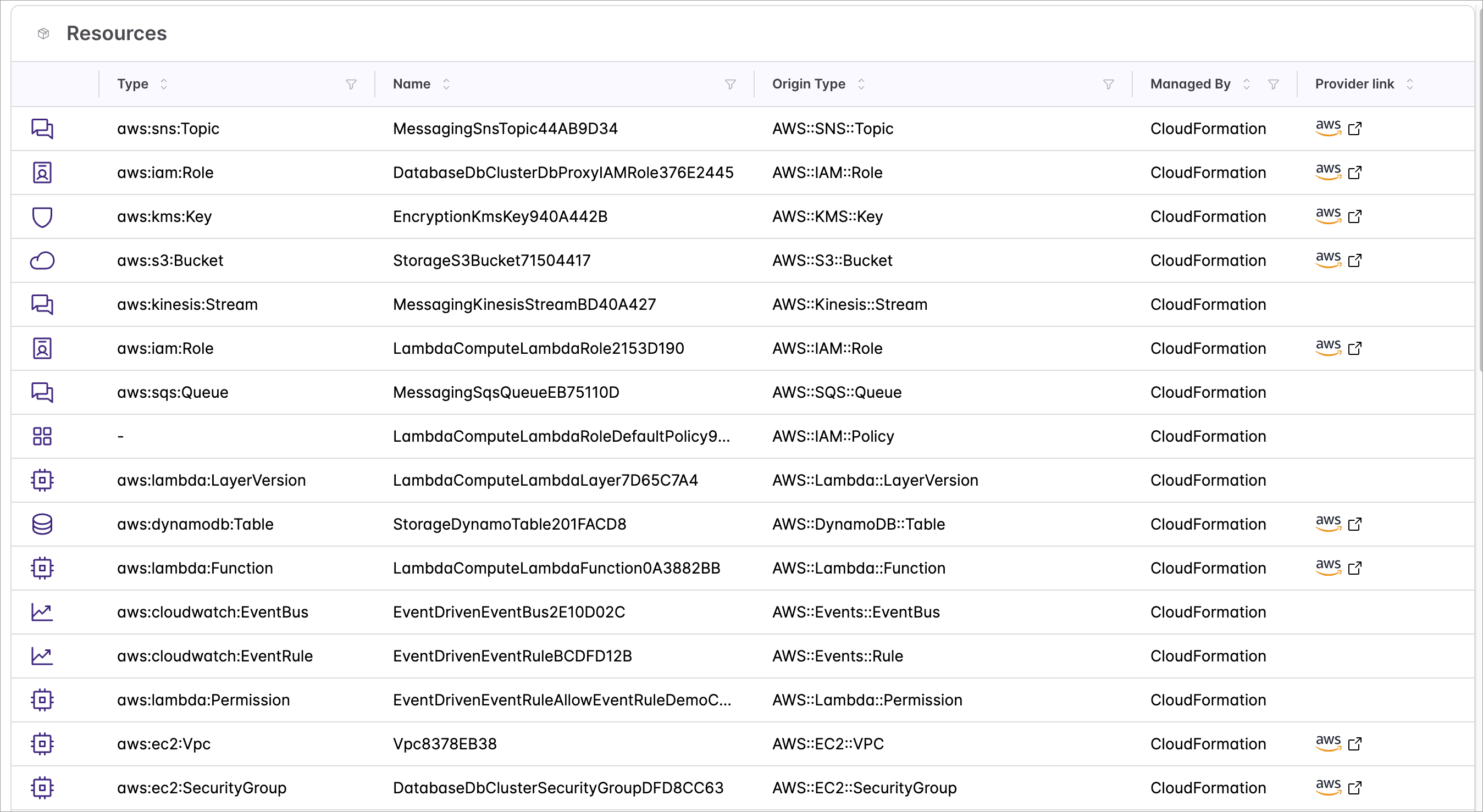
Migration on your terms
When you’re ready to migrate, the console is where you plan and build confidence. Migrate with Neo hands the job to Pulumi Neo, which imports the resources, reconciles the generated program, and opens a pull request for review. If you prefer local development, Generate Import Commands gives you the raw materials, and the same API lets your own agents drive the flow.
Two things hold regardless of the path. Progress is derived: a resource shows as migrated when it actually exists in the target Pulumi stack, not when someone checks a box. And the quality gate is a zero-diff pulumi preview — the migration is done when the code demonstrably matches your cloud.
Terraform stacks whose state you store in Pulumi Cloud get the same treatment through a new Migration tab, with statuses derived from the Terraform state.
Try it
Open the Stacks page in Pulumi Cloud, turn on Show Discovered Stacks, and your CloudFormation and ARM estates appear next to your IaC. From there:
- Read the Discovered Stacks documentation.
- Follow the step-by-step migration tutorial to take a CloudFormation stack all the way to Pulumi.
We’d love to hear how it works on your estate — reach out through Pulumi feedback or your customer success team.