Integrate with External Secrets Operator (ESO)
15 minExternal Secrets Operator is a Kubernetes operator that integrates external secret management systems with Kubernetes. By using External Secrets Operator, you have several advantages over Kubernetes native secrets:
- Sensitive data is stored and managed by an external service outside the Kubernetes cluster and this leads to better security and compliance.
- External Secrets Operator supports multiple different sources, so you can use the same operator to manage secrets and configuration from different sources.
- Take advantage of the advanced features of the secret provider, such as encryption of data at rest and scenarios like secret rotation.
Since version 0.10.0 External Secrets Operator supports Pulumi ESC as a secret provider.
- How to deploy the External Secrets Operator using Helm or Pulumi
- How to manage secrets stored in Pulumi ESC using External Secrets Operator
- How to push secrets from Kubernetes to Pulumi ESC
- The Pulumi CLI
- A Kubernetes cluster (for example, kind)
- kubectl
- helm
Deploy External Secrets Operator#
Deploy using Helm#
Install from Helm Chart Repository#
# add ESO Operator Chart repo into helmhelm repo add external-secrets https://charts.external-secrets.iohelm repo update
# installs latest ESO Operator Chart, creates also namespacehelm upgrade --install external-secrets external-secrets/external-secrets \  --namespace external-secrets \  --create-namespace \  --wait
Create secret containing Pulumi access token#
# create a local k8s secret to store(PAT), to allow accessing Pulumi Cloud Resourceskubectl create secret generic pulumi-access-token --from-literal=PULUMI_ACCESS_TOKEN=${PULUMI_ACCESS_TOKEN} \ --namespace external-secretsCreate ClusterSecretStore#
You can create a SecretStore resource to notify the External Secrets Operator to use Pulumi ESC as a secret provider for a specific namespace.
However, if you want to expand the scope to an entire cluster you can use a ClusterSecretStore resource instead.
cat <<EOF | kubectl apply -f -apiVersion: external-secrets.io/v1kind: SecretStoremetadata: name: secret-store namespace: external-secretsspec: provider: pulumi: organization: {PULUMI_ORG_NAME} project: {ESC_PROJECT_NAME} environment: {ESC_ENV_NAME} accessToken: secretRef: name: pulumi-access-token key: PULUMI_ACCESS_TOKEN namespace: external-secretsEOFPlease replace ${PULUMI_ORG_NAME}, ${ESC_PROJECT_NAME}, ${ESC_ENV_NAME} with your Pulumi organization, project, and environment names.
For demo purposes, we assume that we already have an ESC environment my-org/my-project/my-env with a secret my-secret that we want to manage using the External Secrets Operator.
values: hello: worldCreate ExternalSecret#
Now you can create an ExternalSecret resource that will tell External Secrets Operator to fetch the secret from Pulumi ESC. There is also an ClusterExternalSecret resource, which is a cluster scoped resource that can be used to manage ExternalSecret resources in specific namespaces.
cat <<EOF | kubectl apply -f -apiVersion: external-secrets.io/v1kind: ExternalSecretmetadata: name: secret namespace: external-secretsspec: data: - secretKey: esc-secret remoteRef: key: hello refreshInterval: 1h secretStoreRef: kind: SecretStore name: secret-storeEOFThere a many other options available for ExternalSecret resource to control the creation of the secret like rewriting keys, templating and more. You can find more information in the External Secrets Operator documentation.
Verify the secret#
With the following command, you can verify that the secret has been created in the cluster:
kubectl get secret secret --namespace external-secrets -o jsonpath='{.data.esc-secret}' | base64 -d# Output:worldCleanup#
To remove the External Secrets Operator and the created resources, you can use the following commands:
kubectl delete externalsecret secretkubectl delete clustersecretstore secret-storekubectl delete secret pulumi-access-token -n external-secretshelm uninstall external-secrets -n external-secretsDeploy using Pulumi#
Of course, you can also deploy the External Secrets Operator using Pulumi. The following examples shows how to deploy the External Secrets Operator on some of the Pulumi supported languages.
Select your Pulumi supported language#
Create a new Pulumi program in your preferred language and add the following code to deploy the External Secrets Operator.
pulumi new <your-preferred-language> --name external-secrets-operatorAdd the following code to the index.ts, index.py, or main.go file:
 TypeScript
 Python
 Go
Goimport * as pulumi from "@pulumi/pulumi";import * as kubernetes from "@pulumi/kubernetes";
const config = new pulumi.Config();
const externalSecretsNamespace = new kubernetes.core.v1.Namespace("external-secrets-namespace", { metadata: { name: "external-secrets", }});const externalSecretsRelease = new kubernetes.helm.v3.Release("external-secrets-release", { chart: "external-secrets", version: "0.10.4", namespace: externalSecretsNamespace.metadata.apply(metadata => metadata.name), repositoryOpts: { repo: "https://charts.external-secrets.io", },});const patSecret = new kubernetes.core.v1.Secret("patSecret", { metadata: { namespace: externalSecretsNamespace.metadata.apply(metadata => metadata.name), name: "pulumi-access-token", }, stringData: { PULUMI_ACCESS_TOKEN: config.require("pulumi-pat"), }, type: "Opaque",});
const clusterSecretStore = new kubernetes.apiextensions.CustomResource("cluster-secret-store", { apiVersion: "external-secrets.io/v1beta1", kind: "ClusterSecretStore", metadata: { name: "secret-store", }, spec: { provider: { pulumi: { organization: pulumi.getOrganization(), project: "dirien", environment: "hello-world", accessToken: { secretRef: { name: patSecret.metadata.name, key: "PULUMI_ACCESS_TOKEN", namespace: patSecret.metadata.namespace, }, }, }, }, },}, { dependsOn: externalSecretsRelease });
const externalSecret = new kubernetes.apiextensions.CustomResource("external-secret", { apiVersion: "external-secrets.io/v1beta1", kind: "ExternalSecret", metadata: { name: "secret", namespace: "default", }, spec: { data: [ { secretKey: "esc-secret", remoteRef: { key: "hello", } } ], refreshInterval: "1h", secretStoreRef: { kind: clusterSecretStore.kind, name: clusterSecretStore.metadata.name, } },}, { dependsOn: externalSecretsRelease });import pulumiimport pulumi_kubernetes as kubernetes
config = pulumi.Config()
external_secrets_namespace = kubernetes.core.v1.Namespace( "external-secrets-namespace", metadata=kubernetes.meta.v1.ObjectMetaArgs(name="external-secrets"),)
external_secrets_release = kubernetes.helm.v3.Release( "external-secrets-release", chart="external-secrets", version="0.10.4", namespace=external_secrets_namespace.metadata.apply(lambda metadata: metadata.name), repository_opts=kubernetes.helm.v3.RepositoryOptsArgs( repo="https://charts.external-secrets.io" ),)
pat_secret = kubernetes.core.v1.Secret( "patSecret", metadata=kubernetes.meta.v1.ObjectMetaArgs( namespace=external_secrets_namespace.metadata.apply( lambda metadata: metadata.name ), name="pulumi-access-token", ), string_data={"PULUMI_ACCESS_TOKEN": config.require("pulumi-pat")}, type="Opaque",)
cluster_secret_store = kubernetes.apiextensions.CustomResource( "cluster-secret-store", api_version="external-secrets.io/v1beta1", kind="ClusterSecretStore", metadata=kubernetes.meta.v1.ObjectMetaArgs(name="secret-store"), spec={ "provider": { "pulumi": { "organization": pulumi.get_organization(), "project": "dirien", "environment": "hello-world", "accessToken": { "secretRef": { "name": pat_secret.metadata.name, "key": "PULUMI_ACCESS_TOKEN", "namespace": pat_secret.metadata.namespace, } }, } } }, opts=pulumi.ResourceOptions(depends_on=[external_secrets_release]),)
external_secret = kubernetes.apiextensions.CustomResource( "external-secret", api_version="external-secrets.io/v1beta1", kind="ExternalSecret", metadata=kubernetes.meta.v1.ObjectMetaArgs(name="secret", namespace="default"), spec={ "data": [{"secretKey": "esc-secret", "remoteRef": {"key": "hello"}}], "refreshInterval": "1h", "secretStoreRef": { "kind": cluster_secret_store.kind, "name": cluster_secret_store.metadata.name, }, }, opts=pulumi.ResourceOptions(depends_on=[external_secrets_release]),)package main
import ( "github.com/pulumi/pulumi-kubernetes/sdk/v4/go/kubernetes" "github.com/pulumi/pulumi-kubernetes/sdk/v4/go/kubernetes/apiextensions" "github.com/pulumi/pulumi-kubernetes/sdk/v4/go/kubernetes/core/v1" "github.com/pulumi/pulumi-kubernetes/sdk/v4/go/kubernetes/helm/v3" metav1 "github.com/pulumi/pulumi-kubernetes/sdk/v4/go/kubernetes/meta/v1" "github.com/pulumi/pulumi/sdk/v3/go/pulumi" "github.com/pulumi/pulumi/sdk/v3/go/pulumi/config")
func main() { pulumi.Run(func(ctx *pulumi.Context) error { conf := config.New(ctx, "")
externalSecretsNamespace, err := v1.NewNamespace(ctx, "external-secrets-namespace", &v1.NamespaceArgs{ Metadata: &metav1.ObjectMetaArgs{ Name: pulumi.String("external-secrets"), }, }) if err != nil { return err }
externalSecretsRelease, err := helm.NewRelease(ctx, "external-secrets-release", &helm.ReleaseArgs{ Chart: pulumi.String("external-secrets"), Version: pulumi.String("0.10.4"), Namespace: externalSecretsNamespace.Metadata.Name(), RepositoryOpts: &helm.RepositoryOptsArgs{ Repo: pulumi.String("https://charts.external-secrets.io"), }, }) if err != nil { return err }
patSecret, err := v1.NewSecret(ctx, "patSecret", &v1.SecretArgs{ Metadata: &metav1.ObjectMetaArgs{ Namespace: externalSecretsNamespace.Metadata.Name(), Name: pulumi.String("pulumi-access-token"), }, StringData: pulumi.StringMap{ "PULUMI_ACCESS_TOKEN": conf.RequireSecret("pulumi-pat"), }, Type: pulumi.String("Opaque"), }) if err != nil { return err }
clusterSecretStore, err := apiextensions.NewCustomResource(ctx, "cluster-secret-store", &apiextensions.CustomResourceArgs{ ApiVersion: pulumi.String("external-secrets.io/v1beta1"), Kind: pulumi.String("ClusterSecretStore"), Metadata: &metav1.ObjectMetaArgs{ Name: pulumi.String("secret-store"), }, OtherFields: kubernetes.UntypedArgs{ "spec": pulumi.Map{ "provider": pulumi.Map{ "pulumi": pulumi.Map{ "organization": pulumi.String(ctx.Organization()), "project": pulumi.String("dirien"), "environment": pulumi.String("hello-world"), "accessToken": pulumi.Map{ "secretRef": pulumi.Map{ "name": patSecret.Metadata.Name(), "key": pulumi.String("PULUMI_ACCESS_TOKEN"), "namespace": patSecret.Metadata.Namespace(), }, }, }, }, }}, }, pulumi.DependsOn([]pulumi.Resource{externalSecretsRelease})) if err != nil { return err }
_, err = apiextensions.NewCustomResource(ctx, "external-secret", &apiextensions.CustomResourceArgs{ ApiVersion: pulumi.String("external-secrets.io/v1beta1"), Kind: pulumi.String("ExternalSecret"), Metadata: &metav1.ObjectMetaArgs{ Name: pulumi.String("secret"), Namespace: pulumi.String("default"), }, OtherFields: kubernetes.UntypedArgs{ "spec": pulumi.Map{ "data": pulumi.Array{ pulumi.Map{ "secretKey": pulumi.String("esc-secret"), "remoteRef": pulumi.Map{ "key": pulumi.String("hello"), }, }, }, "refreshInterval": pulumi.String("1h"), "secretStoreRef": pulumi.Map{ "kind": clusterSecretStore.Kind, "name": clusterSecretStore.Metadata.Name(), }, }, }, }, pulumi.DependsOn([]pulumi.Resource{externalSecretsRelease})) if err != nil { return err }
return nil })}You can then deploy the Pulumi program using below command as you would normally do with any Pulumi program:
pulumi upCleanup#
To remove the External Secrets Operator and the created resources, you can use the following commands:
pulumi destroyPush Secrets to Pulumi ESC#
The Pulumi ESC provider for External Secrets Operator supports also PushSecrets. This feature allows you to push secrets from a Kubernetes cluster to Pulumi ESC. This is useful, if you have for example other operators that create secrets in the cluster and you want automatically push them to Pulumi ESC for further management.
Here is an example of a PushSecret resource:
apiVersion: external-secrets.io/v1alpha1kind: PushSecretmetadata: name: push-secret-examplespec: refreshInterval: 1h selector: secret: name: <NAME_OF_THE_KUBERNETES_SECRET> secretStoreRefs: - kind: ClusterSecretStore name: secret-store data: - match: secretKey: <KEY_IN_KUBERNETES_SECRET> remoteRef: remoteKey: <PULUMI_PATH_SYNTAX>Let’s see PushSecret in action:
This is how out demo Pulumi ESC environment looks like before we push the secret:
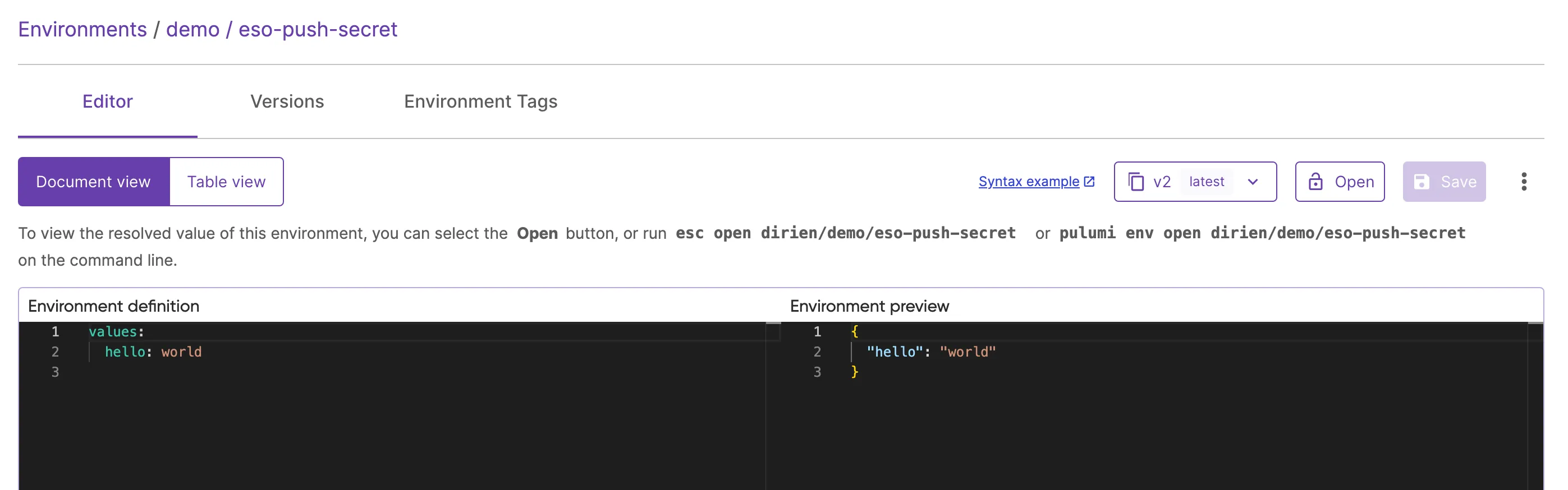
Only one configuration hello: world is present. Now, assume that another process (for example an application, operator, etc.) creates during runtime a Kubernetes secret.
This secret is called my-secret and contains the following data:
apiVersion: v1data: world: aGVsbG8=kind: Secretmetadata: name: test-cred namespace: defaulttype: OpaqueThe world key contains the value hello. We can now create a PushSecret resource that will select the secret test-cred and push the world key to the Pulumi ESC environment.
apiVersion: external-secrets.io/v1alpha1kind: PushSecretmetadata: name: pushsecret-example # Customisable namespace: default # Same of the SecretStoresspec: refreshInterval: 1h selector: secret: name: test-cred secretStoreRefs: - kind: ClusterSecretStore name: secret-store data: - match: secretKey: world remoteRef: remoteKey: worldThis PushSecret resource will push the world key from the test-cred secret to the Pulumi ESC environment. After applying this resource, the Pulumi ESC environment will look like this:
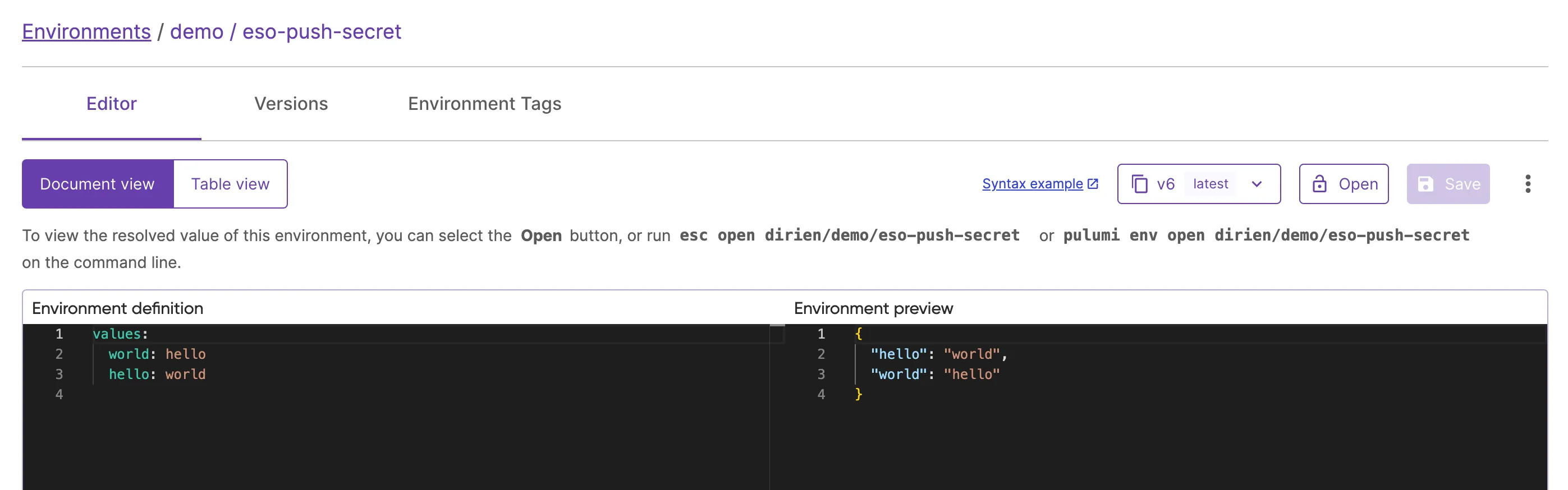
This is a great way to manage secrets that are created by other processes in the cluster and ensure that they are stored in a secure and compliant way reducing the risk of secret sprawl.
Next steps#
This tutorial showed you how to deploy the External Secrets Operator and use it to manage secrets stored in Pulumi ESC. This gives you the ability to elevate Pulumi ESC as the single source of truth for your secrets even when you are not using Pulumi to manage your Kubernetes resources.
As we continue to improve the integration between Pulumi ESC and External Secrets Operator, we highly recommend you to check the External Secrets Operator Pulumi ESC for the latest features.
To dive deeper into using Pulumi ESC for advanced scenarios, check out the following resources:
Environment Composition: Learn more about to effectively compose multiple environments to manage configurations across your infrastructure. Explore the Pulumi documentation on environment imports.
Managing Secrets: Learn how to securely manage and adopt dynamic, short-lived secrets on demand using Pulumi ESC, ensuring sensitive information is protected across different environments. Read more in the Pulumi ESC documentation.