Pulumi Cloud organizations can now enforce a maximum expiry on the access tokens used against them. Organization admins can set a cap in days, and from that point on, personal, organization, and team tokens operating on resources in the org must carry an expiration within the cap for requests to succeed. Tokens that never expire, or that have too much lifetime remaining, get rejected with an error that tells the user exactly how to regain access.
Why cap token lifetimes
Many organizations already have a credential rotation policy that says tokens must expire, but until now, Pulumi Cloud could only recommend an expiry at creation time. Nothing stopped a member from creating a never-expiring personal token, and nothing aged out the long-lived tokens created before your policy existed.
That gap matters because a leaked token is only as dangerous as its remaining lifetime. A token that never expires is a standing liability.
By adding support for access token expiry policies, Pulumi Cloud now closes the gap at the platform level. Once you’ve set the cap, Pulumi Cloud enforces it immediately for your organization, including for tokens that already exist.
How it works
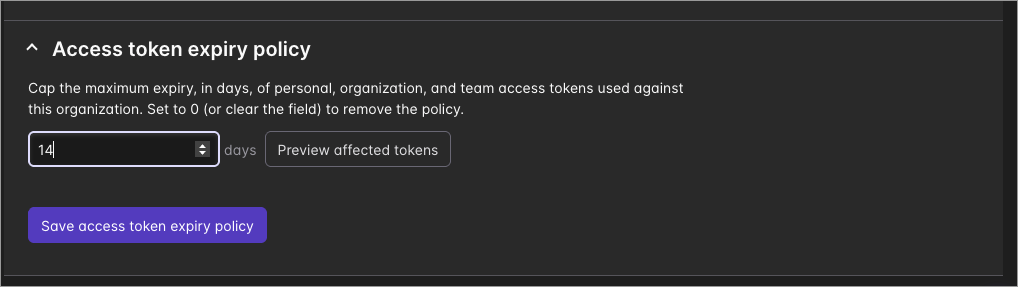
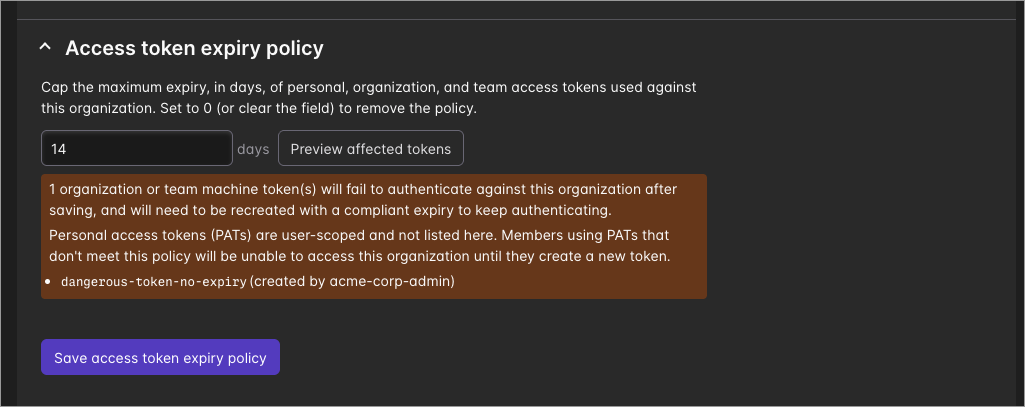
In your organization’s settings, navigate to Settings > Access Management > Other and scroll to Access token expiry policy:
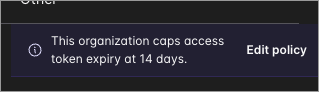
You can also get there from the Access Tokens tab, where a banner shows whether a policy is in effect — select Edit policy:
The policy is a single number: the maximum expiry, in days, for tokens used against your organization. Compliance is checked on every request, and a token complies when both of these are true:
- It has an expiration date. Never-expiring tokens violate any policy.
- Its remaining lifetime — the time between now and its expiration — is within the cap.
Because compliance is based on remaining lifetime rather than the expiry chosen at creation, the policy is pragmatic about existing credentials: a token created a year ago with a two-year expiry becomes compliant once it has less than the cap remaining. You’re enforcing exposure going forward, not retroactively punishing old tokens that are already near the end of their life.
Enforcement is tailored to each token type:
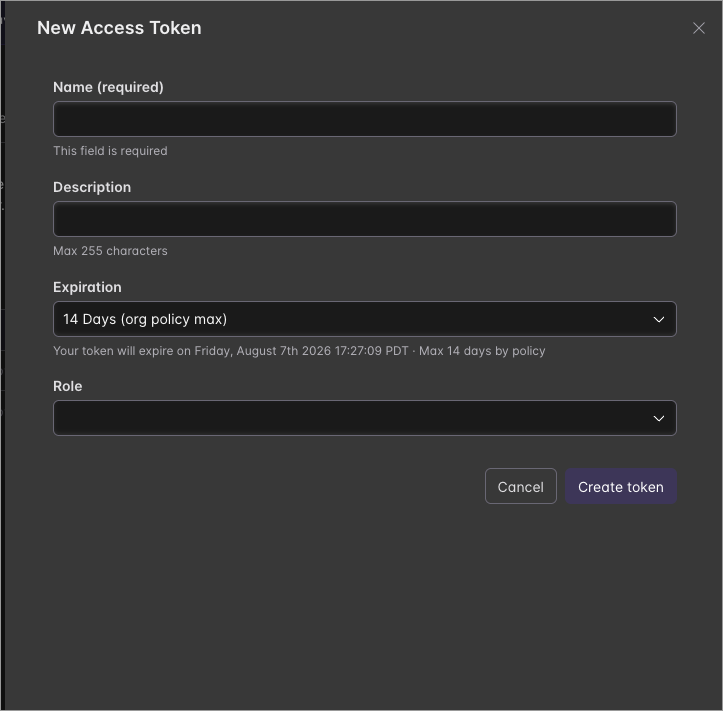
- Organization and team tokens can’t be created out of compliance: the creation dialog caps the expiry picker at your policy maximum, and the API rejects requests that exceed it. Existing machine tokens that violate the policy stop authenticating and need to be recreated with a compliant expiry.
- Personal tokens span all of a user’s organizations, so they can’t be blocked at creation. Instead, a non-compliant personal token is rejected when it’s used against your organization, and the member sees an error explaining the policy and how to fix it. The personal token creation dialog also warns members when a chosen expiry doesn’t meet a policy in one of their organizations, steering them toward a compliant choice up front.
- Web console sessions are unaffected, as are the short-lived tokens issued through OIDC token exchange — those are already bounded by their issuer.
Once a policy is active, the creation dialog does the steering for you — the expiry picker tops out at the policy maximum:
Rolling it out without breaking CI
The riskiest moment for any new enforcement policy is the moment you turn it on. Two things make that safe here.
First, Preview affected tokens shows you the blast radius before you save: the organization and team tokens that would stop authenticating under the proposed cap, by name and creator. Recreate those credentials with compliant expiries first, then save the policy.
Second, rejections are designed to be self-explanatory. A blocked request fails with a 403 Forbidden that names your organization and its policy maximum, so a member whose personal token no longer complies knows immediately what happened and what to do: generate a new token that meets the policy. Policy changes are also recorded in your organization’s audit logs.

A reasonable rollout looks like:
- Decide on a cap that matches your rotation policy. 90 days is a common choice for CI credentials.
- Use Preview affected tokens and recreate any non-compliant machine tokens.
- Socialize the change in your organization: personal tokens without a compliant expiry will stop working against the organization.
- Save the policy. From here on, the platform enforces it for you.
Get started
The access token expiry policy is available now in your organization’s access settings. For the full reference — compliance rules, per-token-type behavior, and exemptions — see the access tokens documentation.
If you have feedback, we’d love to hear it in the Pulumi Community Slack or on GitHub.