
Pulumi ESC centralizes your secrets and configuration, and it can automatically rotate secrets on a schedule so credentials never go stale. But a rotation is only useful if the systems that depend on it know it happened. ESC secret rotation webhooks close that gap by notifying you the moment a secret rotates.
Introducing secret rotation webhooks
With ESC webhooks, you can react to rotations automatically. When ESC rotates an environment’s secrets, a webhook can be configured to trigger on either success or failure. Use it to notify your team in Slack, refresh services that hold the old credential, or catch a failed rotation before it causes an outage.
How to configure
Pulumi Cloud Console
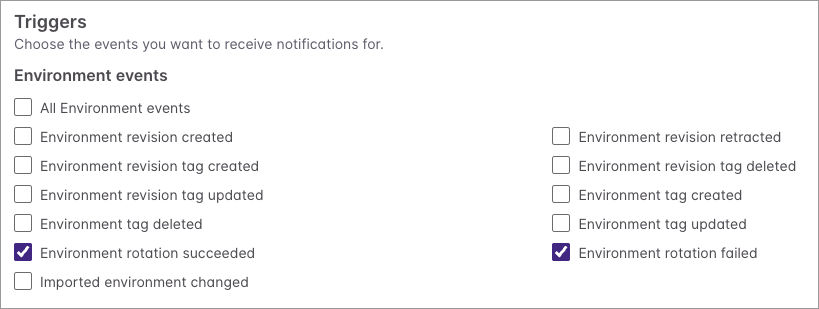
Using the Pulumi Cloud Console, you can now configure webhooks for “Environment rotation succeeded” and “Environment rotation failed” in your ESC Environment’s Settings page (under Settings -> Notifications).
Pulumi Service Provider
You can use the Pulumi Service Provider in your Pulumi program to configure webhooks. Here is an example in TypeScript:
const environmentWebhook = new service.Webhook("env-webhook", {
  active: true,
  displayName: "env-webhook",
  organizationName: "my-org",
  projectName: environment.project,
  environmentName: environment.name,
  payloadUrl: "https://example.com",
  filters: [WebhookFilters.EnvironmentRotationSucceeded, WebhookFilters.EnvironmentRotationFailed],
})
Pulumi CLI
You can also use the Pulumi CLI to configure the webhook:
pulumi env webhook new my-org/project/env env-webhook \
  --url https://example.com \
  --event environment_rotation_succeeded \
  --event environment_rotation_failed
Get started
Secret rotation webhooks are available now for all Pulumi ESC environments. See the webhooks documentation to get started, and share your feedback on our GitHub repository.