Plenty happens in a Pulumi organization while you’re looking somewhere else. Neo finishes a task you kicked off just before taking lunch. A teammate submits an ESC change request that needs your approval before it can land. Until now, catching any of that meant either keeping the right tab open or hoping the right email reached you.
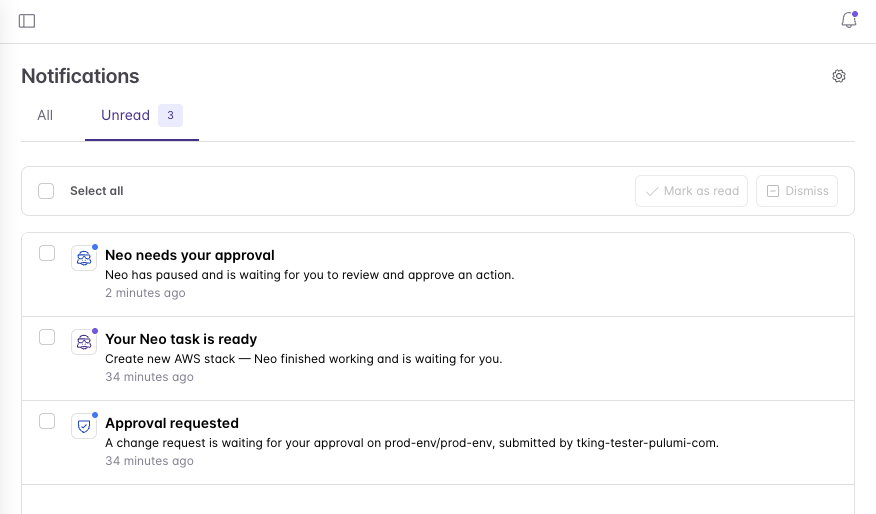
Today we’re introducing the Notification Center: a single inbox in the Pulumi Cloud console for the things that actually need you. It lives behind the bell in the sidebar, with a dot when something’s waiting. Notifications arrive in real time — no refresh — and each one carries exactly one action: Review request, View task, Update billing. Click it and you land on the page where you can do the thing, not on a dashboard where you have to go find it.
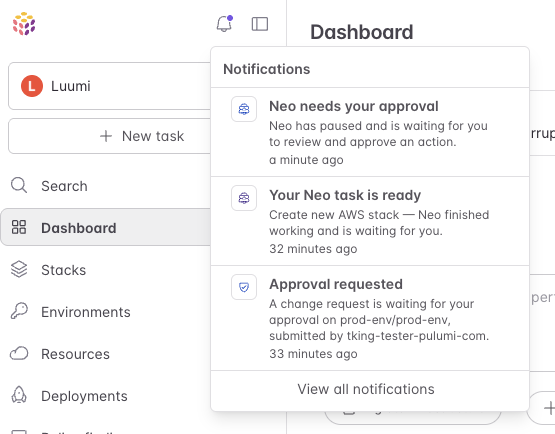
What you’ll hear about
We’ve started with the moments where being a few minutes late actually costs you something: a Neo task that’s paused waiting on your approval, a Neo task that’s finished, an ESC change request waiting on your sign-off, and billing conditions like a locked organization or a trial that’s about to end. Relevant people in your organization will be notified when there’s a pending approval, or billing alert. Nobody gets paged for someone else’s work.
Where you’ll hear about it
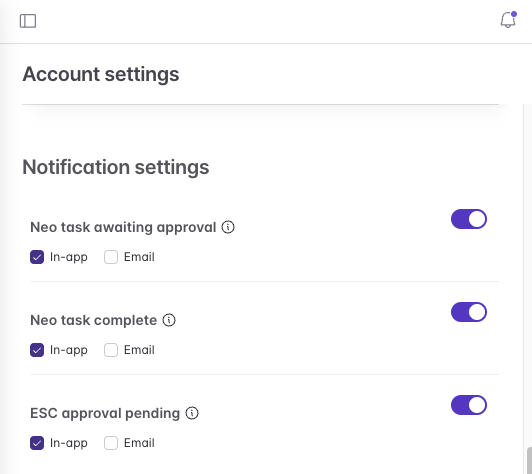
Every notification type can be delivered two ways — in the console and over email — and you choose per type, per channel. Organization admins set a sensible baseline for everyone; each person can override it for themselves on their account settings page.
What’s next
The Notification Center is available today. We’re starting with this set of notifications and expanding from there. If there’s an event you’d rather hear about from the bell than from a colleague on Slack, we’d like to know which one.
Join our Community Slack to connect with the Pulumi team and other users, or open an issue on our GitHub repository.