
Pulumi Insights account scanning now supports every AWS partition. If your workloads run in GovCloud, China, the European Sovereign Cloud, or one of the ISO intelligence-community clouds, you can get the same resource discovery, cross-account search, and AI-assisted insights that commercial accounts already have.
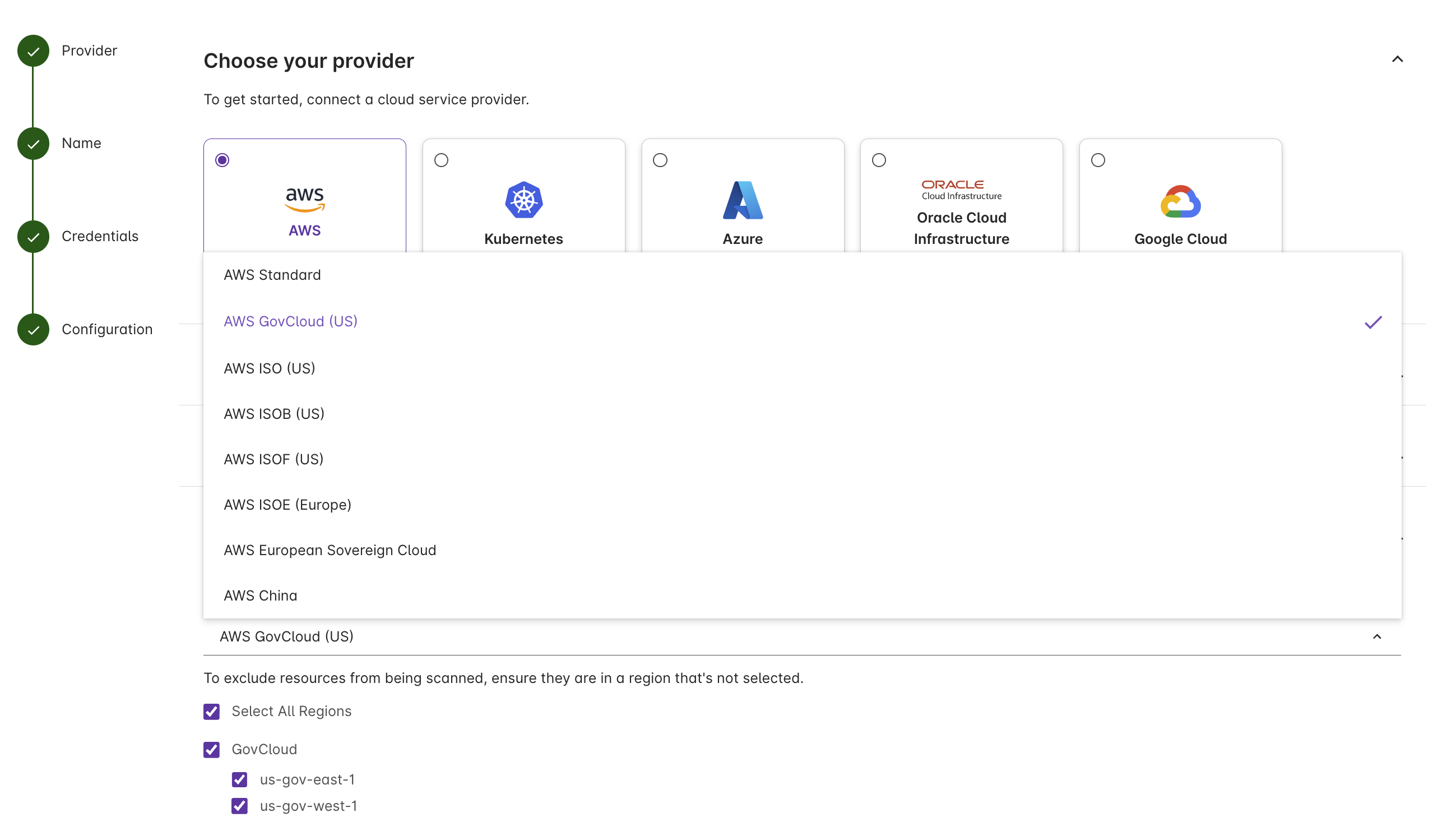
Supported partitions
- AWS Standard (Commercial)
- AWS GovCloud (US)
- AWS ISO (US)
- AWS ISOB (US)
- AWS ISOF (US)
- AWS ISOE (Europe)
- AWS European Sovereign Cloud
- AWS China
You can also exclude specific regions from discovery — useful when regions are disabled by SCPs or fall outside an audit’s scope.
Set it up
In the Pulumi Cloud console:
- Go to Accounts → Create account.
- Select AWS as the provider.
- Under Add your configuration, pick the target partition.
- Supply credentials via a Pulumi ESC environment. The OIDC trust policy uses the partition-appropriate ARN prefix (
arn:aws-us-gov:,arn:aws-cn:, etc.).
For IAM and ESC setup, see the Insights accounts docs. Log in to Pulumi Cloud to get started.