


AWS Serverless Application
Available in TypeScript, Python, Go, C#, YAML, HCL
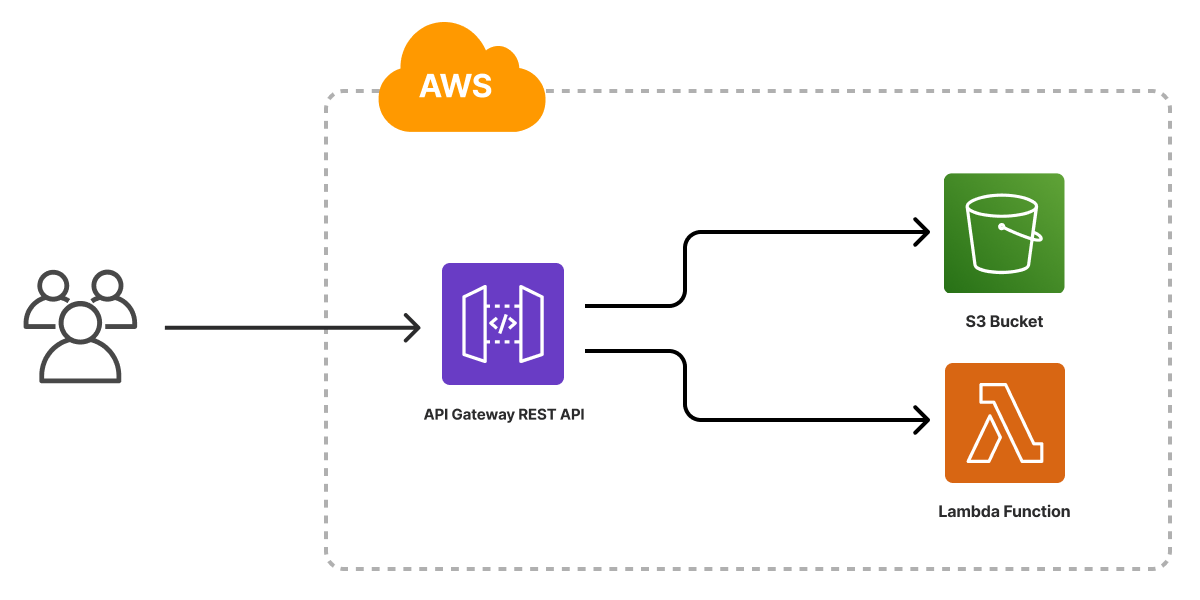
The AWS Serverless Application template scaffolds a Pulumi project that deploys a serverless web application to AWS. It provisions an Amazon S3 bucket for static website hosting, an AWS Lambda function for the application backend, and an Amazon API Gateway REST API that routes requests to the static content and the Lambda function. The template ships with a placeholder web page that displays the current time so the project deploys end to end out of the box.
Using this template
To use this template to deploy your own AWS serverless application, make sure you’ve installed Pulumi and configured your AWS credentials, then create a new project using the template in the language of your choice:
$ mkdir my-serverless-app && cd my-serverless-app
$ pulumi new serverless-aws-typescript

$ mkdir my-serverless-app && cd my-serverless-app
$ pulumi new serverless-aws-python
$ mkdir my-serverless-app && cd my-serverless-app
$ pulumi new serverless-aws-go
$ mkdir my-serverless-app && cd my-serverless-app
$ pulumi new serverless-aws-csharp
$ mkdir my-serverless-app && cd my-serverless-app
$ pulumi new serverless-aws-yaml
$ mkdir my-serverless-app && cd my-serverless-app
$ pulumi new serverless-aws-hcl
Follow the prompts to complete the new-project wizard. When it’s done, you’ll have a complete Pulumi project that’s ready to deploy and configured with the most common settings. Feel free to inspect the code in index.jsindex.ts__main__.pymain.goProgram.csProgram.fsProgram.vbApp.javaPulumi.yamlmain.tf
Deploying the project
The template requires no additional configuration. Once the new project is created, you can deploy it with pulumi up:
$ pulumi up
When the deployment completes, Pulumi exports the following stack output values:
- url
- The HTTP URL for the application.
Stack outputs are useful in a number of ways, most commonly as inputs to other stacks or cloud resources.
Customizing the project
Projects created with the AWS Serverless template expose the following configuration settings:
- path
- The path to the folder containing the files of the website. Defaults to
www, which is the folder included with the template. The/datepath is a GET endpoint that retrieves the current time from the Lambda function. - code
- The path to the folder containing the Lambda function code. Defaults to the
functionfolder included with the template.
None of these settings is required; by default, the template deploys the website and function using the files in the www and function folders bundled with the template.
The HCL version of this template exposes no configuration settings. It deploys the website and function using the files in the www and function folders bundled with the template.
Using your own web content
If you already have a website you’d like to deploy, you can do so by replacing the contents of the www folder and redeploying with pulumi up.
Alternatively, you can configure the stack to deploy from another folder on your machine by using pulumi config set to change the value of the website path setting:
$ pulumi config set path ../my-website/dist
$ pulumi up
Customizing the application’s functionality
You can customize the placeholder website by editing the Lambda function to perform another action, such as displaying a countdown to a future time. You can also add new functionality by creating a new Lambda function, adding a new path to the REST API, and updating the HTML to call the new path.
Cleaning up
You can cleanly destroy the stack and all of its infrastructure with pulumi destroy:
$ pulumi destroy
Learn more
- Browse other architecture templates in the Templates gallery.
- Explore the AWS provider API docs in the Pulumi Registry.
- Walk through Pulumi from the ground up in Pulumi Tutorials.
- Read the latest serverless posts on the Pulumi blog.