TL;DR. Want to self-host an open-source LLM on AWS? Use a g4dn.xlarge ($0.526/hr on-demand, 16 GB GPU memory) for 7B/8B models, a g5.xlarge ($1.006/hr, 24 GB) for 13B–14B models, a g5.2xlarge ($1.212/hr, 24 GB) for 32B models, or a g6e.2xlarge ($2.242/hr, 48 GB) for 70B models. Deploy with the Pulumi program below and Ollama will run any model from its library: DeepSeek-R1, Llama 3, Qwen, or Mistral, with a one-line change.
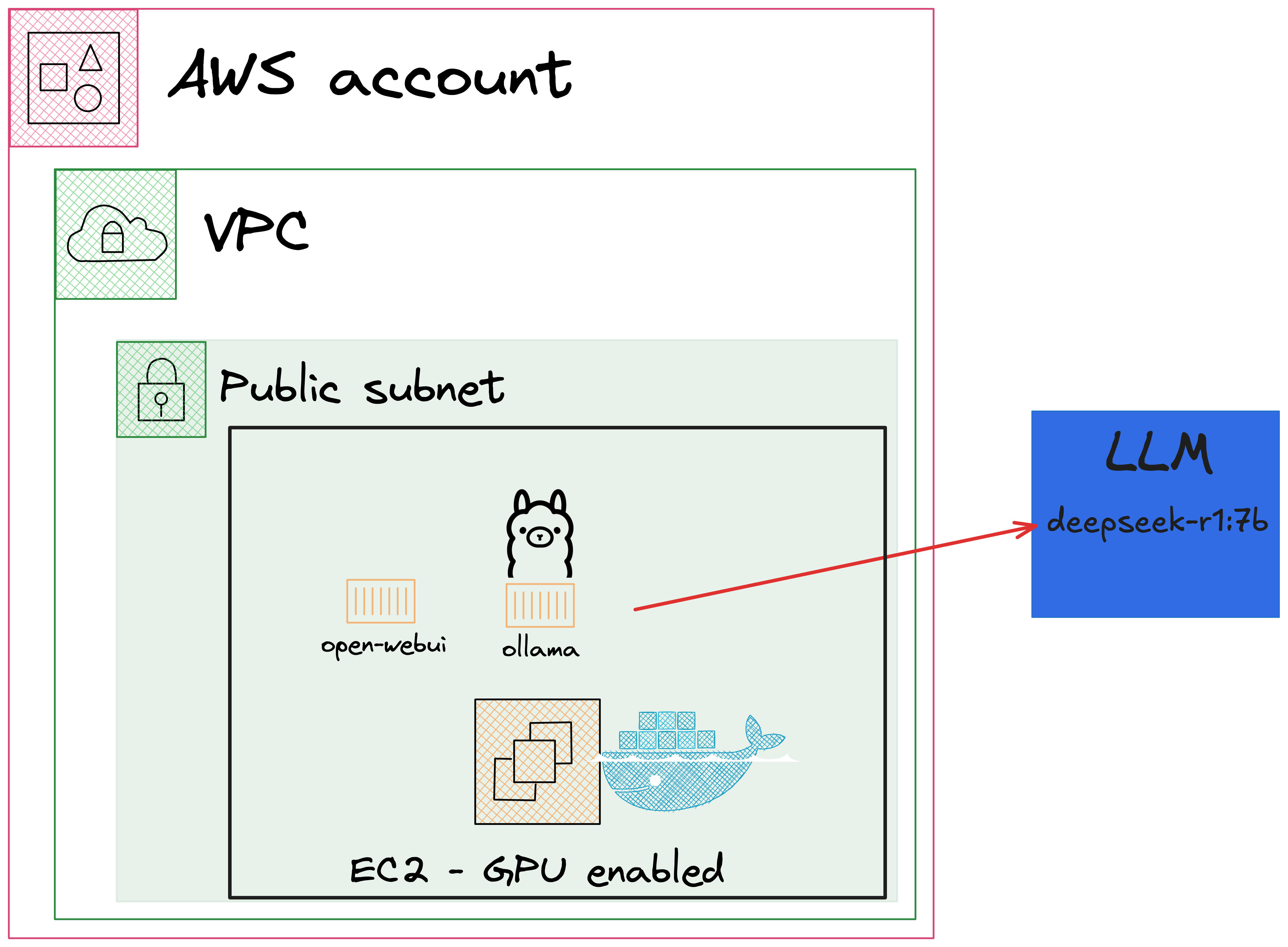
This guide walks through that deployment end-to-end: a single Pulumi program that provisions a GPU-enabled EC2 instance, installs Ollama and Open WebUI via cloud-init, and exposes both a chat UI and an OpenAI-compatible API. The model is configurable, so you can swap DeepSeek-R1 for Llama 3.1, Qwen 2.5, or Mistral without touching the infrastructure code.
- Why run open-source LLMs on AWS EC2?
- Which models can I run, and which EC2 instance do I need?
- How much does this cost vs. hosted APIs?
- How do I deploy Ollama on AWS EC2 with Pulumi?
- How do I switch models?
- What are the next steps?
Why run open-source LLMs on AWS EC2?
Self-hosting an open-source LLM on AWS gives you three things hosted APIs can’t: data stays inside your VPC, per-token costs collapse to a flat hourly rate at high volume, and you can fine-tune or quantize models freely under permissive licenses. Ollama handles all three concerns from a single binary: it downloads, manages, and serves models behind an OpenAI-compatible API on port 11434.
The original version of this post focused on DeepSeek-R1 because it landed in late January 2025 and reset expectations for what an open-weight reasoning model could do. DeepSeek-R1 is still an excellent default (MIT-licensed, strong on math and coding, with distilled 1.5B–70B variants) but the same infrastructure runs Meta’s Llama 3, Alibaba’s Qwen, and Mistral equally well. Picking a model is now a config change, not an infrastructure decision.
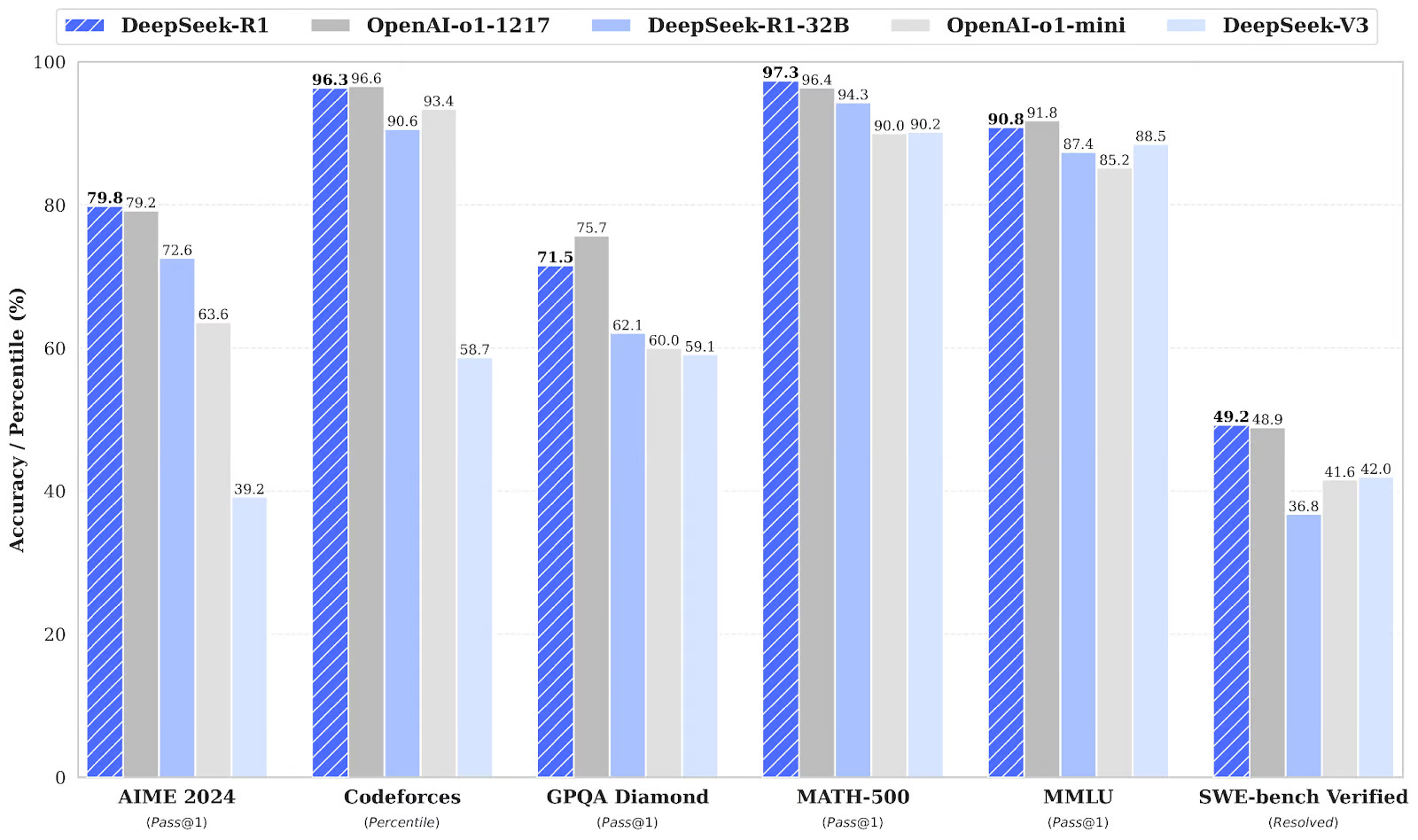
For reference, DeepSeek-R1 scores 79.8% on AIME 2024 (vs. 79.2% for OpenAI o1-1217), 97.3% on MATH-500 (vs. 96.4%), 96.3% on Codeforces (vs. 96.6%), and 49.2% on SWE-bench Verified (vs. 48.9%)—near-parity with closed frontier models on most reasoning benchmarks, with the same caveat that benchmark scores age fast.
Which models can I run, and which EC2 instance do I need?
The bottleneck for inference is GPU memory (VRAM): the model weights have to fit in it, plus a few GB of headroom for the KV cache. The table below maps the most common Ollama models to the smallest AWS GPU instance that comfortably runs them at 4-bit (Q4) quantization, which is what ollama pull <model> gives you by default.
| Model family | Sizes | Approx. VRAM (Q4) | Smallest EC2 instance | On-demand price (us-east-1) |
|---|---|---|---|---|
| DeepSeek-R1 (distill) | 1.5B / 7B / 8B | 1–6 GB | g4dn.xlarge (T4, 16 GB) | $0.526/hr |
| Llama 3.1 / Llama 3.2 | 8B | ~5 GB | g4dn.xlarge (T4, 16 GB) | $0.526/hr |
| Qwen 2.5 | 7B | ~5 GB | g4dn.xlarge (T4, 16 GB) | $0.526/hr |
| Mistral 7B / Mistral Nemo | 7B / 12B | 5–8 GB | g4dn.xlarge (T4, 16 GB) | $0.526/hr |
| DeepSeek-R1 (distill) | 14B | ~10 GB | g5.xlarge (A10G, 24 GB) | $1.006/hr |
| Llama 3.3 / DeepSeek-R1 | 32B / 32B distill | ~20 GB | g5.2xlarge (A10G, 24 GB) | $1.212/hr |
| Llama 3.1 / DeepSeek-R1 | 70B | ~42 GB | g6e.2xlarge (L40S, 48 GB) | $2.242/hr |
| DeepSeek-R1 (full) | 671B (MoE) | 400 GB+ | p5.48xlarge or multi-node | $98.32/hr |
For most workloads—internal tools, RAG backends, code assistants—a g4dn.xlarge running an 8B model is the right starting point. Move up only if quality is the bottleneck.
How much does this cost vs. hosted APIs?
A g4dn.xlarge running 24/7 costs ~$378/month on-demand, or ~$237/month with a 1-year reserved instance. Whether that’s cheaper than a hosted API depends entirely on your token volume.
Compare against hosted pricing as of April 2026 (input + output blended, rough numbers):
| Provider | Model | Approx. blended price |
|---|---|---|
| OpenAI | GPT-4o-mini | ~$0.30 per 1M tokens |
| OpenAI | GPT-4o | ~$5.00 per 1M tokens |
| Anthropic | Claude Sonnet 4 | ~$6.00 per 1M tokens |
| DeepSeek (hosted) | DeepSeek-V3 | ~$0.50 per 1M tokens |
A g4dn.xlarge running Llama 3.1 8B sustains roughly 40–60 tokens/sec under single-user load, or about 100–155M tokens/month at 100% utilization. At that ceiling the effective rate is ~$2.40/M tokens—cheaper than GPT-4o or Claude, more expensive than GPT-4o-mini or DeepSeek’s own hosted API.
The takeaway: self-hosting wins on data residency, latency, and predictable cost at high utilization. Hosted APIs win below ~10M tokens/month or when you need frontier-class quality. Run the math against your actual token volume before committing.
How do I deploy Ollama on AWS EC2 with Pulumi?
Prerequisites
Before we start, make sure you have the following:
- An AWS account
- Pulumi CLI installed
- AWS CLI installed and configured
- A working understanding of Ollama
What is Ollama?

Ollama is an open-source runtime that downloads, manages, and serves large language models from a single binary. It runs on macOS, Linux, and Windows, supports GPU acceleration through CUDA and Metal, and exposes both a native HTTP API and an OpenAI-compatible API on port 11434. Most clients written for the OpenAI SDK work against an Ollama endpoint with only a base-URL change.
It supports the major open-weight families—DeepSeek-R1, Llama 3, Qwen, Mistral, Gemma, Phi—plus quantized and distilled variants for each. You pull a model by name and tag (ollama pull llama3.1:8b) and run it (ollama run llama3.1:8b); Ollama handles the rest.
Architecture
Create a new Pulumi project
First, scaffold a new Pulumi project. Run the following from an empty directory:
# Replace <language> with typescript, python, go, csharp, or yaml
pulumi new aws-<language>
Pick the language you are most comfortable with. The template installs the AWS provider and creates a working sample. You can delete the sample code—we’ll replace it with the snippets below.
Step 1: Create an instance role with S3 access
The EC2 instance needs to download NVIDIA drivers from a public AWS-managed S3 bucket. Create an IAM role with S3 read access and attach it to an instance profile:
import * as pulumi from "@pulumi/pulumi";
import * as aws from "@pulumi/aws";
import * as fs from "fs";

const role = new aws.iam.Role("deepSeekRole", {
    name: "deepseek-role",
    assumeRolePolicy: JSON.stringify({
        Version: "2012-10-17",
        Statement: [
            {
                Action: "sts:AssumeRole",
                Effect: "Allow",
                Principal: {
                    Service: "ec2.amazonaws.com",
                },
            },
        ],
    }),
});

new aws.iam.RolePolicyAttachment("deepSeekS3Policy", {
    policyArn: "arn:aws:iam::aws:policy/AmazonS3ReadOnlyAccess",
    role: role.name,
});

const instanceProfile = new aws.iam.InstanceProfile("deepSeekProfile", {
    name: "deepseek-profile",
    role: role.name,
});
import pulumi
import pulumi_aws as aws
import json
import os

# IAM Role for EC2 instances
role = aws.iam.Role(
    "deepSeekRole",
    name="deepseek-role",
    assume_role_policy=json.dumps(
        {
            "Version": "2012-10-17",
            "Statement": [
                {
                    "Action": "sts:AssumeRole",
                    "Effect": "Allow",
                    "Principal": {
                        "Service": "ec2.amazonaws.com",
                    },
                }
            ],
        }
    ),
)

# Attach S3 read-only policy to the IAM Role
iam_policy_attachment = aws.iam.RolePolicyAttachment(
    "deepSeekS3Policy",
    policy_arn="arn:aws:iam::aws:policy/AmazonS3ReadOnlyAccess",
    role=role.name,
)

# Instance Profile containing the IAM Role
instance_profile = aws.iam.InstanceProfile(
    "deepSeekProfile", name="deepseek-profile", role=role.name
)
package main

import (
	"encoding/json"
	"os"

	"github.com/pulumi/pulumi-aws/sdk/v6/go/aws/ec2"
	"github.com/pulumi/pulumi-aws/sdk/v6/go/aws/iam"
	"github.com/pulumi/pulumi/sdk/v3/go/pulumi"
)

func main() {
	pulumi.Run(func(ctx *pulumi.Context) error {
		rolePolicy, err := json.Marshal(map[string]interface{}{
			"Version": "2012-10-17",
			"Statement": []map[string]interface{}{
				{
					"Action":    "sts:AssumeRole",
					"Effect":    "Allow",
					"Principal": map[string]interface{}{"Service": "ec2.amazonaws.com"},
				},
			},
		})
		if err != nil {
			return err
		}

		role, err := iam.NewRole(ctx, "deepSeekRole", &iam.RoleArgs{
			Name:             pulumi.String("deepseek-role"),
			AssumeRolePolicy: pulumi.String(rolePolicy),
		})
		if err != nil {
			return err
		}

		// Attach S3 read-only policy to the IAM Role
		_, err = iam.NewRolePolicyAttachment(ctx, "deepSeekS3Policy", &iam.RolePolicyAttachmentArgs{
			PolicyArn: pulumi.String("arn:aws:iam::aws:policy/AmazonS3ReadOnlyAccess"),
			Role:      role.Name,
		})
		if err != nil {
			return err
		}

		// Instance Profile containing the IAM Role
		instanceProfile, err := iam.NewInstanceProfile(ctx, "deepSeekProfile", &iam.InstanceProfileArgs{
			Name: pulumi.String("deepseek-profile"),
			Role: role.Name,
		})
		if err != nil {
			return err
		}
		return nil
	})
}
using Pulumi;
using Pulumi.Aws.Ec2;
using Pulumi.Aws.Iam;
using System.Collections.Generic;
using System.IO;
using Pulumi.Aws.Ec2.Inputs;
using System.Text.Json;

return await Deployment.RunAsync(() =>
{
    var rolePolicy = JsonSerializer.Serialize(new Dictionary<string, object>
    {
    {
        ["Version"] = "2012-10-17",
        ["Statement"] = new[]
        {
            new Dictionary<string, object>
            {
                ["Action"] = "sts:AssumeRole",
                ["Effect"] = "Allow",
                ["Principal"] = new Dictionary<string, string>
                {
                    ["Service"] = "ec2.amazonaws.com"
                }
            }
        }
    });

    var role = new Role("deepSeekRole", new RoleArgs
    {
        Name = "deepseek-role",
        AssumeRolePolicy = rolePolicy
    });

    var rolePolicyAttachment = new RolePolicyAttachment("deepSeekS3Policy", new RolePolicyAttachmentArgs
    {
        PolicyArn = "arn:aws:iam::aws:policy/AmazonS3ReadOnlyAccess",
        Role = role.Name
    });

    var instanceProfile = new InstanceProfile("deepSeekProfile", new InstanceProfileArgs
    {
        Name = "deepseek-profile",
        Role = role.Name
    });

    var vpc = new Vpc("deepSeekVpc", new VpcArgs
    {
        CidrBlock = "10.0.0.0/16",
        EnableDnsHostnames = true,
        EnableDnsSupport = true
    });

    var subnet = new Subnet("deepSeekSubnet", new SubnetArgs
    {
        VpcId = vpc.Id,
        CidrBlock = "10.0.48.0/20",
        AvailabilityZone = "eu-central-1a",
        MapPublicIpOnLaunch = true
    });

    var internetGateway = new InternetGateway("deepSeekInternetGateway", new InternetGatewayArgs
    {
        VpcId = vpc.Id
    });

    var routeTable = new RouteTable("deepSeekRouteTable", new RouteTableArgs
name: deepseek-ollama-yaml
description: DeepSeek Ollama AWS example
runtime: yaml

variables:
  publicKey:
    fn::readFile: ./deepseek.rsa
  userData:
    fn::readFile: ./cloud-init.yaml
  amiFilter: "amzn2-ami-hvm-*-x86_64-gp2"
  amiOwner: "137112412989"
  amiId:
    fn::invoke:
      function: aws:ec2:getAmi
      arguments:
        filters:
          - name: name
            values: ["${amiFilter}"]
        owners: ["${amiOwner}"]
        mostRecent: true
      return: id

resources:
  deepSeekRole:
    type: aws:iam:Role
    properties:
      name: deepseek-role
      assumeRolePolicy: |
        {
            "Version": "2012-10-17",
            "Statement": [
                {
                    "Action": "sts:AssumeRole",
                    "Effect": "Allow",
                    "Principal": {
                        "Service": "ec2.amazonaws.com"
                    }
                }
            ]
        }

  deepSeekS3Policy:
    type: aws:iam:RolePolicyAttachment
    properties:
      role: ${deepSeekRole.name}
      policyArn: arn:aws:iam::aws:policy/AmazonS3ReadOnlyAccess

  deepSeekProfile:
    type: aws:iam:InstanceProfile
    properties:
      name: deepseek-profile
      role: ${deepSeekRole.name}
Step 2: Create the network
Next, create the VPC, subnet, internet gateway, and route table. The security group opens ports 22 (SSH), 3000 (Open WebUI), and 11434 (Ollama API):
const vpc = new aws.ec2.Vpc("deepSeekVpc", {
    cidrBlock: "10.0.0.0/16",
    enableDnsHostnames: true,
    enableDnsSupport: true,
});

const subnet = new aws.ec2.Subnet("deepSeekSubnet", {
    vpcId: vpc.id,
    cidrBlock: "10.0.48.0/20",
    availabilityZone: pulumi.interpolate`${aws.getAvailabilityZones().then(it => it.names[0])}`,
    mapPublicIpOnLaunch: true,
});

const internetGateway = new aws.ec2.InternetGateway("deepSeekInternetGateway", {
    vpcId: vpc.id,
});

const routeTable = new aws.ec2.RouteTable("deepSeekRouteTable", {
    vpcId: vpc.id,
    routes: [
        {
            cidrBlock: "0.0.0.0/0",
            gatewayId: internetGateway.id,
        },
    ],
});

const routeTableAssociation = new aws.ec2.RouteTableAssociation("deepSeekRouteTableAssociation", {
    subnetId: subnet.id,
    routeTableId: routeTable.id,
});

const securityGroup = new aws.ec2.SecurityGroup("deepSeekSecurityGroup", {
    vpcId: vpc.id,
    egress: [
        {
            fromPort: 0,
            toPort: 0,
            protocol: "-1",
            cidrBlocks: ["0.0.0.0/0"],
        },
    ],
    ingress: [
        {
            fromPort: 22,
            toPort: 22,
            protocol: "tcp",
            cidrBlocks: ["0.0.0.0/0"],
        },
        {
            fromPort: 3000,
            toPort: 3000,
            protocol: "tcp",
            cidrBlocks: ["0.0.0.0/0"],
        },
        {
            fromPort: 11434,
            toPort: 11434,
            protocol: "tcp",
            cidrBlocks: ["0.0.0.0/0"],
        },
    ],
});
# Create a VPC
vpc = aws.ec2.Vpc(
    "deepSeekVpc",
    cidr_block="10.0.0.0/16",
    enable_dns_hostnames=True,
    enable_dns_support=True,
)

# Create a subnet
subnet = aws.ec2.Subnet(
    "deepSeekSubnet",
    vpc_id=vpc.id,
    cidr_block="10.0.48.0/20",
    availability_zone="eu-central-1a",
    map_public_ip_on_launch=True,
)

# Create an internet gateway
internet_gateway = aws.ec2.InternetGateway("deepSeekInternetGateway", vpc_id=vpc.id)

# Create a route table and route table association
route_table = aws.ec2.RouteTable(
    "deepSeekRouteTable",
    vpc_id=vpc.id,
    routes=[
        aws.ec2.RouteTableRouteArgs(
            cidr_block="0.0.0.0/0", gateway_id=internet_gateway.id
        )
    ],
)

route_table_association = aws.ec2.RouteTableAssociation(
    "deepSeekRouteTableAssociation", subnet_id=subnet.id, route_table_id=route_table.id
)

# Create a security group
security_group = aws.ec2.SecurityGroup(
    "deepSeekSecurityGroup",
    vpc_id=vpc.id,
    egress=[
        {
            "from_port": 0,
            "to_port": 0,
            "protocol": "-1",
            "cidr_blocks": ["0.0.0.0/0"],
        }
    ],
    ingress=[
        {
            "from_port": 22,
            "to_port": 22,
            "protocol": "tcp",
            "cidr_blocks": ["0.0.0.0/0"],
        },
        {
            "from_port": 3000,
            "to_port": 3000,
            "protocol": "tcp",
            "cidr_blocks": ["0.0.0.0/0"],
        },
        {
            "from_port": 11434,
            "to_port": 11434,
            "protocol": "tcp",
            "cidr_blocks": ["0.0.0.0/0"],
        },
    ],
)
package main

import (
	"encoding/json"
	"os"

	"github.com/pulumi/pulumi-aws/sdk/v6/go/aws/ec2"
	"github.com/pulumi/pulumi-aws/sdk/v6/go/aws/iam"
	"github.com/pulumi/pulumi/sdk/v3/go/pulumi"
)

func main() {
	pulumi.Run(func(ctx *pulumi.Context) error {
                // omitted for brevity
		}

		// Create a VPC
		vpc, err := ec2.NewVpc(ctx, "deepSeekVpc", &ec2.VpcArgs{
			CidrBlock:          pulumi.String("10.0.0.0/16"),
			EnableDnsHostnames: pulumi.Bool(true),
			EnableDnsSupport:   pulumi.Bool(true),
		})
		if err != nil {
			return err
		}

		// Create a subnet
		subnet, err := ec2.NewSubnet(ctx, "deepSeekSubnet", &ec2.SubnetArgs{
			VpcId:               vpc.ID(),
			CidrBlock:           pulumi.String("10.0.48.0/20"),
			AvailabilityZone:    pulumi.String("eu-central-1a"),
			MapPublicIpOnLaunch: pulumi.Bool(true),
		})
		if err != nil {
			return err
		}

		// Create an internet gateway
		internetGateway, err := ec2.NewInternetGateway(ctx, "deepSeekInternetGateway", &ec2.InternetGatewayArgs{
			VpcId: vpc.ID(),
		})
		if err != nil {
			return err
		}

		// Create a route table and route table association
		routeTable, err := ec2.NewRouteTable(ctx, "deepSeekRouteTable", &ec2.RouteTableArgs{
			VpcId: vpc.ID(),
			Routes: ec2.RouteTableRouteArray{
				&ec2.RouteTableRouteArgs{
					CidrBlock: pulumi.String("0.0.0.0/0"),
					GatewayId: internetGateway.ID(),
				},
			},
		})
		if err != nil {
			return err
		}

		_, err = ec2.NewRouteTableAssociation(ctx, "deepSeekRouteTableAssociation", &ec2.RouteTableAssociationArgs{
			SubnetId:     subnet.ID(),
			RouteTableId: routeTable.ID(),
		})
		if err != nil {
			return err
		}

		// Create a security group
		securityGroup, err := ec2.NewSecurityGroup(ctx, "deepSeekSecurityGroup", &ec2.SecurityGroupArgs{
			VpcId: vpc.ID(),
			Egress: ec2.SecurityGroupEgressArray{
				&ec2.SecurityGroupEgressArgs{
					FromPort:   pulumi.Int(0),
					ToPort:     pulumi.Int(0),
					Protocol:   pulumi.String("-1"),
					CidrBlocks: pulumi.StringArray{pulumi.String("0.0.0.0/0")},
				},
			},
			Ingress: ec2.SecurityGroupIngressArray{
				&ec2.SecurityGroupIngressArgs{
					FromPort:   pulumi.Int(22),
					ToPort:     pulumi.Int(22),
					Protocol:   pulumi.String("tcp"),
					CidrBlocks: pulumi.StringArray{pulumi.String("0.0.0.0/0")},
				},
				&ec2.SecurityGroupIngressArgs{
					FromPort:   pulumi.Int(3000),
					ToPort:     pulumi.Int(3000),
					Protocol:   pulumi.String("tcp"),
					CidrBlocks: pulumi.StringArray{pulumi.String("0.0.0.0/0")},
				},
				&ec2.SecurityGroupIngressArgs{
					FromPort:   pulumi.Int(11434),
					ToPort:     pulumi.Int(11434),
					Protocol:   pulumi.String("tcp"),
					CidrBlocks: pulumi.StringArray{pulumi.String("0.0.0.0/0")},
				},
			},
		})
		if err != nil {
			return err
		}

		return nil
	})
}
using Pulumi;
using Pulumi.Aws.Ec2;
using Pulumi.Aws.Iam;
using System.Collections.Generic;
using System.IO;
using Pulumi.Aws.Ec2.Inputs;
using System.Text.Json;

return await Deployment.RunAsync(() =>
{
    var rolePolicy = JsonSerializer.Serialize(new Dictionary<string, object>
    {
            // omitted for brevity
    {
        VpcId = vpc.Id,
        Routes =
        {
            new RouteTableRouteArgs
            {
                CidrBlock = "0.0.0.0/0",
                GatewayId = internetGateway.Id
            }
        }
    });

    var routeTableAssociation = new RouteTableAssociation("deepSeekRouteTableAssociation", new RouteTableAssociationArgs
    {
        SubnetId = subnet.Id,
        RouteTableId = routeTable.Id
    });

    var securityGroup = new SecurityGroup("deepSeekSecurityGroup", new SecurityGroupArgs
    {
        VpcId = vpc.Id,
        Egress =
        {
            new SecurityGroupEgressArgs
            {
                FromPort = 0,
                ToPort = 0,
                Protocol = "-1",
                CidrBlocks = { "0.0.0.0/0" }
            }
        },
        Ingress =
        {
            new SecurityGroupIngressArgs
            {
                FromPort = 22,
                ToPort = 22,
                Protocol = "tcp",
                CidrBlocks = { "0.0.0.0/0" }
            },
            new SecurityGroupIngressArgs
            {
                FromPort = 3000,
                ToPort = 3000,
                Protocol = "tcp",
                CidrBlocks = { "0.0.0.0/0" }
            },
            new SecurityGroupIngressArgs
            {
                FromPort = 11434,
                ToPort = 11434,
                Protocol = "tcp",
                CidrBlocks = { "0.0.0.0/0" }
            }
        }
    });

    var publicKey = File.ReadAllText("deepseek.rsa");
    var keyPair = new KeyPair("deepSeekKey", new KeyPairArgs
    {
        PublicKey = publicKey
    });

    var amazonLinux = Pulumi.Aws.Ec2.GetAmi.Invoke(new()
    {
        MostRecent = true,
        Filters = new[]
        {
            new GetAmiFilterInputArgs
            {
                Name = "name",
                Values = new[] { "amzn2-ami-hvm-*-x86_64-gp2" }
            },
            new GetAmiFilterInputArgs
            {
                Name = "architecture",
  deepSeekVpc:
    type: aws:ec2:Vpc
    properties:
      cidrBlock: 10.0.0.0/16
      enableDnsHostnames: true
      enableDnsSupport: true

  deepSeekSubnet:
    type: aws:ec2:Subnet
    properties:
      vpcId: ${deepSeekVpc.id}
      cidrBlock: 10.0.48.0/20
      availabilityZone: eu-central-1a
      mapPublicIpOnLaunch: true

  deepSeekInternetGateway:
    type: aws:ec2:InternetGateway
    properties:
      vpcId: ${deepSeekVpc.id}

  deepSeekRouteTable:
    type: aws:ec2:RouteTable
    properties:
      vpcId: ${deepSeekVpc.id}
      routes:
        - cidrBlock: 0.0.0.0/0
          gatewayId: ${deepSeekInternetGateway.id}

  deepSeekRouteTableAssociation:
    type: aws:ec2:RouteTableAssociation
    properties:
      subnetId: ${deepSeekSubnet.id}
      routeTableId: ${deepSeekRouteTable.id}

  deepSeekSecurityGroup:
    type: aws:ec2:SecurityGroup
    properties:
      vpcId: ${deepSeekVpc.id}
      ingress:
        - fromPort: 22
          toPort: 22
          protocol: tcp
          cidrBlocks:
            - 0.0.0.0/0
        - fromPort: 3000
          toPort: 3000
          protocol: tcp
          cidrBlocks:
            - 0.0.0.0/0
        - fromPort: 11434
          toPort: 11434
          protocol: tcp
          cidrBlocks:
            - 0.0.0.0/0
      egress:
        - fromPort: 0
          toPort: 0
          protocol: -1
          cidrBlocks:
            - 0.0.0.0/0
Step 3: Launch the GPU EC2 instance
Now create the EC2 instance itself. The example uses Amazon Linux because the NVIDIA driver install path is well-trodden, plus an SSH key pair you generate locally.
The default instance type is g4dn.xlarge—the cheapest option that fits any 7B/8B model. Bump it up if you picked a larger model from the table above: g5.xlarge for 13B–14B, g5.2xlarge for 32B, g6e.2xlarge for 70B. AWS publishes full specs for the G4, G5, and G6 families.
Generate the key pair if you don’t already have one:
openssl genrsa -out deepseek.pem 2048
openssl rsa -in deepseek.pem -pubout > deepseek.pub
ssh-keygen -f mykey.pub -i -mPKCS8 > deepseek.pem
const keyPair = new aws.ec2.KeyPair("deepSeekKey", {
    publicKey: pulumi.output(fs.readFileSync("deepseek.rsa", "utf-8")),
});

const deepSeekAmi = aws.ec2
    .getAmi({
        filters: [
            {
                name: "name",
                values: ["amzn2-ami-hvm-2.0.*-x86_64-gp2"],
            },
            {
                name: "architecture",
                values: ["x86_64"],
            },
        ],
        owners: ["137112412989"], // Amazon
        mostRecent: true,
    })
    .then(ami => ami.id);

const deepSeekInstance = new aws.ec2.Instance("deepSeekInstance", {
    ami: deepSeekAmi,
    instanceType: "g4dn.xlarge",
    keyName: keyPair.keyName,
    rootBlockDevice: {
        volumeSize: 100,
        volumeType: "gp3",
    },
    subnetId: subnet.id,
    vpcSecurityGroupIds: [securityGroup.id],
    iamInstanceProfile: instanceProfile.name,
    userData: fs.readFileSync("cloud-init.yaml", "utf-8"),
    tags: {
        Name: "deepSeek-server",
    },
});

export const amiId = deepSeekAmi;
export const instanceId = deepSeekInstance.id;
export const instancePublicDns = deepSeekInstance.publicIp;
# Key pair for SSH access
public_key = open("deepseek.rsa", "r").read()
key_pair = aws.ec2.KeyPair("deepSeekKey", public_key=public_key)


# Get the latest Amazon Linux 2 AMI
ami = aws.ec2.get_ami(
    filters=[
        {"name": "name", "values": ["amzn2-ami-hvm-2.0.*-x86_64-gp2"]},
        {"name": "architecture", "values": ["x86_64"]},
    ],
    owners=["137112412989"],  # Amazon
    most_recent=True,
).id

# Create an EC2 instance
user_data = open("cloud-init.yaml", "r").read()
instance = aws.ec2.Instance(
    "deepSeekInstance",
    ami=ami,
    instance_type="g4dn.xlarge",
    key_name=key_pair.key_name,
    root_block_device=aws.ec2.InstanceRootBlockDeviceArgs(
        volume_size=100, volume_type="gp3"
    ),
    subnet_id=subnet.id,
    vpc_security_group_ids=[security_group.id],
    iam_instance_profile=instance_profile.name,
    user_data=user_data,
    tags={"Name": "deepSeek-server"},
)

pulumi.export("amiId", ami)
pulumi.export("instanceId", instance.id)
pulumi.export("instancePublicDns", instance.public_ip)
package main

import (
	"encoding/json"
	"os"

	"github.com/pulumi/pulumi-aws/sdk/v6/go/aws/ec2"
	"github.com/pulumi/pulumi-aws/sdk/v6/go/aws/iam"
	"github.com/pulumi/pulumi/sdk/v3/go/pulumi"
)

func main() {
	pulumi.Run(func(ctx *pulumi.Context) error {
                // omitted for brevity

		// Key pair for SSH access
		publicKey, err := os.ReadFile("deepseek.rsa")
		if err != nil {
			return err
		}

		keyPair, err := ec2.NewKeyPair(ctx, "deepSeekKey", &ec2.KeyPairArgs{
			PublicKey: pulumi.String(string(publicKey)),
		})
		if err != nil {
			return err
		}

		// Get the latest Amazon Linux 2 AMI
		mostRecent := true
		ami, err := ec2.LookupAmi(ctx, &ec2.LookupAmiArgs{
			Filters: []ec2.GetAmiFilter{
				{
					Name:   "name",
					Values: []string{"amzn2-ami-hvm-2.0.*-x86_64-gp2"},
				},
				{
					Name:   "architecture",
					Values: []string{"x86_64"},
				},
			},
			Owners:     []string{"137112412989"},
			MostRecent: &mostRecent,
		})
		if err != nil {
			return err
		}

		// Create an EC2 instance
		userData, err := os.ReadFile("cloud-init.yaml")
		if err != nil {
			return err
		}

		instance, err := ec2.NewInstance(ctx, "deepSeekInstance", &ec2.InstanceArgs{
			Ami:          pulumi.String(ami.Id),
			InstanceType: pulumi.String("g4dn.xlarge"),
			KeyName:      keyPair.KeyName,
			RootBlockDevice: &ec2.InstanceRootBlockDeviceArgs{
				VolumeSize: pulumi.Int(100),
				VolumeType: pulumi.String("gp3"),
			},
			SubnetId:            subnet.ID(),
			VpcSecurityGroupIds: pulumi.StringArray{securityGroup.ID()},
			IamInstanceProfile:  instanceProfile.Name,
			UserData:            pulumi.String(string(userData)),
			Tags: pulumi.StringMap{
				"Name": pulumi.String("deepSeek-server"),
			},
		})
		if err != nil {
			return err
		}

		ctx.Export("amiId", pulumi.String(ami.Id))
		ctx.Export("instanceId", instance.ID())
		ctx.Export("instancePublicDns", instance.PublicIp)

		return nil
	})
}
using Pulumi;
using Pulumi.Aws.Ec2;
using Pulumi.Aws.Iam;
using System.Collections.Generic;
using System.IO;
using Pulumi.Aws.Ec2.Inputs;
using System.Text.Json;

return await Deployment.RunAsync(() =>
{
    var rolePolicy = JsonSerializer.Serialize(new Dictionary<string, object>
    {
            // omitted for brevity
                Name = "architecture",
                Values = new[] { "x86_64" }
            }
        },
        Owners = new[] { "137112412989" }
    });

    var userData = File.ReadAllText("cloud-init.yaml");
    var instance = new Instance("deepSeekInstance", new InstanceArgs
    {
        Ami = amazonLinux.Apply(r => r.Id),
        InstanceType = "g4dn.xlarge",
        KeyName = keyPair.KeyName,
        RootBlockDevice = new InstanceRootBlockDeviceArgs
        {
            VolumeSize = 100,
            VolumeType = "gp3"
        },
        SubnetId = subnet.Id,
        VpcSecurityGroupIds = { securityGroup.Id },
        IamInstanceProfile = instanceProfile.Name,
        UserData = userData,
        Tags = { { "Name", "deepSeek-server" } }
    });

    return new Dictionary<string, object?>
    {
        ["amiId"] = amazonLinux.Apply(r => r.Id),
        ["instanceId"] = instance.Id,
        ["instancePublicDns"] = instance.PublicIp
    };
});
  deepSeekKey:
    type: aws:ec2:KeyPair
    properties:
      publicKey: ${publicKey}

  deepSeekInstance:
    type: aws:ec2:Instance
    properties:
      ami: ${amiId}
      instanceType: "g4dn.xlarge"
      keyName: ${deepSeekKey.keyName}
      rootBlockDevice:
        volumeSize: 100
        volumeType: gp3
      subnetId: ${deepSeekSubnet.id}
      vpcSecurityGroupIds:
        - ${deepSeekSecurityGroup.id}
      iamInstanceProfile: ${deepSeekProfile.name}
      userData: ${userData}
      tags:
        Name: deepSeek-server

outputs:
  AmiId: ${amiId}
  InstanceId: ${deepSeekInstance.id}
  InstancePublicDns: ${deepSeekInstance.publicIp}
Step 4: Install Ollama via cloud-init
The EC2 instance is a blank box until cloud-init runs. The user-data script below installs the NVIDIA GRID drivers, Docker, and the NVIDIA Container Toolkit, then starts the Ollama and Open WebUI containers. To switch models, edit the ollama run line—the rest is identical regardless of which model you want.
#cloud-config
users:
- default

package_update: true

packages:
- apt-transport-https
- ca-certificates
- curl
- openjdk-17-jre-headless
- gcc

runcmd:
- yum install -y gcc kernel-devel-$(uname -r)
- aws s3 cp --recursive s3://ec2-linux-nvidia-drivers/latest/ .
- chmod +x NVIDIA-Linux-x86_64*.run
- /bin/sh ./NVIDIA-Linux-x86_64*.run --tmpdir . --silent
- touch /etc/modprobe.d/nvidia.conf
- echo "options nvidia NVreg_EnableGpuFirmware=0" | sudo tee --append /etc/modprobe.d/nvidia.conf
- yum install -y docker
- usermod -a -G docker ec2-user
- systemctl enable docker.service
- systemctl start docker.service
- curl -s -L https://nvidia.github.io/libnvidia-container/stable/rpm/nvidia-container-toolkit.repo | sudo tee /etc/yum.repos.d/nvidia-container-toolkit.repo
- yum install -y nvidia-container-toolkit
- nvidia-ctk runtime configure --runtime=docker
- systemctl restart docker
- docker run -d --gpus=all -v ollama:/root/.ollama -p 11434:11434 --name ollama --restart always ollama/ollama
- sleep 120
- docker exec ollama ollama run deepseek-r1:7b
- docker run -d -p 3000:8080 --add-host=host.docker.internal:host-gateway -v open-webui:/app/backend/data --name open-webui --restart always ghcr.io/open-webui/open-webui:main
Step 5: Deploy the infrastructure
Make sure your AWS credentials are configured:
aws configure
Pulumi supports several other authentication methods for the AWS provider. Once credentials are in place, deploy the infrastructure:
pulumi up
Pulumi previews the changes; type yes to confirm.
pulumi up
Please choose a stack, or create a new one: <create a new stack>
Please enter your desired stack name.
To create a stack in an organization, use the format <org-name>/<stack-name> (e.g. `acmecorp/dev`): dev
Please enter your desired stack name.
Created stack 'dev'
Previewing update (dev)

View in Browser (Ctrl+O): https://app.pulumi.com/dirien/deepseek-ollama-typescript/dev/previews/1dbb18ea-ba31-4d5b-9510-5dce19eb8ee8

     Type                              Name                            Plan
 +   pulumi:pulumi:Stack               deepseek-ollama-typescript-dev  create
 +   ├─ aws:ec2:KeyPair                deepSeekKey                     create
 +   ├─ aws:ec2:Vpc                    deepSeekVpc                     create
 +   ├─ aws:iam:Role                   deepSeekRole                    create
 +   ├─ aws:iam:InstanceProfile        deepSeekProfile                 create
 +   ├─ aws:ec2:SecurityGroup          deepSeekSecurityGroup           create
 +   ├─ aws:ec2:RouteTable             deepSeekRouteTable              create
 +   ├─ aws:ec2:InternetGateway        deepSeekInternetGateway         create
 +   ├─ aws:ec2:Subnet                 deepSeekSubnet                  create
 +   ├─ aws:iam:RolePolicyAttachment   deepSeekS3Policy                create
 +   ├─ aws:ec2:RouteTableAssociation  deepSeekRouteTableAssociation   create
 +   └─ aws:ec2:Instance               deepSeekInstance                create

Outputs:
    amiId            : "ami-085131ff43045c877"
    instanceId       : output<string>
    instancePublicDns: output<string>

Resources:
    + 12 to create

Do you want to perform this update? yes
Updating (dev)

View in Browser (Ctrl+O): https://app.pulumi.com/dirien/deepseek-ollama-typescript/dev/updates/1

     Type                              Name                            Status
 +   pulumi:pulumi:Stack               deepseek-ollama-typescript-dev  created (40s)
 +   ├─ aws:ec2:KeyPair                deepSeekKey                     created (0.47s)
 +   ├─ aws:iam:Role                   deepSeekRole                    created (1s)
 +   ├─ aws:ec2:Vpc                    deepSeekVpc                     created (12s)
 +   ├─ aws:iam:InstanceProfile        deepSeekProfile                 created (6s)
 +   ├─ aws:iam:RolePolicyAttachment   deepSeekS3Policy                created (0.90s)
 +   ├─ aws:ec2:InternetGateway        deepSeekInternetGateway         created (0.69s)
 +   ├─ aws:ec2:Subnet                 deepSeekSubnet                  created (11s)
 +   ├─ aws:ec2:SecurityGroup          deepSeekSecurityGroup           created (2s)
 +   ├─ aws:ec2:RouteTable             deepSeekRouteTable              created (1s)
 +   ├─ aws:ec2:RouteTableAssociation  deepSeekRouteTableAssociation   created (0.92s)
 +   └─ aws:ec2:Instance               deepSeekInstance                created (12s)

Outputs:
    amiId            : "ami-085131ff43045c877"
    instanceId       : "i-0ae7495781ace3e81"
    instancePublicDns: "18.159.211.136"

Resources:
    + 12 created

Duration: 42s
The infrastructure provisions in under a minute, but the cloud-init script needs another 5–10 minutes to install drivers, pull container images, and download the model weights. SSH in to watch the progress, or just wait and load the Web UI when it’s ready.
ssh -i deepseek.pem ec2-user@<instance-public-ip>
Check the container status:
sudo docker ps
CONTAINER ID   IMAGE                                COMMAND               CREATED         STATUS                   PORTS                                           NAMES
c8714335e205   ghcr.io/open-webui/open-webui:main   "bash start.sh"       6 minutes ago   Up 6 minutes (healthy)   0.0.0.0:3000->8080/tcp, :::3000->8080/tcp       open-webui
bf4bb3b7ede1   ollama/ollama                        "/bin/ollama serve"   8 minutes ago   Up 7 minutes             0.0.0.0:11434->11434/tcp, :::11434->11434/tcp   ollama
[ec2-user@ip-10-0-58-122 ~]$
Step 6: Access the Web UI or API
Once the containers are healthy, open http://<instance-public-ip>:3000 in your browser for Open WebUI:
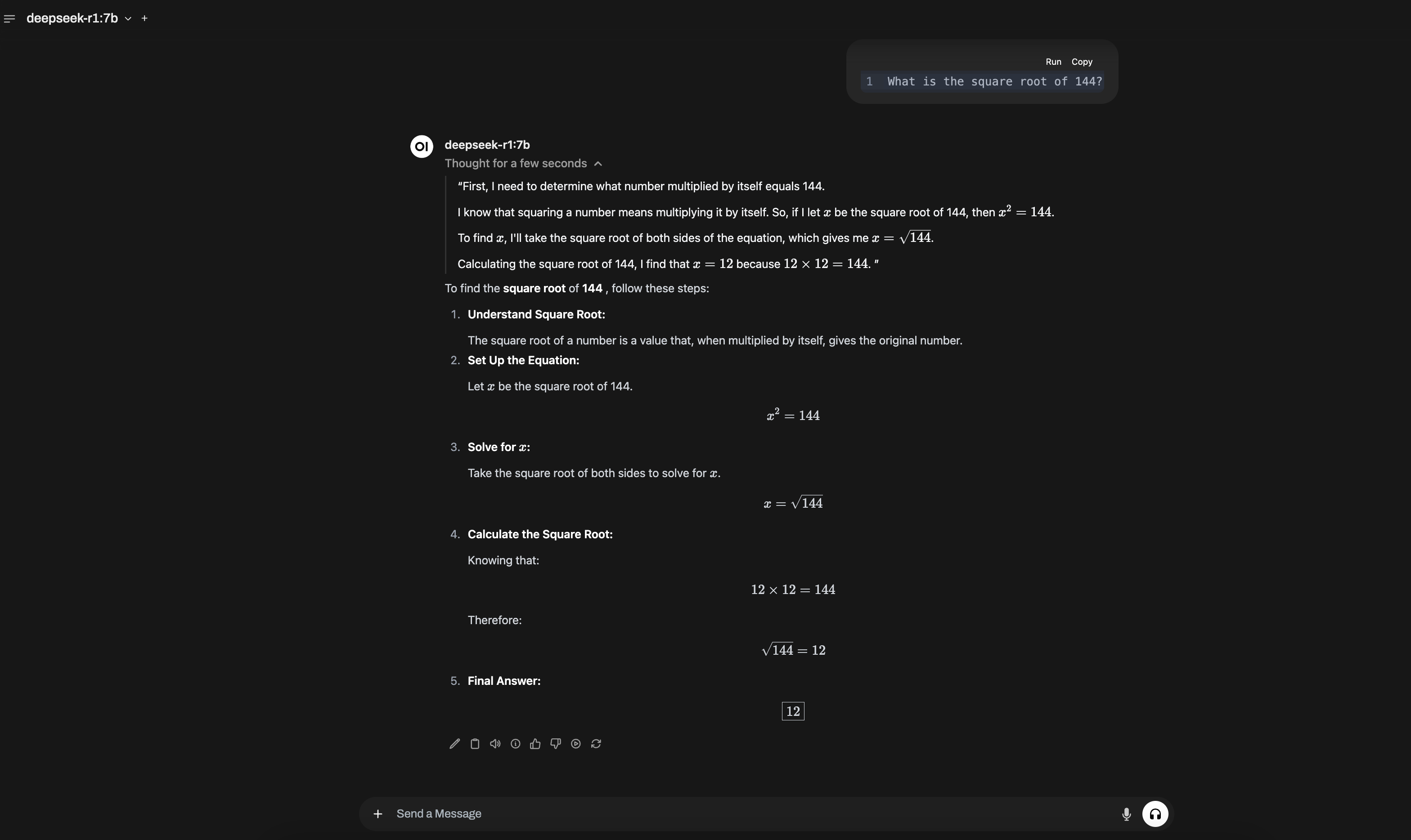
For programmatic access, Ollama exposes an OpenAI-compatible API on port 11434. Most clients written for the OpenAI SDK only need a base-URL change:
from openai import OpenAI

client = OpenAI(
    base_url="http://<instance-public-ip>:11434/v1",
    api_key="ollama",  # required by the SDK, ignored by Ollama
)

response = client.chat.completions.create(
    model="llama3.1:8b",
    messages=[{"role": "user", "content": "Why is the sky blue?"}],
)
print(response.choices[0].message.content)
Deploy GPU infrastructure with Pulumi
How do I switch models?
Ollama hosts every major open-weight family in its model library. Pulling a different model is two commands inside the EC2 instance—or a one-line edit to the cloud-init script if you want it provisioned automatically:
# DeepSeek-R1 distill (default in this guide)
docker exec ollama ollama run deepseek-r1:7b

# Llama 3.1 (Meta, 8B)
docker exec ollama ollama run llama3.1:8b

# Qwen 2.5 (Alibaba, 7B)
docker exec ollama ollama run qwen2.5:7b

# Mistral (7B)
docker exec ollama ollama run mistral:7b

# Larger reasoning model (needs g5.2xlarge or larger)
docker exec ollama ollama run deepseek-r1:32b
Tags follow a <size> or <size>-<quantization> pattern—8b, 8b-instruct-q4_K_M, 8b-instruct-q8_0. Q4 is the default and the right starting point; bump to Q8 only if you have spare VRAM and notice quality issues with Q4. Browse the full tag list for any model on its Ollama library page.
Cleaning up
When you’re done, tear everything down:
pulumi destroy
What are the next steps?
You now have a reproducible, IaC-managed deployment of any open-source LLM on AWS. The infrastructure is fixed; the model is a parameter. From here, the natural extensions are wiring this up to a real application, adding RAG over your own data, or moving the deployment behind an authenticated load balancer.
If you want to go further with AI on Pulumi, here are some related guides:
- Deploy LangServe Apps with Pulumi on AWS (RAG & Chatbot) — Build a retrieval-augmented chatbot that could front-end this Ollama instance.
- Deploy AI Models on Amazon SageMaker using Pulumi Python IaC — A SageMaker alternative when you’d rather not manage the EC2 host yourself.
- Build an AI Slack Bot on AWS Using Embedchain & Pulumi — Wire an LLM into Slack as an internal assistant.
- What is Infrastructure as Code? — Background on the IaC approach used throughout this guide.
Changelog
- 2026-04-30 — Broadened scope from DeepSeek-only to any Ollama-supported model (Llama, Qwen, Mistral). Added TL;DR, instance-type recommendation table, cost-vs-hosted-API comparison, and HowTo structured data. Restructured headings as user questions. Verified Ollama and cloud-init commands against current versions.
- 2025-03-10 — Minor edits and corrections.
- 2025-01-27 — Original post: Run DeepSeek-R1 on AWS EC2 Using Ollama.