GitHub Actions for Pulumi
Pulumi’s GitHub Actions help you deploy apps and infrastructure to your cloud of choice, using nothing but code in your favorite language and GitHub. This includes previewing, validating, and collaborating on proposed deployments in the context of Pull Requests, and triggering deployments or promotions between different environments by merging or directly committing changes.
Prerequisites
Before proceeding, you’ll need to Sign Up for Pulumi (if you haven’t already). This guide also assumes you’ve reviewed the GitHub Actions documentation and are generally familiar with its concepts and syntax.
For your workflow to do anything interesting, you’ll want to create a new Pulumi project for it. There are three ways to do this:
- Clone an existing Pulumi example
- Use the New Project wizard
- Download the CLI and run
pulumi newto select a template
Creating a Workflow
Although the full power of the Pulumi CLI is available to use with GitHub Actions, we recommend starting with our standard workflow, which consists of two workflow files, each triggered by common GitHub events:
- Pulumi Preview runs
pulumi previewin response to a Pull Request, showing a preview of the changes to the target branch when the PR gets merged. - Pulumi Up runs
pulumi upon the target branch, in response to a commit on that branch.
Committing the Workflow Files
Let’s get started by adding these two new workflow files to the GitHub repository containing your Pulumi project.
The pull_request Workflow File
Add a new file to your Pulumi project repository at .github/workflows/pull_request.yml
containing the following workflow definition, which instructs GitHub Actions to run
pulumi preview in response to all pull_request events:
name: Pulumi
on:
  - pull_request
jobs:
  preview:
    name: Preview
    runs-on: ubuntu-latest
    steps:
      - uses: actions/checkout@v4
      - uses: actions/setup-node@v4
        with:
          node-version-file: package.json
      - name: Configure AWS Credentials
        uses: aws-actions/configure-aws-credentials@v4
        with:
          aws-access-key-id: ${{ secrets.AWS_ACCESS_KEY_ID }}
          aws-region: ${{ secrets.AWS_REGION }}
          aws-secret-access-key: ${{ secrets.AWS_SECRET_ACCESS_KEY }}
      - run: npm install
      - uses: pulumi/actions@v6
        with:
          command: preview
          stack-name: org-name/stack-name # When using an individual account, only use stack-name.
        env:
          PULUMI_ACCESS_TOKEN: ${{ secrets.PULUMI_ACCESS_TOKEN }}
name: Pulumi
on:
  - pull_request
jobs:
  preview:
    name: Preview
    runs-on: ubuntu-latest
    steps:
      - uses: actions/checkout@v4
      - uses: actions/setup-python@v5
        with:
          python-version: 3.11
      - name: Configure AWS Credentials
        uses: aws-actions/configure-aws-credentials@v4
        with:
          aws-access-key-id: ${{ secrets.AWS_ACCESS_KEY_ID }}
          aws-region: ${{ secrets.AWS_REGION }}
          aws-secret-access-key: ${{ secrets.AWS_SECRET_ACCESS_KEY }}
      - run: pip install -r requirements.txt
      - uses: pulumi/actions@v6
        with:
          command: preview
          stack-name: org-name/stack-name # When using an individual account, only use stack-name.
        env:
          PULUMI_ACCESS_TOKEN: ${{ secrets.PULUMI_ACCESS_TOKEN }}
name: Pulumi
on:
  - pull_request
jobs:
  preview:
    name: Preview
    runs-on: ubuntu-latest
    steps:
      - uses: actions/checkout@v4
      - uses: actions/setup-go@v6
        with:
          go-version: 'stable'
      - name: Configure AWS Credentials
        uses: aws-actions/configure-aws-credentials@v4
        with:
          aws-access-key-id: ${{ secrets.AWS_ACCESS_KEY_ID }}
          aws-region: ${{ secrets.AWS_REGION }}
          aws-secret-access-key: ${{ secrets.AWS_SECRET_ACCESS_KEY }}
      - run: go mod download
      - uses: pulumi/actions@v6
        with:
          command: preview
          stack-name: org-name/stack-name # When using an individual account, only use stack-name.
        env:
          PULUMI_ACCESS_TOKEN: ${{ secrets.PULUMI_ACCESS_TOKEN }}
name: Pulumi
on:
  - pull_request
jobs:
  preview:
    name: Preview
    runs-on: ubuntu-latest
    steps:
      - uses: actions/checkout@v4
      - uses: actions/setup-dotnet@v5
        with:
          dotnet-version: 10.0.x
      - name: Configure AWS Credentials
        uses: aws-actions/configure-aws-credentials@v4
        with:
          aws-access-key-id: ${{ secrets.AWS_ACCESS_KEY_ID }}
          aws-region: ${{ secrets.AWS_REGION }}
          aws-secret-access-key: ${{ secrets.AWS_SECRET_ACCESS_KEY }}
      - uses: pulumi/actions@v6
        with:
          command: preview
          stack-name: org-name/stack-name # When using an individual account, only use stack-name.
        env:
          PULUMI_ACCESS_TOKEN: ${{ secrets.PULUMI_ACCESS_TOKEN }}
The push Workflow File
Next, add a second workflow file at .github/workflows/push.yml containing the following
definition, which tells GitHub to run pulumi up in response to a commit on the main
branch:
name: Pulumi
on:
  push:
    branches:
      - main
jobs:
  update:
    name: Update
    runs-on: ubuntu-latest
    steps:
      - uses: actions/checkout@v4
      - uses: actions/setup-node@v4
        with:
          node-version-file: package.json
      - name: Configure AWS Credentials
        uses: aws-actions/configure-aws-credentials@v4
        with:
          aws-access-key-id: ${{ secrets.AWS_ACCESS_KEY_ID }}
          aws-region: ${{ secrets.AWS_REGION }}
          aws-secret-access-key: ${{ secrets.AWS_SECRET_ACCESS_KEY }}
      - run: npm install
      - uses: pulumi/actions@v6
        with:
          command: up
          stack-name: org-name/stack-name # When using an individual account, only use stack-name.
        env:
          PULUMI_ACCESS_TOKEN: ${{ secrets.PULUMI_ACCESS_TOKEN }}
name: Pulumi
on:
  push:
    branches:
      - main
jobs:
  update:
    name: Update
    runs-on: ubuntu-latest
    steps:
      - uses: actions/checkout@v4
      - uses: actions/setup-python@v5
        with:
          python-version: 3.11
      - name: Configure AWS Credentials
        uses: aws-actions/configure-aws-credentials@v4
        with:
          aws-access-key-id: ${{ secrets.AWS_ACCESS_KEY_ID }}
          aws-region: ${{ secrets.AWS_REGION }}
          aws-secret-access-key: ${{ secrets.AWS_SECRET_ACCESS_KEY }}
      - run: pip install -r requirements.txt
      - uses: pulumi/actions@v6
        with:
          command: up
          stack-name: org-name/stack-name # When using an individual account, only use stack-name.
        env:
          PULUMI_ACCESS_TOKEN: ${{ secrets.PULUMI_ACCESS_TOKEN }}
name: Pulumi
on:
  push:
    branches:
      - main
jobs:
  update:
    name: Update
    runs-on: ubuntu-latest
    steps:
      - uses: actions/checkout@v4
      - uses: actions/setup-go@v6
        with:
          go-version: 'stable'
      - name: Configure AWS Credentials
        uses: aws-actions/configure-aws-credentials@v4
        with:
          aws-access-key-id: ${{ secrets.AWS_ACCESS_KEY_ID }}
          aws-region: ${{ secrets.AWS_REGION }}
          aws-secret-access-key: ${{ secrets.AWS_SECRET_ACCESS_KEY }}
      - run: go mod download
      - uses: pulumi/actions@v6
        with:
          command: up
          stack-name: org-name/stack-name # When using an individual account, only use stack-name.
        env:
          PULUMI_ACCESS_TOKEN: ${{ secrets.PULUMI_ACCESS_TOKEN }}
name: Pulumi
on:
  push:
    branches:
      - main
jobs:
  update:
    name: Update
    runs-on: ubuntu-latest
    steps:
      - uses: actions/checkout@v4
      - uses: actions/setup-dotnet@v5
        with:
          dotnet-version: 10.0.x
      - name: Configure AWS Credentials
        uses: aws-actions/configure-aws-credentials@v4
        with:
          aws-access-key-id: ${{ secrets.AWS_ACCESS_KEY_ID }}
          aws-region: ${{ secrets.AWS_REGION }}
          aws-secret-access-key: ${{ secrets.AWS_SECRET_ACCESS_KEY }}
      - uses: pulumi/actions@v6
        with:
          command: up
          stack-name: org-name/stack-name # When using an individual account, only use stack-name.
        env:
          PULUMI_ACCESS_TOKEN: ${{ secrets.PULUMI_ACCESS_TOKEN }}
Now that you’ve got these two common workflows defined, you’ll need to configure your secrets. Secrets are exposed as environment variables to the GitHub Actions runtime environment. Minimally, you’ll need to supply a Pulumi access token to allow the Pulumi CLI to communicate with Pulumi Cloud on your behalf, and you’ll probably want to provide credentials for communicating with your cloud provider as well.
Configuring Your Secrets
With your workflow files committed and pushed to GitHub, head on over to your repo’s Settings tab, where you’ll find the new Secrets area:
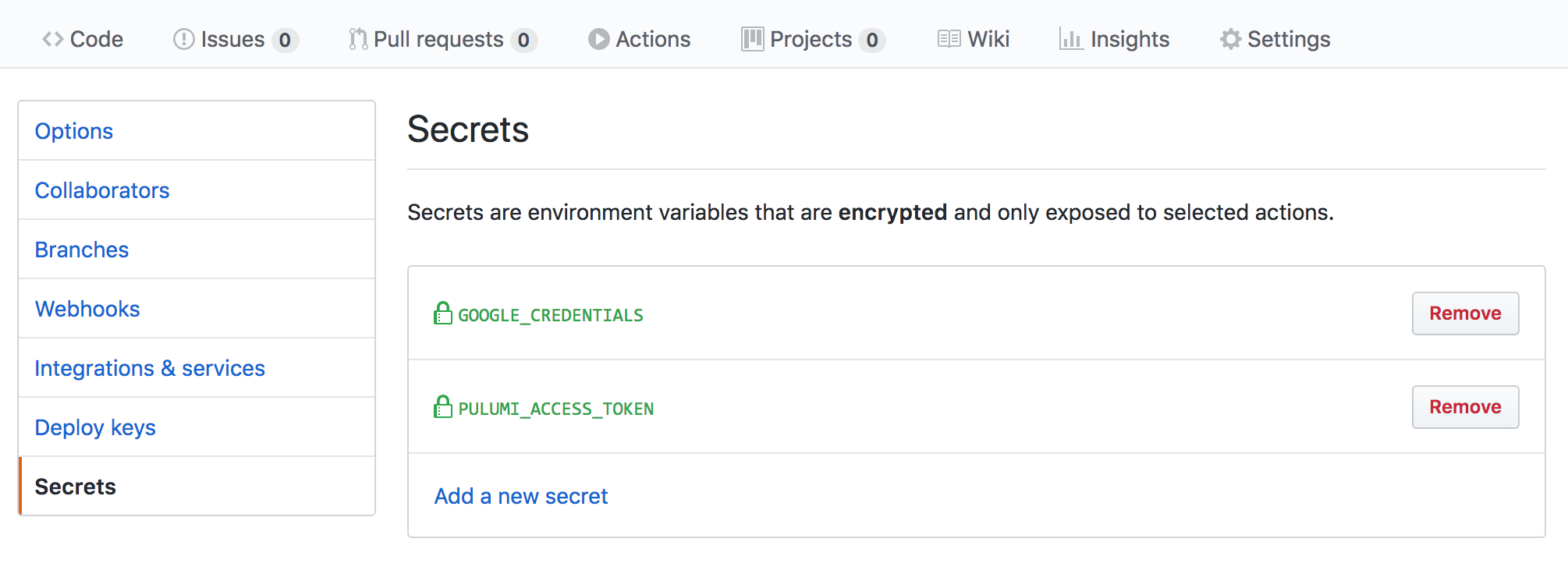
First, create a new Pulumi Access Token, then
submit that token as a new secret named named PULUMI_ACCESS_TOKEN. This enables your
GitHub Action to communicate with Pulumi Cloud on your behalf.
Next, add secrets for your cloud credentials, just as you did PULUMI_ACCESS_TOKEN above,
based on your provider of choice. For example:
AWS_ACCESS_KEY_ID,AWS_REGIONandAWS_SECRET_ACCESS_KEYfor AWSARM_CLIENT_ID,ARM_CLIENT_SECRET, andARM_TENANT_IDfor AzureGOOGLE_CREDENTIALSfor Google CloudKUBECONFIGfor Kubernetes
Using OIDC for cloud provider credentials
Instead of storing long-lived cloud provider credentials as GitHub Secrets, you can use OpenID Connect (OIDC) to obtain short-lived credentials at runtime. This eliminates static API keys that never expire and reduces credential exposure.
Using Pulumi ESC (recommended)
Pulumi ESC is the recommended approach for OIDC-based cloud credentials in GitHub Actions. Rather than configuring trust between GitHub Actions and each cloud provider separately, you configure trust once between Pulumi ESC and your cloud provider. ESC then surfaces the resulting short-lived credentials as environment variables that the Pulumi CLI and cloud provider SDKs consume automatically.
This approach is preferred because it is:
- Provider-agnostic: Works with AWS, Azure, Google Cloud, and others using the same workflow pattern.
- Portable: The same ESC environment works locally and in any CI/CD system, not just GitHub Actions.
- Centralized: Credential configuration lives in ESC, not scattered across individual pipelines.
To set this up:
- Configure OIDC between Pulumi ESC and your cloud provider using one of the ESC OIDC guides.
- Configure Pulumi Cloud to trust GitHub OIDC tokens using the GitHub OIDC client guide.
- Update your workflow to use
pulumi/auth-actionsandpulumi/esc-actioninstead of long-lived secrets:
name: Pulumi
on:
  - pull_request
permissions:
  id-token: write
  contents: read
  pull-requests: write # Required when using comment-on-pr: true
jobs:
  preview:
    name: Preview
    runs-on: ubuntu-latest
    steps:
      - uses: actions/checkout@v4
      - uses: actions/setup-node@v4
        with:
          node-version-file: package.json
      - name: Authenticate with Pulumi Cloud
        uses: pulumi/auth-actions@v1
        with:
          organization: org-name
          requested-token-type: urn:pulumi:token-type:access_token:organization
      - name: Inject ESC environment variables
        uses: pulumi/esc-action@v1
        with:
          environment: org-name/project-name/env-name
      - run: npm install
      - uses: pulumi/actions@v6
        with:
          command: preview
          stack-name: org-name/stack-name
          comment-on-pr: true
          github-token: ${{ secrets.GITHUB_TOKEN }}
The pulumi/auth-actions step exchanges the GitHub OIDC token for a short-lived Pulumi access token, so no PULUMI_ACCESS_TOKEN secret is required. The pulumi/esc-action step opens the specified ESC environment and injects its environmentVariables into the workflow — for example, AWS_ACCESS_KEY_ID, AWS_SECRET_ACCESS_KEY, and AWS_SESSION_TOKEN for AWS — which the Pulumi AWS provider picks up automatically.
Replace the npm install step with the appropriate install command for your language. For more details, see the Pulumi ESC GitHub Action documentation.
Direct GitHub → AWS OIDC (without ESC)
If you prefer to configure OIDC directly between GitHub Actions and AWS without ESC, use the aws-actions/configure-aws-credentials action with the role-to-assume parameter. You must first configure an IAM identity provider and role trust policy in AWS that allows GitHub Actions to assume an IAM role.
Note that this approach is AWS-specific. For other cloud providers you would need to configure separate trust relationships.
When using OIDC, the workflow job requires the id-token: write permission. When also posting PR comments via comment-on-pr: true, you must add pull-requests: write as well:
permissions:
  id-token: write
  contents: read
  pull-requests: write # Required when using comment-on-pr: true
Replace the static credentials step with:
- name: Configure AWS credentials
  uses: aws-actions/configure-aws-credentials@v4
  with:
    role-to-assume: arn:aws:iam::123456789012:role/my-github-actions-role
    aws-region: us-east-1
A complete pull request workflow using direct AWS OIDC:
name: Pulumi
on:
  - pull_request
permissions:
  id-token: write
  contents: read
  pull-requests: write
jobs:
  preview:
    name: Preview
    runs-on: ubuntu-latest
    steps:
      - uses: actions/checkout@v4
      - uses: actions/setup-node@v4
        with:
          node-version-file: package.json
      - name: Configure AWS credentials
        uses: aws-actions/configure-aws-credentials@v4
        with:
          role-to-assume: arn:aws:iam::123456789012:role/my-github-actions-role
          aws-region: us-east-1
      - run: npm install
      - uses: pulumi/actions@v6
        with:
          command: preview
          stack-name: org-name/stack-name
          comment-on-pr: true
          github-token: ${{ secrets.GITHUB_TOKEN }}
        env:
          PULUMI_ACCESS_TOKEN: ${{ secrets.PULUMI_ACCESS_TOKEN }}
Try It Out!
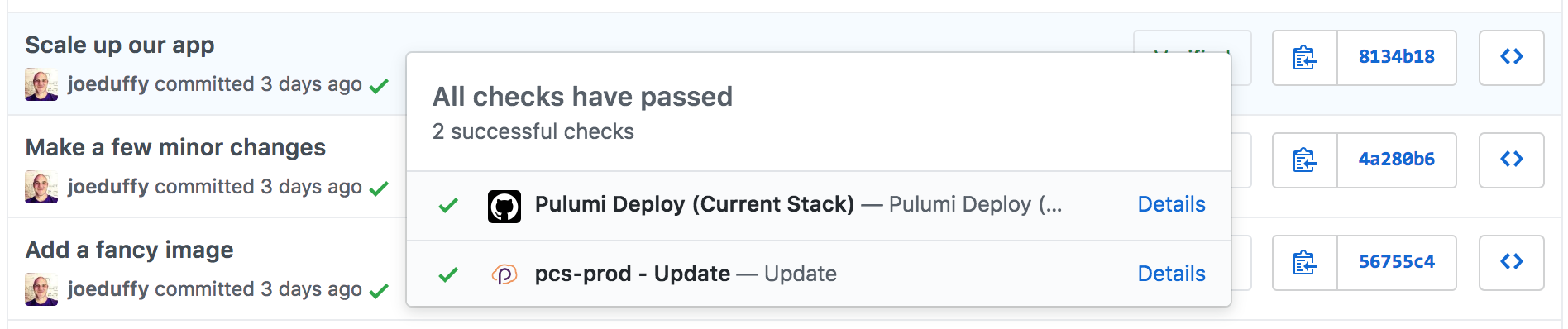
To try things out, create a Pull Request or commit, and you will see these new actions showing up in the usual GitHub Checks dialog, with a green checkmark if everything went as planned:
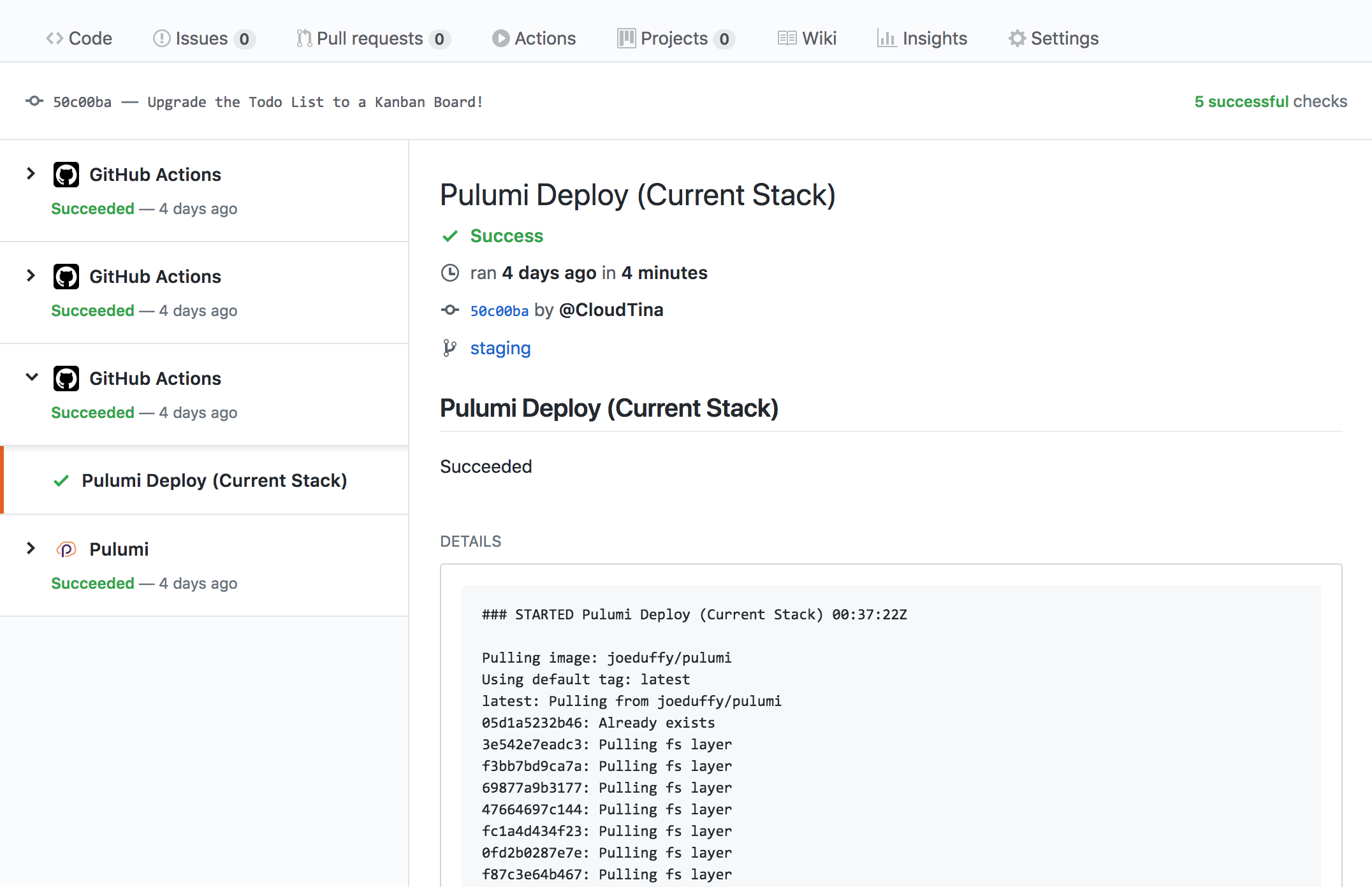
Select the Logs pane to see the full output of the Pulumi CLI, along with the URL of your deployment on Pulumi Cloud with more details:
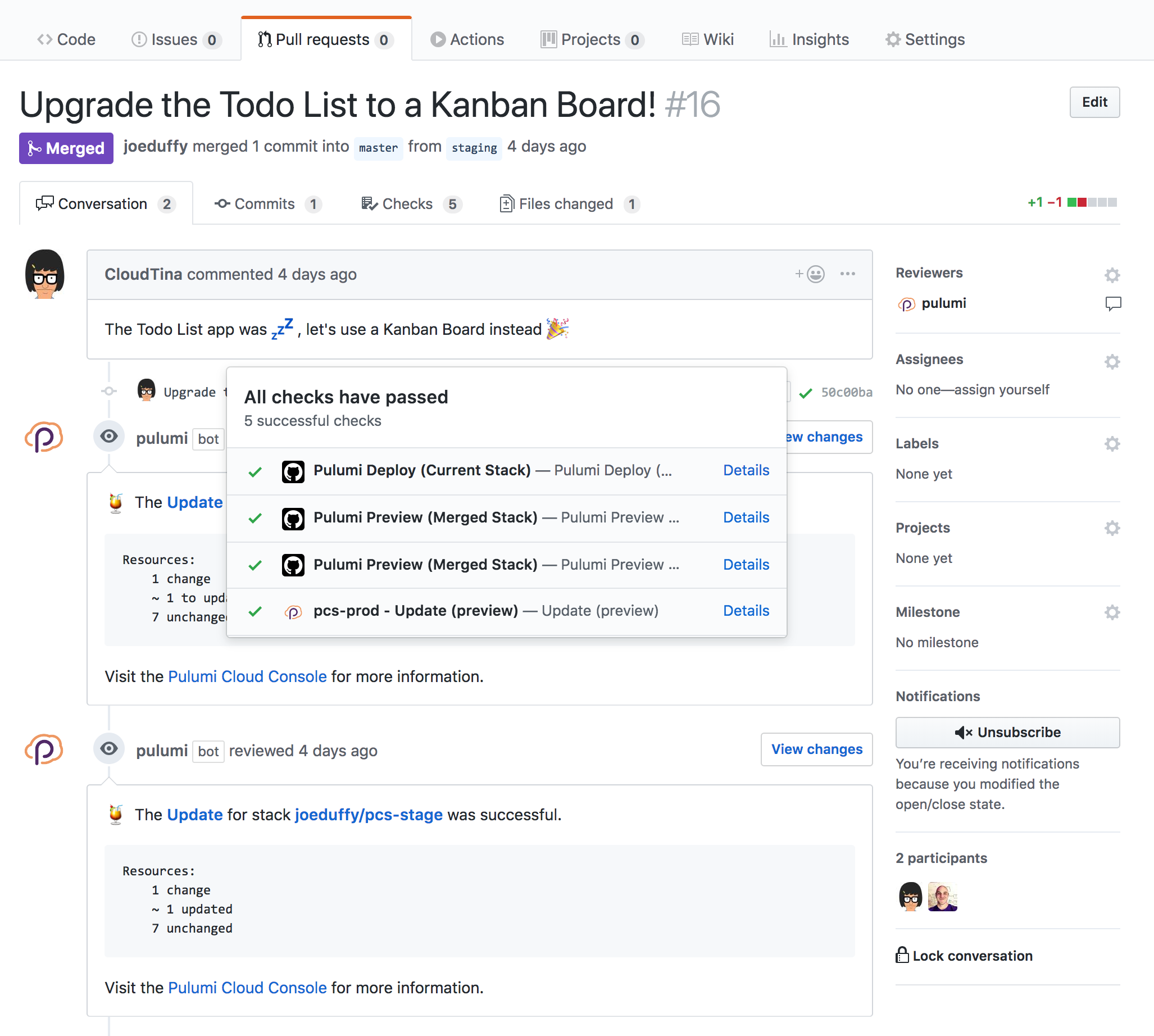
For even better Pull Request integration, make sure to also install our GitHub App!
Pull Request Flow
If you are using Pulumi’s GitHub Actions to preview infrastructure changes from Pull Requests, you may want to have Pulumi comment on those PRs so that you don’t need to look at the specific update logs to see if there were any changes.
There are two ways to do this: using the Pulumi GitHub App (recommended), or configuring the GitHub Actions container directly.
Pulumi GitHub App
The Pulumi GitHub App is something you install on your GitHub organization. It allows Pulumi Cloud to leave comments on Pull Requests.
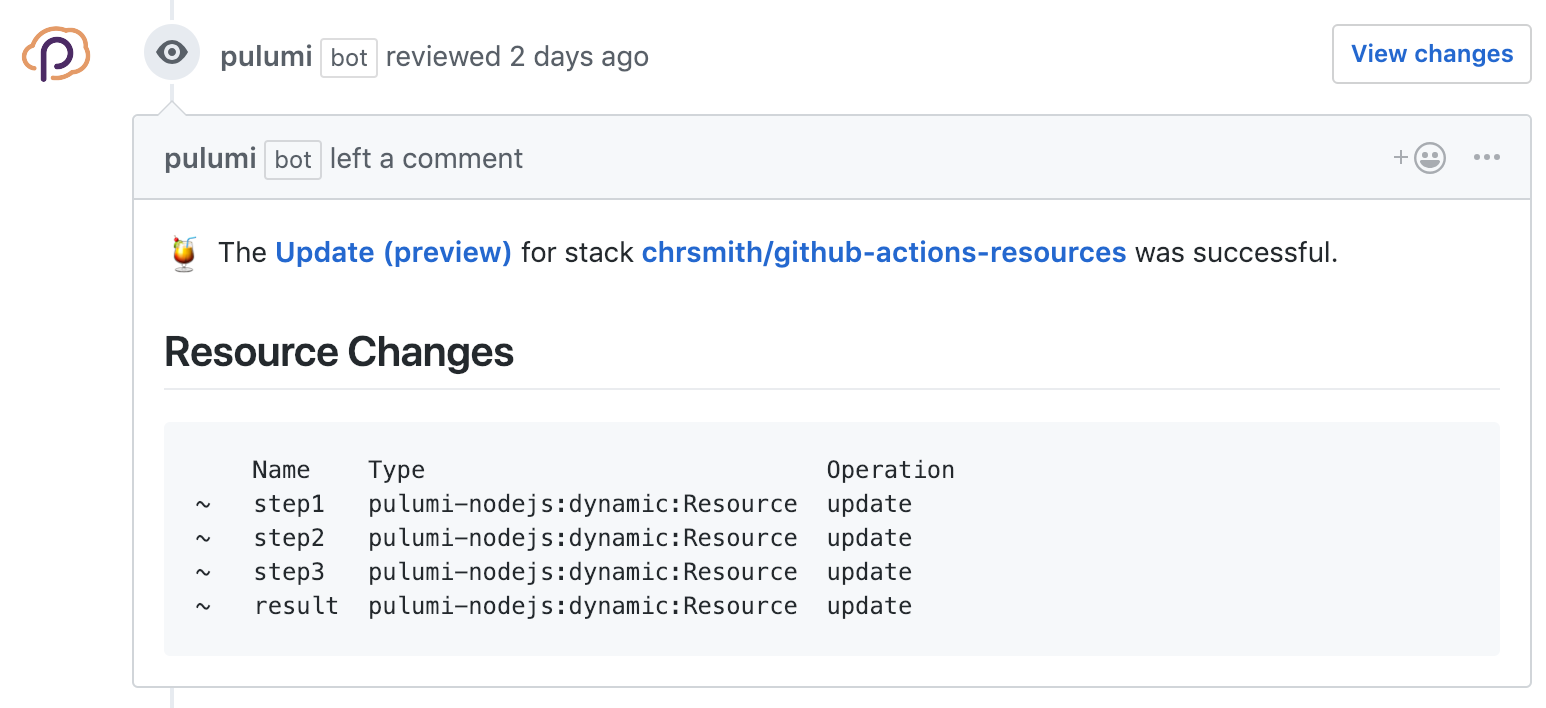
Once the Pulumi GitHub App is installed, when your GitHub Actions run Pulumi, a summary of any resource changes will be left on the Pull Request, as well as links to the Pulumi Console for more detailed information.
Install Pulumi GitHub AppExample comment when using the Pulumi GitHub App:
Comments By GitHub Actions
If you don’t want to use the Pulumi GitHub App, you can configure Pulumi’s GitHub Actions
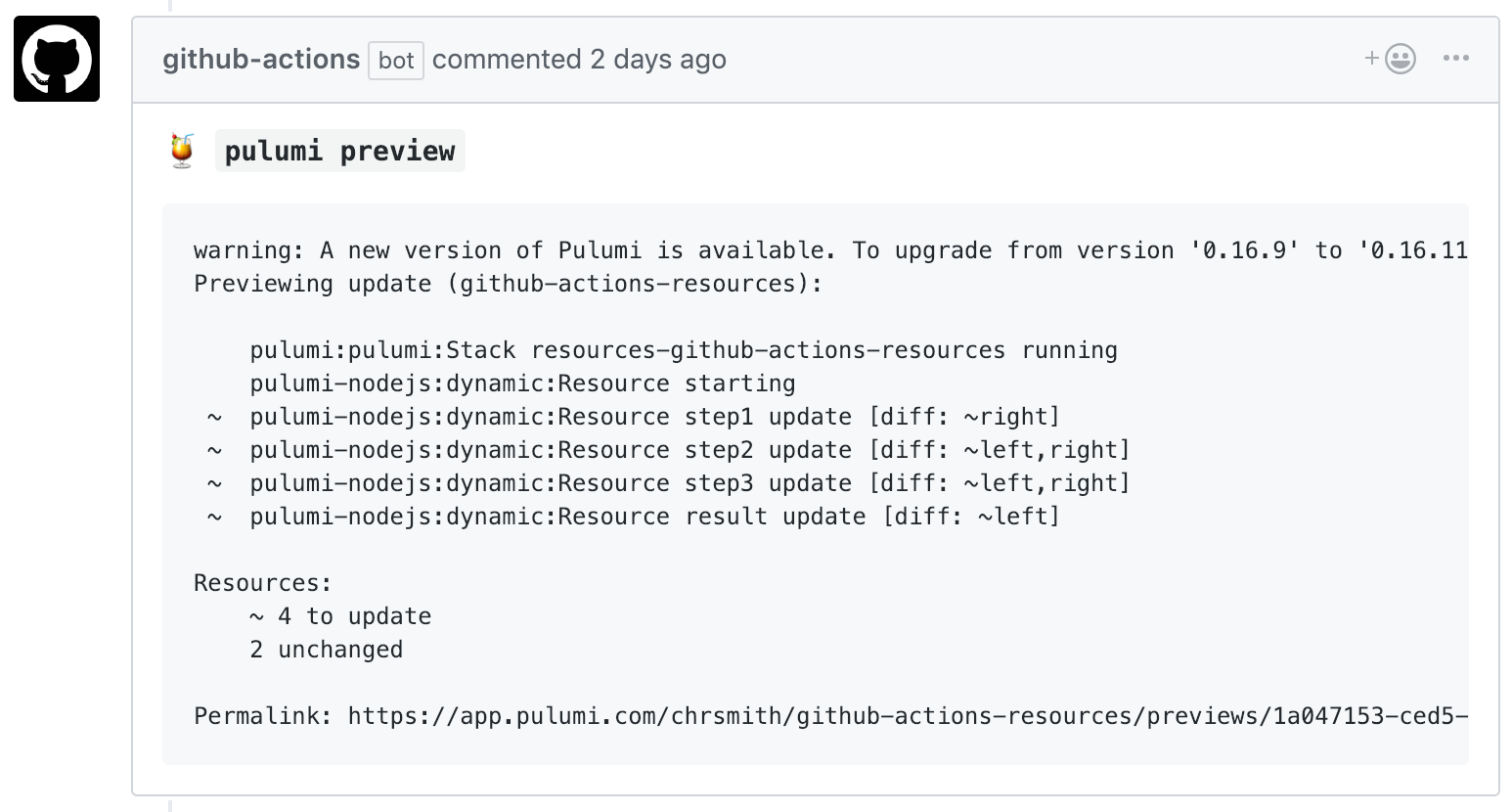
to copy the output of the pulumi invocation on the Pull Request. This option doesn’t
have as rich an output display as the Pulumi GitHub App, as it copies the raw
output of the Pulumi CLI.
To allow your GitHub Action to leave Pull Request comments, you’ll need to add
comment-on-pr and github-token to the list of inputs
passed to the action. Update the action as follows:
name: Pulumi
on:
  - pull_request
jobs:
  preview:
    name: Preview
    runs-on: ubuntu-latest
    steps:
      - uses: actions/checkout@v4
      - uses: actions/setup-node@v4
        with:
          node-version-file: package.json
      - name: Configure AWS Credentials
        uses: aws-actions/configure-aws-credentials@v4
        with:
          aws-access-key-id: ${{ secrets.AWS_ACCESS_KEY_ID }}
          aws-region: ${{ secrets.AWS_REGION }}
          aws-secret-access-key: ${{ secrets.AWS_SECRET_ACCESS_KEY }}
      - run: npm install
      - uses: pulumi/actions@v6
        with:
          command: preview
          stack-name: org-name/stack-name # When using an individual account, only use stack-name.
          comment-on-pr: true
          github-token: ${{ secrets.GITHUB_TOKEN }}
        env:
          PULUMI_ACCESS_TOKEN: ${{ secrets.PULUMI_ACCESS_TOKEN }}
name: Pulumi
on:
  - pull_request
jobs:
  preview:
    name: Preview
    runs-on: ubuntu-latest
    steps:
      - uses: actions/checkout@v4
      - uses: actions/setup-python@v5
        with:
          python-version: 3.11
      - name: Configure AWS Credentials
        uses: aws-actions/configure-aws-credentials@v4
        with:
          aws-access-key-id: ${{ secrets.AWS_ACCESS_KEY_ID }}
          aws-region: ${{ secrets.AWS_REGION }}
          aws-secret-access-key: ${{ secrets.AWS_SECRET_ACCESS_KEY }}
      - run: pip install -r requirements.txt
      - uses: pulumi/actions@v6
        with:
          command: preview
          stack-name: org-name/stack-name # When using an individual account, only use stack-name.
          comment-on-pr: true
          github-token: ${{ secrets.GITHUB_TOKEN }}
        env:
          PULUMI_ACCESS_TOKEN: ${{ secrets.PULUMI_ACCESS_TOKEN }}
name: Pulumi
on:
  - pull_request
jobs:
  preview:
    name: Preview
    runs-on: ubuntu-latest
    steps:
      - uses: actions/checkout@v4
      - uses: actions/setup-go@v6
        with:
          go-version: 'stable'
      - name: Configure AWS Credentials
        uses: aws-actions/configure-aws-credentials@v4
        with:
          aws-access-key-id: ${{ secrets.AWS_ACCESS_KEY_ID }}
          aws-region: ${{ secrets.AWS_REGION }}
          aws-secret-access-key: ${{ secrets.AWS_SECRET_ACCESS_KEY }}
      - run: go mod download
      - uses: pulumi/actions@v6
        with:
          command: preview
          stack-name: org-name/stack-name # When using an individual account, only use stack-name.
          comment-on-pr: true
          github-token: ${{ secrets.GITHUB_TOKEN }}
        env:
          PULUMI_ACCESS_TOKEN: ${{ secrets.PULUMI_ACCESS_TOKEN }}
name: Pulumi
on:
  - pull_request
jobs:
  preview:
    name: Preview
    runs-on: ubuntu-latest
    steps:
      - uses: actions/checkout@v4
      - uses: actions/setup-dotnet@v5
        with:
          dotnet-version: 10.0.x
      - name: Configure AWS Credentials
        uses: aws-actions/configure-aws-credentials@v4
        with:
          aws-access-key-id: ${{ secrets.AWS_ACCESS_KEY_ID }}
          aws-region: ${{ secrets.AWS_REGION }}
          aws-secret-access-key: ${{ secrets.AWS_SECRET_ACCESS_KEY }}
      - uses: pulumi/actions@v6
        with:
          command: preview
          stack-name: org-name/stack-name # When using an individual account, only use stack-name.
          comment-on-pr: true
          github-token: ${{ secrets.GITHUB_TOKEN }}
        env:
          PULUMI_ACCESS_TOKEN: ${{ secrets.PULUMI_ACCESS_TOKEN }}
Example comment when using GitHub Actions directly:
Configuration
You can configure how Pulumi’s GitHub Actions work to have more control about which stacks get updated, and when.
Using a Different Root Directory
By default, the Pulumi GitHub Action assumes your Pulumi project is in your repo’s root
directory. If you are using a different root directory for your project, set the
work-dir variable in your workflow action, with a relative path to your Pulumi
project directory. For example:
name: Pulumi
on:
  - pull_request
jobs:
  preview:
    name: Preview
    runs-on: ubuntu-latest
    steps:
      - uses: actions/checkout@v4
      - uses: actions/setup-node@v4
        with:
          node-version-file: package.json
      - name: Configure AWS Credentials
        uses: aws-actions/configure-aws-credentials@v4
        with:
          aws-access-key-id: ${{ secrets.AWS_ACCESS_KEY_ID }}
          aws-region: ${{ secrets.AWS_REGION }}
          aws-secret-access-key: ${{ secrets.AWS_SECRET_ACCESS_KEY }}
      - run: npm install
        working-directory: infra
      - uses: pulumi/actions@v6
        with:
          command: preview
          stack-name: org-name/stack-name # When using an individual account, only use stack-name.
          comment-on-pr: true
          github-token: ${{ secrets.GITHUB_TOKEN }}
          work-dir: infra
        env:
          PULUMI_ACCESS_TOKEN: ${{ secrets.PULUMI_ACCESS_TOKEN }}
name: Pulumi
on:
  - pull_request
jobs:
  preview:
    name: Preview
    runs-on: ubuntu-latest
    steps:
      - uses: actions/checkout@v4
        with:
          fetch-depth: 1
      - uses: actions/setup-python@v5
        with:
          python-version: 3.11
      - name: Configure AWS Credentials
        uses: aws-actions/configure-aws-credentials@v4
        with:
          aws-access-key-id: ${{ secrets.AWS_ACCESS_KEY_ID }}
          aws-region: ${{ secrets.AWS_REGION }}
          aws-secret-access-key: ${{ secrets.AWS_SECRET_ACCESS_KEY }}
      - run: pip install -r requirements.txt
        working-directory: infra
      - uses: pulumi/actions@v6
        with:
          command: preview
          stack-name: org-name/stack-name # When using an individual account, only use stack-name.
          comment-on-pr: true
          github-token: ${{ secrets.GITHUB_TOKEN }}
          work-dir: infra
        env:
          PULUMI_ACCESS_TOKEN: ${{ secrets.PULUMI_ACCESS_TOKEN }}
name: Pulumi
on:
  - pull_request
jobs:
  preview:
    name: Preview
    runs-on: ubuntu-latest
    steps:
      - uses: actions/checkout@v4
        with:
          fetch-depth: 1
      - uses: actions/setup-go@v6
        with:
          go-version: 'stable'
      - name: Configure AWS Credentials
        uses: aws-actions/configure-aws-credentials@v4
        with:
          aws-access-key-id: ${{ secrets.AWS_ACCESS_KEY_ID }}
          aws-region: ${{ secrets.AWS_REGION }}
          aws-secret-access-key: ${{ secrets.AWS_SECRET_ACCESS_KEY }}
      - run: go mod download
        working-directory: infra
      - uses: pulumi/actions@v6
        with:
          command: preview
          stack-name: org-name/stack-name # When using an individual account, only use stack-name.
          comment-on-pr: true
          github-token: ${{ secrets.GITHUB_TOKEN }}
          work-dir: infra
        env:
          PULUMI_ACCESS_TOKEN: ${{ secrets.PULUMI_ACCESS_TOKEN }}
name: Pulumi
on:
  - pull_request
jobs:
  preview:
    name: Preview
    runs-on: ubuntu-latest
    steps:
      - uses: actions/checkout@v4
        with:
          fetch-depth: 1
      - uses: actions/setup-dotnet@v5
        with:
          dotnet-version: 10.0.x
      - name: Configure AWS Credentials
        uses: aws-actions/configure-aws-credentials@v4
        with:
          aws-access-key-id: ${{ secrets.AWS_ACCESS_KEY_ID }}
          aws-region: ${{ secrets.AWS_REGION }}
          aws-secret-access-key: ${{ secrets.AWS_SECRET_ACCESS_KEY }}
      - uses: pulumi/actions@v6
        with:
          command: preview
          stack-name: org-name/stack-name # When using an individual account, only use stack-name.
          comment-on-pr: true
          github-token: ${{ secrets.GITHUB_TOKEN }}
          work-dir: infra
        env:
          PULUMI_ACCESS_TOKEN: ${{ secrets.PULUMI_ACCESS_TOKEN }}
This tells Pulumi that the project can be found underneath the repo’s infra directory.
Stack Upsert
Pulumi has a concept of stacks, which are isolated environments for your application (e.g., production, staging, or even distinct services).
A stack name is a required input for the Pulumi Action. If you need the GitHub Action to create the stack
(passed through the stack-name parameter) on your behalf you can do so with the upsert config option
as follows:
name: Pulumi
on:
  - pull_request
jobs:
  preview:
    name: Preview
    runs-on: ubuntu-latest
    steps:
      - uses: actions/checkout@v4
        with:
          fetch-depth: 1
      - uses: actions/setup-node@v4
        with:
          node-version-file: package.json
      - name: Configure AWS Credentials
        uses: aws-actions/configure-aws-credentials@v4
        with:
          aws-access-key-id: ${{ secrets.AWS_ACCESS_KEY_ID }}
          aws-region: ${{ secrets.AWS_REGION }}
          aws-secret-access-key: ${{ secrets.AWS_SECRET_ACCESS_KEY }}
      - run: npm install
        working-directory: infra
      - uses: pulumi/actions@v6
        with:
          command: preview
          stack-name: org-name/stack-name # When using an individual account, only use stack-name.
          comment-on-pr: true
          github-token: ${{ secrets.GITHUB_TOKEN }}
          work-dir: infra
          upsert: true
        env:
          PULUMI_ACCESS_TOKEN: ${{ secrets.PULUMI_ACCESS_TOKEN }}
name: Pulumi
on:
  - pull_request
jobs:
  preview:
    name: Preview
    runs-on: ubuntu-latest
    steps:
      - uses: actions/checkout@v4
        with:
          fetch-depth: 1
      - uses: actions/setup-python@v5
        with:
          python-version: 3.11
      - name: Configure AWS Credentials
        uses: aws-actions/configure-aws-credentials@v4
        with:
          aws-access-key-id: ${{ secrets.AWS_ACCESS_KEY_ID }}
          aws-region: ${{ secrets.AWS_REGION }}
          aws-secret-access-key: ${{ secrets.AWS_SECRET_ACCESS_KEY }}
      - run: pip install -r requirements.txt
        working-directory: infra
      - uses: pulumi/actions@v6
        with:
          command: preview
          stack-name: org-name/stack-name # When using an individual account, only use stack-name.
          comment-on-pr: true
          github-token: ${{ secrets.GITHUB_TOKEN }}
          work-dir: infra
          upsert: true
        env:
          PULUMI_ACCESS_TOKEN: ${{ secrets.PULUMI_ACCESS_TOKEN }}
name: Pulumi
on:
  - pull_request
jobs:
  preview:
    name: Preview
    runs-on: ubuntu-latest
    steps:
      - uses: actions/checkout@v4
        with:
          fetch-depth: 1
      - uses: actions/setup-go@v6
        with:
          go-version: 'stable'
      - name: Configure AWS Credentials
        uses: aws-actions/configure-aws-credentials@v4
        with:
          aws-access-key-id: ${{ secrets.AWS_ACCESS_KEY_ID }}
          aws-region: ${{ secrets.AWS_REGION }}
          aws-secret-access-key: ${{ secrets.AWS_SECRET_ACCESS_KEY }}
      - run: go mod download
        working-directory: infra
      - uses: pulumi/actions@v6
        with:
          command: preview
          stack-name: org-name/stack-name # When using an individual account, only use stack-name.
          comment-on-pr: true
          github-token: ${{ secrets.GITHUB_TOKEN }}
          work-dir: infra
          upsert: true
        env:
          PULUMI_ACCESS_TOKEN: ${{ secrets.PULUMI_ACCESS_TOKEN }}
name: Pulumi
on:
  - pull_request
jobs:
  preview:
    name: Preview
    runs-on: ubuntu-latest
    steps:
      - uses: actions/checkout@v4
        with:
          fetch-depth: 1
      - uses: actions/setup-dotnet@v5
        with:
          dotnet-version: 10.0.x
      - name: Configure AWS Credentials
        uses: aws-actions/configure-aws-credentials@v4
        with:
          aws-access-key-id: ${{ secrets.AWS_ACCESS_KEY_ID }}
          aws-region: ${{ secrets.AWS_REGION }}
          aws-secret-access-key: ${{ secrets.AWS_SECRET_ACCESS_KEY }}
      - uses: pulumi/actions@v6
        with:
          command: preview
          stack-name: org-name/stack-name # When using an individual account, only use stack-name.
          comment-on-pr: true
          github-token: ${{ secrets.GITHUB_TOKEN }}
          work-dir: infra
          upsert: true
        env:
          PULUMI_ACCESS_TOKEN: ${{ secrets.PULUMI_ACCESS_TOKEN }}
Caching plugins and policy packs
GitHub Actions downloads plugins and policy packs on each workflow run. To improve CI performance and reduce workflow execution times, you can cache these artifacts using GitHub’s actions/cache.
Pulumi stores plugins in ~/.pulumi/plugins and policy packs in ~/.pulumi/policies. By caching these directories, subsequent workflow runs skip re-downloading plugins and policies, significantly reducing setup time.
Here’s an example workflow that caches both plugins and policy packs:
name: Pulumi
on:
  - pull_request
jobs:
  preview:
    name: Preview
    runs-on: ubuntu-latest
    steps:
      - uses: actions/checkout@v4
      - uses: actions/setup-node@v4
        with:
          node-version-file: package.json
      - name: Configure AWS Credentials
        uses: aws-actions/configure-aws-credentials@v4
        with:
          aws-access-key-id: ${{ secrets.AWS_ACCESS_KEY_ID }}
          aws-region: ${{ secrets.AWS_REGION }}
          aws-secret-access-key: ${{ secrets.AWS_SECRET_ACCESS_KEY }}
      - name: Cache Pulumi plugins
        uses: actions/cache@v4
        with:
          path: ~/.pulumi/plugins
          key: ${{ runner.os }}-pulumi-plugins-${{ hashFiles('**/package.json') }}
          restore-keys: |
            ${{ runner.os }}-pulumi-plugins-
      - name: Cache Pulumi policy packs
        uses: actions/cache@v4
        with:
          path: ~/.pulumi/policies
          key: ${{ runner.os }}-pulumi-policies-${{ hashFiles('**/package.json') }}
          restore-keys: |
            ${{ runner.os }}-pulumi-policies-
      - run: npm install
      - uses: pulumi/actions@v6
        with:
          command: preview
          stack-name: org-name/stack-name
        env:
          PULUMI_ACCESS_TOKEN: ${{ secrets.PULUMI_ACCESS_TOKEN }}
name: Pulumi
on:
  - pull_request
jobs:
  preview:
    name: Preview
    runs-on: ubuntu-latest
    steps:
      - uses: actions/checkout@v4
      - uses: actions/setup-python@v5
        with:
          python-version: 3.11
      - name: Configure AWS Credentials
        uses: aws-actions/configure-aws-credentials@v4
        with:
          aws-access-key-id: ${{ secrets.AWS_ACCESS_KEY_ID }}
          aws-region: ${{ secrets.AWS_REGION }}
          aws-secret-access-key: ${{ secrets.AWS_SECRET_ACCESS_KEY }}
      - name: Cache Pulumi plugins
        uses: actions/cache@v4
        with:
          path: ~/.pulumi/plugins
          key: ${{ runner.os }}-pulumi-plugins-${{ hashFiles('requirements.txt') }}
          restore-keys: |
            ${{ runner.os }}-pulumi-plugins-
      - name: Cache Pulumi policy packs
        uses: actions/cache@v4
        with:
          path: ~/.pulumi/policies
          key: ${{ runner.os }}-pulumi-policies-${{ hashFiles('requirements.txt') }}
          restore-keys: |
            ${{ runner.os }}-pulumi-policies-
      - run: pip install -r requirements.txt
      - uses: pulumi/actions@v6
        with:
          command: preview
          stack-name: org-name/stack-name
        env:
          PULUMI_ACCESS_TOKEN: ${{ secrets.PULUMI_ACCESS_TOKEN }}
name: Pulumi
on:
  - pull_request
jobs:
  preview:
    name: Preview
    runs-on: ubuntu-latest
    steps:
      - uses: actions/checkout@v4
      - uses: actions/setup-go@v6
        with:
          go-version: 'stable'
      - name: Configure AWS Credentials
        uses: aws-actions/configure-aws-credentials@v4
        with:
          aws-access-key-id: ${{ secrets.AWS_ACCESS_KEY_ID }}
          aws-region: ${{ secrets.AWS_REGION }}
          aws-secret-access-key: ${{ secrets.AWS_SECRET_ACCESS_KEY }}
      - name: Cache Pulumi plugins
        uses: actions/cache@v4
        with:
          path: ~/.pulumi/plugins
          key: ${{ runner.os }}-pulumi-plugins-${{ hashFiles('go.sum') }}
          restore-keys: |
            ${{ runner.os }}-pulumi-plugins-
      - name: Cache Pulumi policy packs
        uses: actions/cache@v4
        with:
          path: ~/.pulumi/policies
          key: ${{ runner.os }}-pulumi-policies-${{ hashFiles('go.sum') }}
          restore-keys: |
            ${{ runner.os }}-pulumi-policies-
      - run: go mod download
      - uses: pulumi/actions@v6
        with:
          command: preview
          stack-name: org-name/stack-name
        env:
          PULUMI_ACCESS_TOKEN: ${{ secrets.PULUMI_ACCESS_TOKEN }}
name: Pulumi
on:
  - pull_request
jobs:
  preview:
    name: Preview
    runs-on: ubuntu-latest
    steps:
      - uses: actions/checkout@v4
      - uses: actions/setup-dotnet@v5
        with:
          dotnet-version: 10.0.x
      - name: Configure AWS Credentials
        uses: aws-actions/configure-aws-credentials@v4
        with:
          aws-access-key-id: ${{ secrets.AWS_ACCESS_KEY_ID }}
          aws-region: ${{ secrets.AWS_REGION }}
          aws-secret-access-key: ${{ secrets.AWS_SECRET_ACCESS_KEY }}
      - name: Cache Pulumi plugins
        uses: actions/cache@v4
        with:
          path: ~/.pulumi/plugins
          key: ${{ runner.os }}-pulumi-plugins-${{ hashFiles('**/*.csproj') }}
          restore-keys: |
            ${{ runner.os }}-pulumi-plugins-
      - name: Cache Pulumi policy packs
        uses: actions/cache@v4
        with:
          path: ~/.pulumi/policies
          key: ${{ runner.os }}-pulumi-policies-${{ hashFiles('**/*.csproj') }}
          restore-keys: |
            ${{ runner.os }}-pulumi-policies-
      - uses: pulumi/actions@v6
        with:
          command: preview
          stack-name: org-name/stack-name
        env:
          PULUMI_ACCESS_TOKEN: ${{ secrets.PULUMI_ACCESS_TOKEN }}
The cache key includes a hash of your dependency files (e.g., package.json, requirements.txt, go.sum, or .csproj) to invalidate the cache when dependencies change and may require different plugins. The restore-keys fallback allows the cache to be used even if there isn’t an exact match, providing benefit in most scenarios.
For additional examples, see the sample workflows available in our Actions repository.
Thank you for your feedback!
If you have a question about how to use Pulumi, reach out in Community Slack.
Open an issue on GitHub to report a problem or suggest an improvement.