


Configuration
Different stacks for a single project often need different values. You might want a different size for your AWS EC2 instance, or a different number of servers for your Kubernetes cluster, between your development and production stacks.
Pulumi offers a configuration system for managing such differences. Instead of hard-coding the differences, you can store and retrieve configuration values using a combination of the CLI and the programming model.
The key-value pairs for any given stack are stored in your project’s stack settings file, which is automatically named Pulumi.<stack-name>.yaml. Stack configuration files should be committed to version control because their values drive the behavior of your Pulumi program.
Configuration options
You can use both the CLI and the programming model for your Pulumi configuration.
- The CLI offers a
configcommand withsetandgetsubcommands for managing key-value pairs. - The programming model offers a
Configobject with getters for retrieving values.
process.env in Node.js and os.environ in Python, which can also drive dynamic behavior. Prefer configuration, however, because it’s designed for multi-stack collaborative scenarios.Configuration keys
Configuration keys use the format [<namespace>:]<key-name>, with a colon delimiting the optional namespace and the actual key name. When a key name is used without a colon, Pulumi uses the current project name from Pulumi.yaml as the namespace.
This namespacing allows the AWS package to accept a configuration value for aws:region without conflicting with other packages using the common key name region. It also allows custom components to define their own key spaces without risk of conflicting with other components, packages, or projects.
Setting and getting configuration values
The pulumi config CLI command can get, set, or list configuration key-value pairs in your current project stack:
pulumi config set <key> [value]sets a configuration entry<key>to[value].pulumi config get <key>gets an existing configuration value with the key<key>.pulumi configgets all configuration key-value pairs in the current stack (as JSON if--jsonis passed).
config set command, any existing value for <key> is overwritten without warning.For example, to set and then get the current AWS region in the aws package, run the following:
$ pulumi config set aws:region us-west-2
$ pulumi config get aws:region
us-west-2
To set and get configuration in the current project (named broome-proj, for example), use the key name on its own:
$ pulumi config set name BroomeLLC
$ pulumi config get name
BroomeLLC
If you omit [value] when setting a configuration key, the CLI prompts for it interactively. You can also pipe the value in on standard input, which helps with multiline values or any value that would otherwise need escaping on the command line:
$ cat my_key.pub | pulumi config set publicKey
Using the config flag with pulumi new
Configuration keys and values can be passed when using pulumi new.
To pass a single key/value config pair use:
$ pulumi new template-name --config="key=value"
To pass multiple key/value config pairs use:
$ pulumi new template-name --config="key=value" --config="key=value"
And a complete example showing how to pass in the AWS region:
$ pulumi new aws-typescript --config="aws:region=us-west-2"
Accessing configuration from code
Configuration values can be retrieved for a given stack using either Config.get
Config.get
Config.get
config.Get
Config.Get
Config.require
Config.require
Config.require
config.Require
Config.Require
Config.get
Config.get
Config.get
config.Get
Config.Get
undefined
undefined
None
nil
null
Config.require
Config.require
Config.require
config.Require
Config.Require
For potentially secret config, use Config.getSecret
Config.getSecret
Config.get_secret
config.GetSecret
Config.GetSecret
ctx.config().getSecret(key)
Config.requireSecret
Config.requireSecret
Config.require_secret
config.RequireSecret
Config.RequireSecret
ctx.config().requireSecret(key)
Output that carries both the value and its secret-ness, so the value is encrypted whenever it’s serialized (see secrets for more on managing secret values).
Configuration methods operate on a particular namespace, which by default is the name of the current project. Passing an empty constructor to Config
Config
Config
config
Config
pulumi config set name Joe):
let config = new pulumi.Config();
let name = config.require("name");
let lucky = config.getNumber("lucky") || 42;
let secret = config.requireSecret("secret");
config = pulumi.Config()
name = config.require('name')
lucky = config.get_int('lucky') or 42
secret = config.require_secret('secret')
package main

import (
    "github.com/pulumi/pulumi/sdk/v3/go/pulumi"
    "github.com/pulumi/pulumi/sdk/v3/go/pulumi/config"
)
func main() {
    pulumi.Run(func(ctx *pulumi.Context) error {
        conf := config.New(ctx, "")
        name := conf.Require("name")
        lucky, err := conf.TryInt("lucky")
        if err != nil {
            lucky = 42
        }
        secret := conf.RequireSecret("secret")
        ctx.Export("name", pulumi.String(name))
        ctx.Export("lucky", pulumi.Int(lucky))
        ctx.Export("secret", secret)
        return nil
    })
}
var config = new Pulumi.Config();
var name = config.Require("name");
var lucky = config.GetInt32("lucky") ?? 42;
var secret = config.RequireSecret("secret");
public static void stack(Context ctx) {
    var config = ctx.config();
    var name = config.require("name");
    var lucky = config.getInteger("lucky").orElse(42);
    var secret = config.requireSecret("secret");
}
config:
  name:
    type: string
  lucky:
    default: 42
  secret:
    type: string
    secret: true
To access a namespaced configuration value, such as one set for a provider library like aws, you must pass the library’s name to the constructor. The examples below assume the value has already been set in your stack’s configuration file (e.g., Pulumi.dev.yaml) — either by running pulumi config set aws:region us-west-2 from the command line, or by adding it to the file directly:
# Pulumi.dev.yaml
config:
  aws:region: us-west-2
Given that configuration, the following shows how to read the value from within your Pulumi program:
let awsConfig = new pulumi.Config("aws");
let awsRegion = awsConfig.require("region");
aws_config = pulumi.Config("aws")
aws_region = aws_config.require("region")
awsConfig := config.New(ctx, "aws")
awsRegion := awsConfig.Require("region")
var awsConfig = new Pulumi.Config("aws");
var awsRegion = awsConfig.Require("region");
var awsConfig = ctx.config("aws");
var awsRegion = awsConfig.require("region");
variables:
  awsRegion: ${aws:region}
Similarly, if you are writing code that will be imported into a broader project, such as your own library of Pulumi components, pass your library’s name to the Config
Config
Config
config
Config
class MyComponent extends pulumi.ComponentResource {
    constructor(name: string, args = {}, opts: pulumi.ComponentResourceOptions = {}) {
        super("mylib:index:MyComponent", name, args, opts);

        // Read settings from the 'mylib' namespace (e.g., 'mylib:name').
        const config = new pulumi.Config("mylib");
        const configuredName = config.require("name");
    }
}
class MyComponent(pulumi.ComponentResource):
    def __init__(self, name, opts = None):
        super().__init__("mylib:index:MyComponent", name, None, opts)

        # Read settings from the 'mylib' namespace (e.g., 'mylib:name').
        config = pulumi.Config("mylib")
        configured_name = config.require("name")

        # ...
type MyComponent struct {
    pulumi.ResourceState
}

func NewMyComponent(ctx *pulumi.Context, name string, opts ...pulumi.ResourceOption) (*MyComponent, error) {
    myComponent := &MyComponent{}
    err := ctx.RegisterComponentResource("mylib:index:MyComponent", name, myComponent, opts...)
    if err != nil {
        return nil, err
    }

    // Read settings from the 'mylib' namespace (e.g., 'mylib:name').
    conf := config.New(ctx, "mylib")
    configuredName := conf.Require("name")

    // ...
}
class MyComponent : Pulumi.ComponentResource
{
    public MyComponent(string name, ComponentResourceOptions opts)
        : base("mylib:index:MyComponent", name, opts)
    {

        // Read settings from the 'mylib' namespace (e.g., 'mylib:name').
        var config = new Pulumi.Config("mylib");
        var configuredName = config.Require("name");

        // ...
    }
}
import com.pulumi.resources.ComponentResource;
import com.pulumi.resources.ComponentResourceOptions;

class MyComponent extends ComponentResource {
    public MyComponent(String name, ComponentResourceOptions opts) {
        super("mylib:index:MyComponent", name, null, opts);

        // Read settings from the 'mylib' namespace (e.g., 'mylib:name').
        var config = ctx.config("mylib");
        var configuredName = config.require("name");

        // ...
    }
}
Structured configuration
Pulumi also supports structured configuration, which you set with pulumi config set and the --path flag. --path tells the CLI to treat the config key as a path to a location within an object.
For example:
$ pulumi config set --path 'data.active' true
$ pulumi config set --path 'data.nums[0]' 1
$ pulumi config set --path 'data.nums[1]' 2
$ pulumi config set --path 'data.nums[2]' 3
The structure of data is persisted in the stack’s Pulumi.<stack-name>.yaml file. Note the types: true and false are persisted as boolean values, and values convertible to integers are persisted as integers.
config:
  proj:data:
    active: true
    nums:
    - 1
    - 2
    - 3
The data config can be accessed in your Pulumi program using:
interface Data {
    active: boolean;
    nums: number[];
}

let config = new pulumi.Config();
let data = config.requireObject<Data>("data");
console.log(`Active: ${data.active}`);
config = pulumi.Config()
data = config.require_object("data")
print("Active:", data.get("active"))
package main

import (
    "fmt"

    "github.com/pulumi/pulumi/sdk/v3/go/pulumi"
    "github.com/pulumi/pulumi/sdk/v3/go/pulumi/config"
)

type Data struct {
    Active bool
    Nums   []int
}

func main() {
    pulumi.Run(func(ctx *pulumi.Context) error {
        var d Data
        cfg := config.New(ctx, "")
        cfg.RequireObject("data", &d)
        fmt.Printf("Active: %v\n", d.Active)
        return nil
    })
}
var config = new Pulumi.Config();
var data = config.RequireObject<JsonElement>("data");
Console.WriteLine($"Active: {data.GetProperty("active")}");
public static void stack(Context ctx) {
    var config = ctx.config();
    var data = config.requireObject("data", Map.class);
    ctx.log().info(String.format("Active: %s", data.get("active")));
}
In Pulumi YAML, you declare the config inputs your program accepts using the config block in your Pulumi.yaml file. To work with structured (object) configuration, declare the key with type: Object. Pass the value from the stack configuration file using pulumi config set --path, and reference the whole object or individual properties in your program using ${configKey} interpolation.
name: my-project
runtime: yaml
config:
  data:
    type: Object
    default:
      active: true
      nums:
        - 1
        - 2
        - 3
resources:
  my-bucket:
    type: aws:s3:BucketV2
    properties:
      tags:
        Active: ${data.active}
Accessing nested values
requireObject and getObject return a plain object — a dictionary or map, depending on the language — and not a Config instance. Once you have the object, reach into it with ordinary property or key access rather than chaining more Config calls. Nesting can go deeper than one level, as in this api key:
$ pulumi config set --path 'api.endpoint' "https://api.example.com"
$ pulumi config set --path 'api.timeout' 30
$ pulumi config set --path 'api.headers.authorization' "Bearer token123"
$ pulumi config set --path 'api.headers.content-type' "application/json"
Read the whole api object once, then walk it:
interface ApiConfig {
    endpoint: string;
    timeout: number;
    headers: {
        authorization: string;
        "content-type": string;
    };
}

const config = new pulumi.Config();
const apiConfig = config.requireObject<ApiConfig>("api");

// Access nested properties directly using standard object notation
const endpoint = apiConfig.endpoint;  // "https://api.example.com"
const timeout = apiConfig.timeout;    // 30
const authHeader = apiConfig.headers.authorization;  // "Bearer token123"

// You CANNOT chain config.require() calls like this:
// const endpoint = config.require("api").require("endpoint");  // This does NOT work!
// Reason: requireObject() returns a plain JavaScript object, not a Config instance,
// and only Config instances have the require() method.
config = pulumi.Config()
api_config = config.require_object("api")

# Access nested properties using dictionary notation
endpoint = api_config["endpoint"]  # "https://api.example.com"
timeout = api_config["timeout"]    # 30
auth_header = api_config["headers"]["authorization"]  # "Bearer token123"
type ApiConfig struct {
    Endpoint string
    Timeout  int
    Headers  map[string]string
}

cfg := config.New(ctx, "")
var apiConfig ApiConfig
cfg.RequireObject("api", &apiConfig)

// Access nested properties directly
endpoint := apiConfig.Endpoint  // "https://api.example.com"
timeout := apiConfig.Timeout    // 30
authHeader := apiConfig.Headers["authorization"]  // "Bearer token123"
var config = new Pulumi.Config();
var apiConfig = config.RequireObject<JsonElement>("api");

// Access nested properties
var endpoint = apiConfig.GetProperty("endpoint").GetString();  // "https://api.example.com"
var timeout = apiConfig.GetProperty("timeout").GetInt32();    // 30
var authHeader = apiConfig.GetProperty("headers")
    .GetProperty("authorization").GetString();  // "Bearer token123"
var config = ctx.config();
var apiConfig = config.requireObject("api", Map.class);

// Access nested properties
var endpoint = (String) apiConfig.get("endpoint");  // "https://api.example.com"
var timeout = (Integer) apiConfig.get("timeout");   // 30
var headers = (Map<String, String>) apiConfig.get("headers");
var authHeader = headers.get("authorization");  // "Bearer token123"
In Pulumi YAML, declare the object config input in your Pulumi.yaml file, then reference its properties using dot notation in interpolation expressions.
name: my-project
runtime: yaml
config:
  api:
    type: Object
    default:
      endpoint: https://api.example.com
      timeout: 30
      headers:
        authorization: Bearer token123
        content-type: application/json
outputs:
  # Access nested properties using dot notation in interpolation expressions
  endpoint: ${api.endpoint}
  timeout: ${api.timeout}
  authHeader: ${api.headers.authorization}
Project-level configuration
Some configuration is the same for more than one stack in a project — aws:region, for example, is often shared by every stack in the project. Project-level configuration (also called hierarchical configuration) lets you set such values once at the project level instead of repeating them in every stack’s configuration file.
Setting project-level configuration
You define project-level configuration in the project folder’s Pulumi.yaml file, using any text editor.
pulumi config set command does not currently support project-level configuration. Enter the configuration values directly in the Pulumi.yaml file instead. Project-level configuration also supports plaintext values only. Support for setting project-level config from the CLI, project-level secrets, and other features is planned.Project-level configuration supports both flat and structured configuration, in the same forms described in Structured configuration.
Important: Stack-level and project-level YAML files use different syntax for structured configuration:
- Stack-level files (
Pulumi.<stack-name>.yaml): use the formatprojectname:key:, and nest structured values directly under the key. - Project-level file (
Pulumi.yaml): use the formatkey:with no project name prefix, and nest structured values under avalue:wrapper.
Watch for this difference when you move configuration between the two files.
Using the keys from the earlier examples, and applying the value: wrapper that project-level structured config requires, project-level configuration inside Pulumi.yaml looks like this:
config:
  aws:region: us-east-1
  name: BroomeLLC
  data:
    value: # Required for project-level structured config
      active: true
      nums:
      - 10
      - 20
      - 30
The same configuration in a stack-level file (Pulumi.dev.yaml) would look like this (assuming your project name is myproject):
config:
  aws:region: us-east-1
  myproject:name: BroomeLLC
  myproject:data:             # Note: uses project name prefix and no 'value' key needed
    active: true
    nums:
    - 10
    - 20
    - 30
With project-level configuration in place, every stack in the project uses those values by default, unless a stack’s own configuration overrides them.
Project and stack configuration scope
Stack-level configuration using the same key supersedes the project-level configuration for that key. For example, given the project-level configuration above and a Pulumi.dev.yaml file containing:
config:
  aws:region: us-east-2
  name: MopLLC
Then the dev stack would be deployed in us-east-2 instead of us-east-1 and the name configuration value would be MopLLC instead of BroomeLLC defined in the project configuration.
Strongly typed configuration
Project-level configuration can also define type specifications for stack-level configuration, including defaults. Commands like pulumi preview then fail with an error if a stack-level configuration value has the wrong type.
For example, given this in the Pulumi.yaml file:
config:
  name:
    type: string
    description: Base name to use for resources.
    default: BroomeLLC
  subnets:
    type: array
    description: Array of subnets to create.
    items:
      type: string
Stacks default to BroomeLLC for the name configuration item, and the Pulumi CLI reports an error if a stack configuration file sets name to, say, an integer. The CLI reports an error in the same way if a stack’s subnets property is not an array of strings.
Provider configuration options
You can configure providers in three ways:
- Set configuration keys in the stack configuration file:
pulumi config set [PROVIDER]:[KEY] [VALUE] - Set a provider-specific environment variable
- Pass arguments to the provider’s SDK constructor, in your program
Note the following:
- Only the default provider reads configuration file settings. A provider object that you instantiate yourself does not read values from the stack configuration.
- The precedence of configuration sources (configuration file, environment, and constructor arguments) can vary between providers. Refer to the provider’s documentation for its specific rules.
- Default providers can be turned off for some or all packages with the
pulumi:disable-default-providerskey, described below.
Pulumi configuration options
This is a list of configuration keys that the Pulumi CLI is aware of:
pulumi:disable-default-providers
A list of packages for which default providers should be disabled. * disables default providers for all
packages.
In the following example, the default providers for aws and kubernetes are disabled.
config:
  pulumi:disable-default-providers:
    - aws
    - kubernetes
pulumi:tags
A list of stack tags which are read by the Pulumi CLI and automatically applied on the stack at
every pulumi up or pulumi refresh action.
config:
  pulumi:tags:
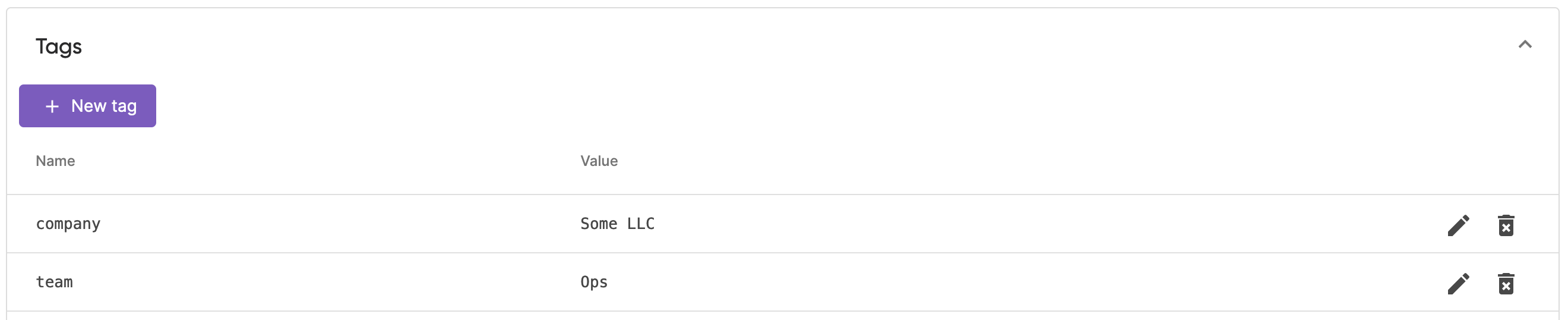
    company: "Some LLC"
    team: Ops
The Pulumi CLI only creates or updates tags listed in the config. If you remove a tag from the stack config, remove it from the stack in Pulumi Cloud manually as well.
Stack tags applied by the Pulumi CLI are listed in the Tags section of the Overview tab:
Using Pulumi ESC from Pulumi stack config
Configuration and secrets that several stacks share don’t have to be duplicated across their stack configuration files — Pulumi ESC can hold them centrally instead.
Once you have an environment set up and are projecting Pulumi configuration from it, you can import that environment (or several environments) into your Pulumi stack.
# import the test environment and all of its configuration
environment:
  - test
config:
  # normal pulumi config
When a key is set both by an imported environment and explicitly in your stack configuration, the explicit stack value takes precedence. See Precedence for the full rules.